In this article
To embed AI agents that act in your SaaS product, you ship an agentic layer that can plan a task, call the right apps, update records, and finish the job on the user's behalf, all under your brand. The fastest path in 2026 is to embed a white-label agentic layer on top of a broad connector library rather than building agent-to-app plumbing yourself. This guide walks through the architecture, the build steps, and the decisions that separate an agent that talks from one that actually gets work done.
Your users have already met chat assistants that answer questions, and the bar has moved since then. They now expect software that acts: books the meeting, moves the deal stage, tags the ticket, updates the record. An agent that only replies with a suggestion pushes the real work back onto the person you were trying to help.
That gap is where most embedded AI stalls. The model reasons well, but it has no hands. It can't reach the user's CRM, helpdesk, or billing tool, so it can't complete anything. Closing that gap is what this article is about.
What it means to embed AI agents that act
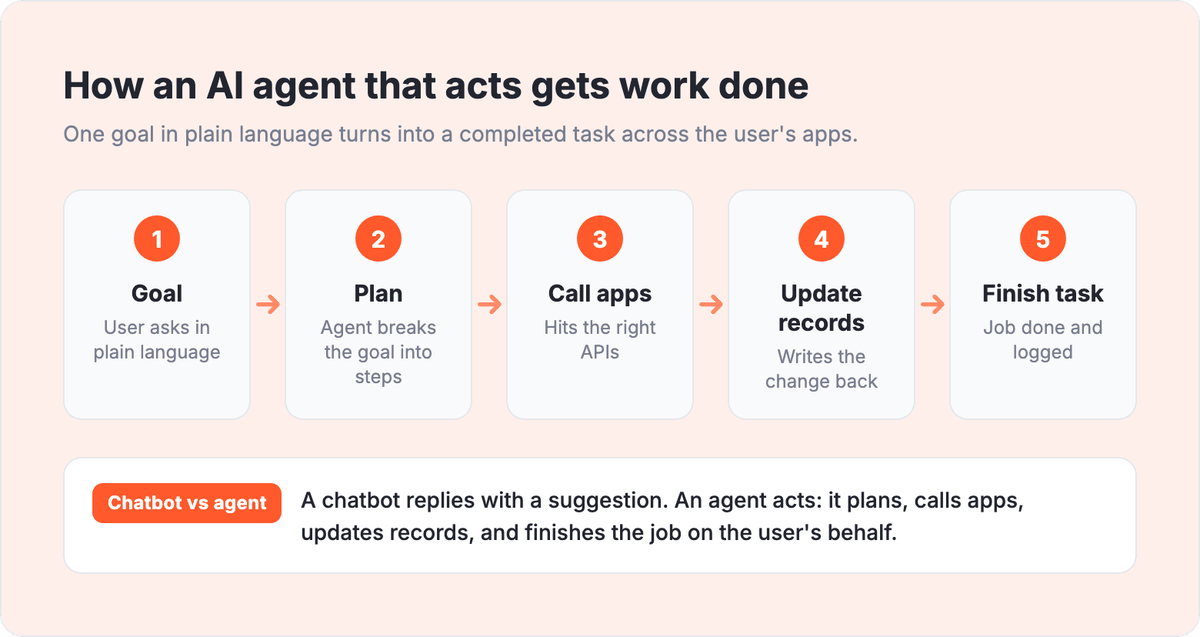
An AI agent that acts is a system that takes a goal in plain language, plans the steps, calls real applications through their APIs, and completes a task without a human doing the clicks. It's different from a chatbot: a chatbot answers, an agent executes. The difference lives entirely in whether the agent can reach and change data in the tools your users already run.
Albato Embedded is a white-label embedded iPaaS that gives SaaS companies a ready-to-ship agentic layer plus 1,000+ native integrations, so your AI agents can act across your users' full tool stack without you building each connection. That combination matters, because an agent is only as capable as the set of actions it can safely trigger.
Embedding this layer means three things run inside your product, under your brand: the agent runtime that plans and executes, the connector library that gives the agent reach, and the permission system that keeps every action scoped and logged. If you want the broader picture of how a hosted integration layer works, our guide on what embedded iPaaS is covers the model in depth.
Key takeaways:
- An AI agent that acts plans a task, calls apps, updates records, and finishes the job. A chatbot only replies.
- The agent's usefulness is capped by the actions it can trigger. Reach across the user's tools is the real constraint, not model quality.
- Building agent-to-app integrations in-house runs into months of work per connection. An embedded agentic layer with 1,000+ connectors ships in 30 to 45 days.
- Credentials, permissions, and an audit trail are non-negotiable once an agent can change customer data.
- White-label matters: users trust actions taken inside your product, under your brand, not routed through a third-party tool.
The diagram below shows how an acting agent moves from goal to completed task, and where the chatbot-versus-agent line sits.
Why "acting" is the hard part, not the model
The reasoning is mostly solved. Any capable LLM can read a support ticket and decide it should be tagged "billing" and assigned to Tier 2. The hard part is doing it: authenticating to the helpdesk as that specific customer, calling the right endpoint, handling the error when the field name changed, and logging what happened.
This is where in-house AI projects quietly run over budget. Each app the agent needs to touch is its own integration, with its own auth, rate limits, pagination, and breaking changes. Teams building this themselves report multi-month timelines and six-figure costs per meaningful set of integrations, which is why so many agentic features ship as demos and never reach production.
The pattern repeats across every department your users work in. A sales agent needs the CRM. A support agent needs the helpdesk and the billing system. An ops agent needs the data warehouse and the ticketing tool. Build them one by one and the roadmap disappears. Our breakdown of how to clear an integration backlog without hiring engineers shows how fast that queue grows.
Two ways to give an agent hands
There are two viable architectures for connecting an embedded agent to your users' tools, and the choice shapes your whole build. The table below compares them on the criteria that actually decide the outcome.
| Criteria | Build agent-to-app connectors in-house | Embed an agentic layer on a connector library |
|---|---|---|
| Time to first production action | Months per set of integrations | 30 to 45 days to go live |
| App reach | Whatever you build and maintain | 1,000+ connectors out of the box |
| Ongoing maintenance | Your team owns every API change | Connectors maintained for you |
| Auth and credentials | You design token handling and storage | Managed proxy, secrets never reach the model |
| Branding | Native by default | Fully white-label, no vendor footprint |
| Best when | You have 1 or 2 deep, differentiated integrations | Users need agents that act across their whole stack |
The in-house route makes sense when your product's value is a single, deep integration you want to own end to end. The embedded route wins when the agent needs breadth, when users expect it to reach whatever tool the task requires. For a fuller build-versus-buy analysis, see our comparison of in-house, unified API, and embedded iPaaS.
Step 1: Define the actions before the agent
Start with a short list of concrete actions your agent should be able to complete, not with the model. Write them as verbs on real objects: create a deal, update a ticket status, enrich a contact, post a summary to Slack. This list becomes your permission scope and your test suite.
Keep the first release narrow. An agent that reliably does five actions across three apps beats one that half-does forty. Pick actions where a wrong move is recoverable, so early mistakes cost a correction, not a customer.
Step 2: Choose the model per workflow
Different tasks want different models. Drafting outreach rewards a strong writing model, while classifying tickets rewards a fast, cheap one. A model-agnostic setup lets you assign the right LLM to each workflow instead of forcing one choice across the product.
Albato Embedded is model-agnostic: you can plug in OpenAI, Anthropic, Gemini, your own model, or Albato AI per workflow. Albato AI is Albato's own built-in model, and the underlying engine isn't disclosed. Mixing models this way lets you balance cost, quality, and compliance step by step rather than settling for one compromise.
Step 3: Connect the agent to real actions
This is the step that turns a reasoning engine into something that acts. The agent needs a reliable way to call apps, and there are two mechanisms worth knowing: direct connectors for defined workflows, and a Model Context Protocol server that exposes many app actions through one standardized endpoint.
An MCP server matters here because it lets the agent reach actions across 1,000+ connected apps without you managing individual API credentials or schemas for each one. If MCP is new to you, our explainer on what the Model Context Protocol is breaks down why it became the standard interface for agent tooling.
The practical payoff: the agent asks for "update this deal," and the layer handles authentication, the correct endpoint, and the response, so your team doesn't hand-wire each path.
Step 4: Lock down credentials and permissions
Once an agent can change customer data, security stops being a feature and becomes the foundation. Two controls carry most of the weight: keeping secrets away from the model, and scoping what each agent may do.
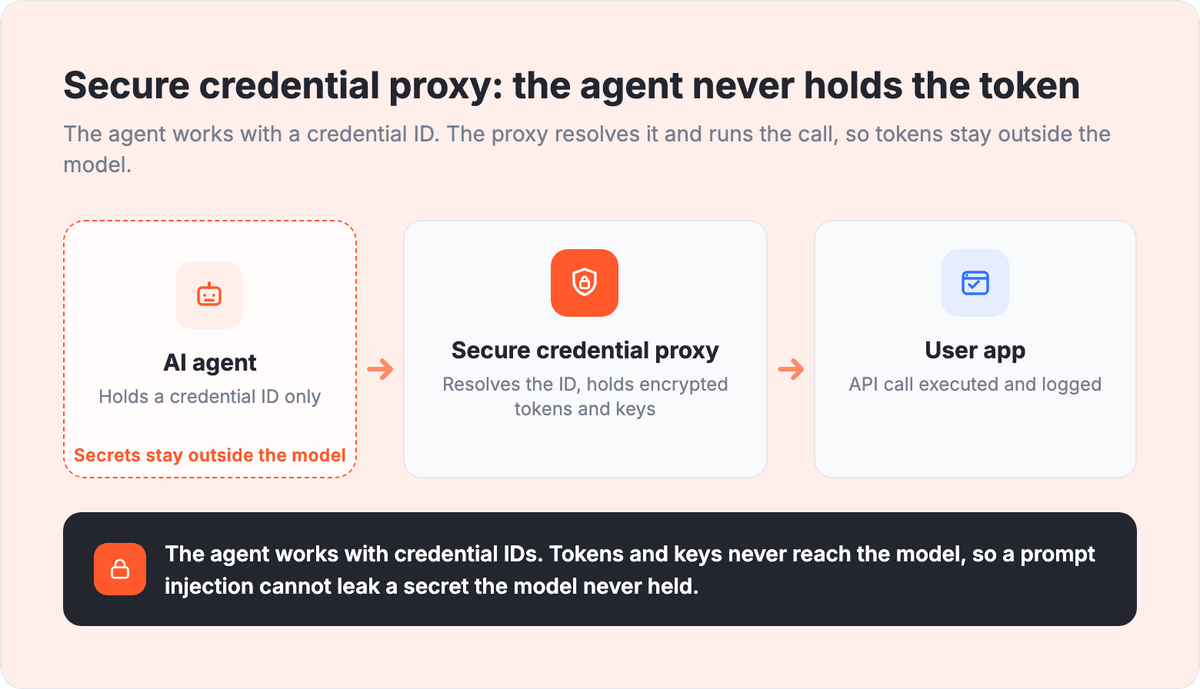
A secure credential proxy is the first. Customer API keys and access tokens never reach the LLM. The agent works with credential IDs, and the platform executes each request through a managed proxy, so a prompt injection can't leak a token that the model never held. The second control is granular permissions: grant each agent access only to the specific apps and endpoints it needs, and log every action for a complete audit trail. Teams evaluating this layer should read our guide on embedded iPaaS security for the full checklist.
The diagram below shows how the secure credential proxy sits between the agent and the user's apps, keeping tokens and keys away from the model.
Step 5: Ship white-label, then package templates
Users trust an action more when it happens inside your product, under your brand, than when they're bounced to a third-party tool. A fully white-label agentic layer keeps the whole experience yours: your UI, your domain, no vendor logo in sight.
Once the runtime is embedded, package common jobs as reusable templates. A "meeting to tasks" agent that turns a call transcript into projects and owners, an outreach agent that drafts and schedules follow-ups, a data agent that enriches and deduplicates records. Templates let users adopt agents in one click instead of building from a blank prompt, which is what actually drives usage.
Common mistakes to avoid
A few patterns show up again and again when teams embed agents that act. Watch for these:
- Shipping an agent that suggests instead of acts. If a human still does the clicks, you built a smarter chatbot, not an agent.
- Starting with the model instead of the actions. Define the verbs and objects first, then pick the LLM.
- Letting one agent touch everything. Scope permissions per agent and log every call, or the first incident becomes an audit nightmare.
- Sending credentials to the model. Use a proxy so the LLM only ever sees credential IDs.
- Building connectors one by one. The maintenance load compounds and buries the roadmap you were trying to protect.
What to expect after you embed
Teams that embed an agentic layer rather than building it tend to go live in weeks, not quarters. Albato reports most Embedded partners launch within 30 to 45 days, with a dedicated PM, CSM, and API engineer on every plan to guide the rollout.
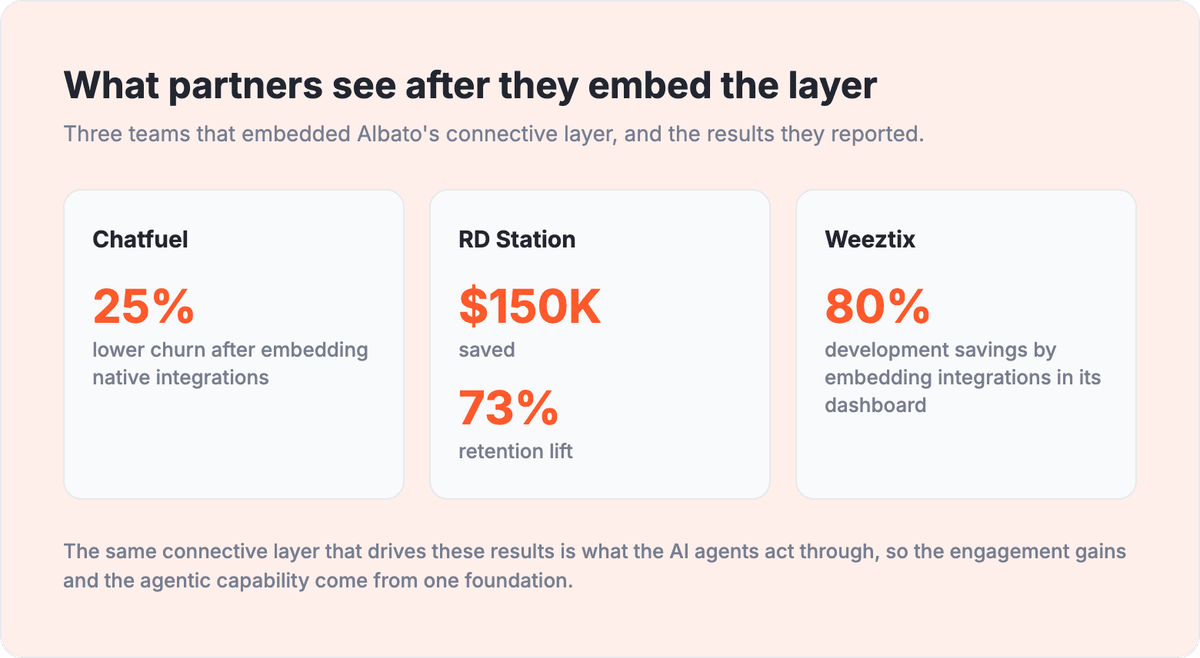
The downstream effect shows up in retention and stickiness, because agents that act make your product harder to leave. Chatfuel cut churn 25% after embedding native integrations with Albato, and RD Station saved roughly $150,000 while lifting retention 73%, while Weeztix reported 80% savings on development by embedding integrations directly into its dashboard instead of building them in-house.
The three results below put those figures side by side for a quick read.
If you want to see the agentic layer running before you commit engineering time, book a demo and we'll walk through embedding agents that act in your product.
When to choose Albato Embedded for AI agents
Albato Embedded is the right fit when your users need AI agents that act across their whole stack, not inside one or two tools you built by hand. If breadth matters, if you want white-label from day one, and if you'd rather ship in weeks than staff an integrations team, the embedded route fits.
It's less of a fit if your entire product value is a single, deep, proprietary integration you want to own at the lowest level. In that narrow case, building in-house can be worth the cost. For everything broader, an embedded agentic layer on 1,000+ connectors is the faster, safer path. When you're ready to see it, book a demo to map it to your product.
Frequently asked questions
The questions below cover the most common decision points for teams evaluating embedded AI agents.
What does it mean for an AI agent to act in a SaaS product?
It means the agent doesn't just answer questions, it completes tasks. It plans the steps, calls the user's apps through their APIs, updates records, and finishes the job. The line between a chatbot and an agent is whether it can reach and change data in the tools the user already runs.
How do you embed AI agents that act without building every integration?
You embed an agentic layer on top of a connector library. The runtime plans and executes, and the connectors give the agent reach across 1,000+ apps. With Albato Embedded, most partners go live in 30 to 45 days instead of spending months wiring agent-to-app connections one at a time.
Is it safe to let an AI agent change customer data?
It can be, with two controls in place. A secure credential proxy keeps API keys and tokens away from the model, so the agent only handles credential IDs. Granular permissions scope each agent to specific apps and endpoints, and every action is logged for a full audit trail.
Can each AI agent use a different LLM?
Yes. Albato Embedded is model-agnostic, so you can assign a different model per workflow: OpenAI, Anthropic, Gemini, your own model, or Albato AI built in. That lets you balance cost, quality, and compliance on each task instead of picking one model for everything.
How is embedding agents different from adding AI agent integrations?
Adding integrations gives an agent access to data. Embedding an agentic layer gives it the ability to plan and execute end to end under your brand. The two work together: the connectors provide reach, and the runtime turns that reach into completed actions.
The articles below explore adjacent topics: building an AI agent integrations layer, designing a white-label approach, and accelerating time to value.