In this article
As AI becomes part of everything, from customer service to logistics, the real challenge isn’t just building smarter models. It’s getting them to work together.
According to Alex Fillimonov, Product Owner of AI Projects at Albato, the future of AI isn’t about standalone tools, but about how well they connect and integrate.
“In most enterprises, AI systems are still stitched together with custom scripts, brittle APIs, and siloed tools,” he explains. “That approach worked when AI was experimental. But now, it’s mission-critical, and it has to scale.”
That’s where MCP (Model Context Protocol) comes in. It marks a shift toward unified orchestration, where models, tools, and data sources can collaborate through a single, shared protocol.
In this article, together with Alex, we’ll explore how MCP can become the backbone of enterprise AI, and why now is the time to adopt it.
💡 Key takeaways.
- MCP (Model Context Protocol) is an open standard that lets AI models call your business tools and data through one shared interface, instead of a custom integration for each app.
- MCP handles access; iPaaS handles orchestration. The two are complementary, and MCP actually makes an integration platform more useful by exposing its connected apps to AI.
- Gartner predicts 40% of enterprise apps will feature task-specific AI agents by 2026, up from less than 5% in 2025, so a standard connection layer is becoming a practical requirement, not a research topic.
- With Albato, you can put MCP-connected tools behind an AI Agent step that reads incoming data and decides which action to run on its own.
What is MCP in simple terms?
A Model Context Protocol (MCP) is like a universal connector between AI models like ChatGPT or Grok and your business tools or data.
You can think of it as similar to an API, but easier and more flexible.
- An API connects one system to another with specific code.
- An MCP lets the AI connect to many systems in a standard way, without custom coding each time.
So instead of building a new integration every time you want AI to use your CRM, database, or email system, MCP makes it plug-and-play.
It’s convenient because:
- You can link your tools once, and any AI that supports MCP can use them.
- It saves development time and cost.
- It keeps data secure, the AI only sees what you allow through the protocol.
In short: MCP is a smarter, more flexible version of an API, made for AI. It makes it easy for AI to work with your existing business systems safely and quickly.
This might sound like MCPs are going to make all integration platforms redundant, which is not a good news for many companies out there. But the truth is: MCP helps AI connect to data and tools, but it doesn’t replace the automation, workflow management, and data transformation that iPaaS provides. For a closer look at the two layers, read MCP versus iPaaS explained.
MCP is about access, giving AI models a way to understand and use connected systems. iPaaS is about orchestration, moving data between systems, keeping everything in sync, and managing complex business logic.
In fact, MCP makes iPaaS more valuable: integration platforms can expose their connected apps through MCP, so AI can use them instantly.
How Model Context Protocol works
We have already explained more about how MCP works and what it consists of in this blog about Model Context Protocol.
But briefly here's how MCP helps connect AI models and AI agents with tools and data.
MCP uses a client-server model, just like an API.
-
The client is the AI model (for example, ChatGPT or Grok).
-
The server is any system or app that provides data or actions, like your CRM or database.
When the AI needs information, it sends a request to the MCP server. The server replies with the needed data or performs an action. For a concrete walkthrough of this inside a SaaS product, see how Albato MCP works.
But there are also differences from and API:
-
MCP is built specifically for AI models, not for human developers.
-
It uses a standard, open format that lets any AI understand any MCP-enabled service without custom coding.
-
It focuses on context sharing, giving AI the right data safely and efficiently during a conversation or task.
Learn also about AI agent crews on our blog.
Why MCP is emerging now
The Model Context Protocol (MCP) is gaining attention because AI systems are shifting from isolated models to agents that can talk to each other and work together behind the scene. This shift requires a shared standard for how models exchange context, not just prompts. It also creates a new risk: connect an agent to too many tools and its context bloats, which can degrade accuracy and trigger hallucinations.
"Customers really want agents that can execute on their behalf across dozens of their tools."
Leo Goldfarb, Co-founder, Albato
As companies begin to deploy multiple AI agents that need to work together, for example, a CRM assistant pulling data from Gmail or a research agent updating a company knowledge base, fragmented integrations become costly. Without a standardized protocol, every connection turns into a custom engineering project, slowing down innovation.
In this sense, MCP is to AI agents what HTTP was to the web: an interoperability layer. It lets different models and tools connect without manual glue code. For developers, it means faster prototyping and cleaner architectures. For users, it means smarter, more consistent AI experiences across platforms.
What are the key benefits of MCP?
-
Faster AI adoption
MCP makes it easy to connect AI models to existing business systems without custom development. Companies can start using AI with their tools, CRM, ERP, analytics, etc., much faster. -
Lower integration costs
Because MCP uses a standard format, one connection can work across multiple AI models. Businesses save time and money compared to building separate APIs for each use case. -
Secure data access
MCP only shares the data the company allows. That means AI can use business data safely, without exposing sensitive information. -
Better automation and insight
By linking AI directly to real business data, MCP lets models analyze information, trigger workflows, and assist in decision-making, improving efficiency and accuracy. -
Future-ready flexibility
As more AI tools support MCP, businesses won’t need to rebuild integrations. They can switch or add AI models easily, keeping systems compatible and scalable.
Do you need to implement MCP for your integrations?
Gartner predicts that 40% of enterprise apps will feature task-specific AI agents by 2026, up from less than 5% in 2025. As those agents multiply, they need a standard way to reach your tools and data, and MCP is the infrastructure layer that makes that practical at scale. Just as important is a place to run and secure them: an AI agent control plane that governs credentials, cost, and access as the number of agents grows.
We're entering an era where the AI stack must resemble the cloud-native stack: composable, portable, and intelligent by design. If you're deciding between MCP and building direct connectors in-house, our comparison of MCP vs native API integrations breaks down when each approach makes sense. And to keep agents fast and accurate as they scale, see why one MCP server beats fifty. Check out our state of integrations report for more insights.
Put MCP-connected tools behind an AI Agent in Albato
MCP gives AI a standard way to reach your tools. The next question is who decides which tool to use, and when. In Albato, that decision sits in an AI Agent step: it reads the data coming from a previous step and picks the action to run on its own, instead of you wiring fixed conditions and branches by hand.
You describe the task in plain language across three fields, a user message, instructions, and guardrails, then connect the actions the agent is allowed to call. Albato exposes around 5,000 actions that the agent can use as tools, and it can fill the fields of each action by itself with per-field "Let the AI agent decide".
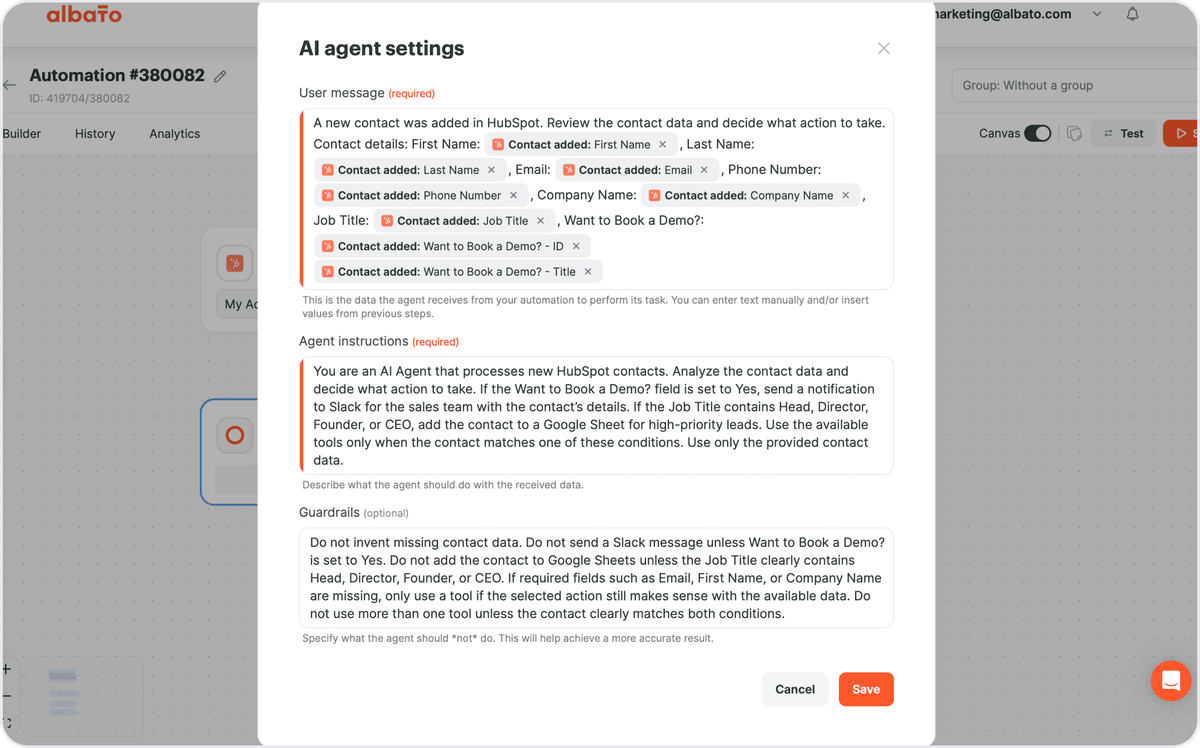
You choose the model behind the agent: Albato AI (built in, no external account), OpenAI, DeepSeek, or Google Gemini. Albato AI is a proprietary model that is not disclosed. Billing is transaction-based: 3 transactions per run regardless of how many tools the agent has.

That is the practical bridge: MCP standardizes access to tools, and the AI Agent decides how to use them inside a real automation.
Summing up
AI agents and automation are transforming the way businesses operate. With tools like MCP, companies can connect multiple AI agents, access real-time data, and make smarter decisions faster. This approach reduces complexity, saves time, and lets teams focus on higher-value work rather than manual tasks.
If you’re ready to see what AI can do for your team, now is a good moment to look closer at AI automation and connected AI tools.
Read more: