In this article
Key Takeaways
- Content now leaks from two surfaces, search and AI answers, and the tools to watch AI visibility pay back in an average of 6 months.
- Prioritize the refresh queue by three measurable inputs: visibility at risk, recoverability, and effort required.
- Automate the process of detection, scoring, and brief-building. But keep the final call on what is correct and ready to publish human-driven.
- Measure recovery over a fixed eight-to-twelve-week window against how the rest of the site moved, not an industry "typical" recovery time.
Most teams treat a content refresh as a rescue. Someone notices a traffic drop, and a writer gets a vague brief for a refresh. By then the page has been slipping for weeks. The fix is not better refreshing. It is automating the queue to catch the slide on early signals, across SERP and AI answers, and routing a diagnosed task before the traffic goes.
Which signals predict a decline before traffic drops?
G2 research found that 51% of B2B software buyers start their research with an AI chatbot more often than with Google. The AI layer is no longer a side channel, so content has to be built for LLMs to find and cite, not just to rank. The signals worth catching early fall into two categories: Search and AI visibility. The search side is measured by impressions, position, and CTR, while the AI visibility side is measured by tools like Profound, Scrunch AI, and Semrush.
The AI-visibility signals these platforms track
| Signal | What it measures | Refresh-worthy trend |
|---|---|---|
| AI crawler activity | How often AI bots fetch the page, to index or to answer a live query (tracked as agent or bot analytics) | Requests fall, or stay high, while citations do not |
| Citations and their trend | Your page is named as a source in an answer, and the direction over time | The count turns down and keeps sliding |
| Share of voice/visibility score | Your citation share against competitors on a prompt set | Your share thins as a rival's page is preferred |
| Mentions | Your brand is named, with or without a link | Mentions drop on prompts you used to win |
| Sentiment/accuracy | How the answer describes you | The description goes stale or is wrong |
| AI referral traffic | Humans arriving from an AI answer | Referrals fall (the last signal to move) |
The combinations that actually flag a refresh
A single number rarely justifies a refresh, especially since retrieval and citation work differently across ChatGPT, Google's AIO, and Perplexity.
- High crawl, low citations: AI systems fetch the page but do not use it. Content is reachable but not answer-ready. The clearest refresh candidate, and the easiest to miss if you track citations alone.
- Falling citations: Previous citation levels are now dropping, usually to a competitor with a fresher page.
- Declining crawl or indexing: AI systems fetch the page less often, an early warning that precedes citation loss.
- Old and overtaken: the page is a year old, and competitors have since adopted a stronger answer-first structure. Age alone is not a trigger; age plus a citation decline is.
For commercial pages, add a market-level trigger: when a new competitor launches or buyer priorities shift, the page can fall behind overnight, long before clicks or rankings show it. G2's review data often picks up that shift first.
What's the first move once a page is flagged?
Not a rewrite. The first move is to confirm the decline is real and page-specific, because acting on a false alarm wastes the slot and can break a page that was fine. Only once you have ruled out the impostors do you diagnose the cause and route the fix.
Rule out what looks like decay but isn't
A flag is a question, not a verdict. Four things mimic content decay, and each has a different answer:
- Seasonality or a fading topic: compare the page year over year, not month over month, and check the query in Google Trends. If the whole topic is cooling, the page is not decaying; demand is.
- Tracking or technical faults: a deindexed page, a switched canonical, a broken redirect, or a misfiring tag all read as a traffic drop. Confirm the page is indexable and tracked before you touch the content.
- A site-wide algorithm move: after a confirmed core update, rankings shift across the whole SERP, not just your page. 79.5% of top-three results changed position after the March 2026 core and spam updates, according to SE Ranking.
- A short-term dip: wait for the trend, not the dip. A single off week resolves itself. A sustained, multi-week slide against the page's own baseline does not.
Then route by what actually moved
Signals rarely have a single cause, so treat it as a set of possibilities to check, not a diagnosis:
| Signal pattern | Possible causes | First move |
|---|---|---|
| Ranking slipped as a competitor rose | A stronger competitor page, an intent shift, or lost authority | Compare the current top results to see which |
| Impressions fell, clicks steady | Fewer ranking queries, or falling demand for the topic itself | Separate your lost queries from the topic's trend |
| CTR fell, position held | A new SERP feature, an AI Overview quoting you, or a weaker snippet | Open the live SERP: is there a feature or Overview, and are you in it? |
| AI citations fell, ranking held | Content isn't structured to be cited by LLMs, or a competitor is now the preferred source | Check what's cited instead and how it's structured |
| AI crawlers fetch the page less | An access or rendering change, or the system deprioritizing it | Confirm the page is reachable and renders server-side |
A worked example
Take a page that slips from position 3 to 7. Impressions hold, but click-through rate falls 31%, and a competitor now sits in position 3 with a recently updated page. AI citations are steady. Read together, that is SERP displacement, not decay, and not an AI problem. The reflex to refresh is wrong. The first move is to compare the competitor's coverage and the current intent of the results page, then refresh only the gaps that cost you the spot.
How do you decide which page to refresh first?
Order the queue by the visibility at stake, so the pages losing the most reach across search and AI answers rise first, weighted by the chance of winning it back for the least work. Most of that is measurable, which is what makes it automatable.
Rank by what you can measure and recover
Three inputs, straight from the signals, do most of the sorting:
- Urgency: the size and speed of the loss. A page shedding citations on a query you used to own, or losing AI-referral traffic week over week, ranks above one drifting slowly on a keyword you barely held.
- Recoverability: how likely a refresh is to restore it. A page that recently slipped recovers faster than one that never ranked or is now owned by a stronger site.
- Effort: how much rework it needs, from a few swapped stats to a full rewrite. Less effort for the same reach wins.
Together, these sort pages into tiers, not one long list: a steep loss with a light fix is a P1, a slow drift needing a rewrite is a P3. Clear the P1s first.
Add business value only where it's real
Some pages carry obvious commercial weight, a pricing page, a comparison, a bottom-of-funnel guide. This can push them up the queue past higher-traffic ones. But most content has no clean revenue number, and approximating one for every page wastes time. Treat business value as an overlay where it's real, not a score you force everywhere.
The most useful output is often the "not now" pile: a low-visibility, unrecoverable, or off-strategy page should stay out of the queue so it doesn't crowd out pages that pay back. Keep the final call human-led, because the ranking is a shortlist, not a work order. Someone still needs to catch a page tied to a launch, or a claim that's now wrong and risky.
How much rework does the page actually need?
This is a data call, not a guess. Compare it against what wins the query now, the top results, the competitors ahead of you, the live SERP, and the AI answers citing others. The size of that gap sets the depth of the fix.
These are levels that overlap, not parallel boxes. A refresh often touches more than one:
- Update: Facts have aged, but the page still fits the query. Refresh stats, dates, screenshots, examples, and dead links.
- Expand: Page has fallen behind on coverage. Add the subtopics, questions, and answer-ready sections that the current winners include and you do not.
- Restructure: Substance is right, but the structure is wrong. Reorder for how people search the term now, and break it into chunks that an AI can lift cleanly.
- Rewrite: The angle no longer matches the query. This is the heaviest call, so be sure before you start.
Some flagged pages are not refreshed at all. A page that duplicates another is merged and redirected into it, and a page with nothing left to recover is pruned.
What that looks like in practice
Three familiar pages, and the mix each one needs:
| Example article | What the gap analysis shows | The refresh it needs |
|---|---|---|
| A "how-to-do keyword research" guide | The core process holds, but the screenshots are stale, and every ranking competitor now has an AI-assisted section | Update the walkthrough; Expand with the AI workflow |
| A "what is zero-trust" explainer | The definition still holds, but the top results now answer how it applies to cloud and AI workloads | Expand with the missing angle; Restructure into chunks that AI can lift |
| A broad "social media statistics" roundup | It restates the same figures everyone lists, with no angle of its own | Rewrite around a sharper focus, like social media statistics for businesses, led by your own data |
How do you build an automated workflow?
Automation does not replace judgment; it runs it at scale. The difference between a light and a heavy setup is how much of the work is encoded and runs automatically, not whether a person decides. At the low end, an AI assistant handles each step in response to a prompt; at the high end, a connected pipeline runs the same steps on a schedule.
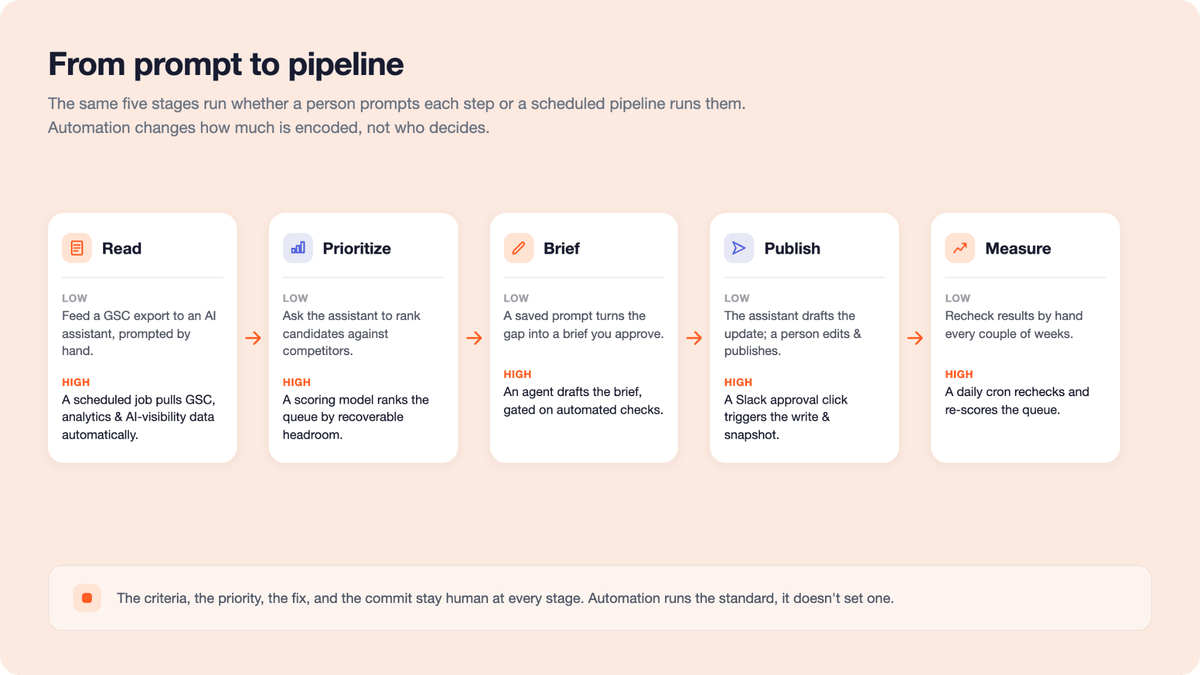
The five stages of refresh: low to high automation
Every refresh runs the same five stages, whatever the tooling. What changes is how much of each stage is encoded once and repeated on a schedule instead of prompted by hand.
| Stage | Low automation | High automation |
|---|---|---|
| Read | Feed a GSC or AI-visibility export to an AI assistant (ChatGPT, Claude, Gemini) to flag and bucket the decliners based on the measurement trends set | A scheduled job pulls GSC, analytics, and AI-visibility data through their APIs into one store to flag refresh candidates based on the measurement trends coded in |
| Prioritize | Ask the AI assistant to rank candidates for the refresh and compare your page to the ones winning the query | A scoring model ranks the queue by how much lost visibility each page can win back and tags each with an action from competitor analysis |
| Brief | A built custom GPT, Claude skill, or Gemini gem turns the gap into a brief that you approve | An AI agent drafts the brief and gates it on automated checks (no banned terms, cited sources, and no cannibalization) before it saves |
| Publish | Based on the level of rework, the AI assistant drafts the update, and a person edits and publishes it | The agent posts an approve button in Slack, and an approval click triggers a server to write the change and take a before-snapshot |
| Measure | Recheck against pre-refresh levels and the expected result every two weeks or so to read the trend | A daily cron reads each page at designed intervals against pre-refresh levels and the expected result, then feeds that back to re-score the queue |
The low end speeds up with reuse: a custom GPT, Claude skill, or Gemini gem stores the instructions you'd otherwise retype for an AI assistant each run, so it holds the same standard once you've tuned it over a few passes. Reaching the high end without an engineer is what an orchestration platform like Albato is for, connecting the stages so data moves between them on a schedule.
📊 Stat. The tooling for this is maturing fast. AI mentions in G2's SEO tool reviews tripled, from 12% in 2024 to 35% in 2026, based on G2 data.
Where human judgment stays
Automation runs a standard; it does not set one. These stay human at any level:
- The criteria: what counts as a decline, and what to look for, are encoded into the system by a person, not invented by the tool.
- What matters: business value and priority are a human call; a tool can rank, but it cannot know which page the business needs to win.
- The fix: whether a replacement stat is correct, and whether the rework fits, needs a person's judgment.
- The commit: the agent proposes, and a person's approval is what publishes. The click is the commit.
💡 Tip. Keep the automation auditable. Have each run write its research and reasoning to an openable file, so you can see why a page was flagged and check the call instead of trusting a black box.
How do you know if the refresh worked?
Decide what "worked" means before you touch the page: forecast the impact you expect, then judge the result against that forecast and against how the rest of the site moved over the same dates, so credit only goes where it's earned.
Set the expected range and a control
Two readings decide whether a refresh actually did anything, and both have to be set up before the edit goes live:
- Forecast the range first: estimate the upside from the query's demand, your current position or citation share, and a realistic target, then use a CTR curve to convert that position into expected clicks. This opportunity forecast gives you a number to check against, rather than "let's see."
- Compare to pre-refresh levels and a control: read the page against its own before-state, and against pages you did not touch over the same dates, so a site-wide rise or fall is not mistaken for your fix. Causal impact analysis is the rigorous version.
Read both layers, then tune
Recovery is not one reading at the end. Track it as it develops, on both surfaces, and feed what you learn back into the next round:
- Treat the refresh as an experiment: it is also a test of what works on your site, not just generic best practice. Track which formats and structures actually recover pages, and standardize the ones that keep winning for your audience.
- Check in progressively, on both layers: read at two, four, six, and eight weeks, not once, since early reads show direction and the full picture settles around eight to twelve weeks. Track search and AI recovery separately, because a page can climb in Google while still missing from AI answers.
- Tune and automate: early forecasts are rough, but each refresh sharpens the next. Automate the measuring too, from an AI assistant checking the before-and-after to a scheduled job that re-scores the queue.
What should you keep in mind when choosing your tools?
The content performance monitoring stack you land on matters less than a few habits when you choose it:
- Match the tool to your scale and industry, not the demo: a lightweight tracker and a heavy enterprise suite solve different problems, and the right fit for a lean team is the wrong one for a large one.
- Weigh time-to-value, not just the sticker price: ask how quickly it goes live and how long it takes to pay back, and read the contract length, not the monthly fee. A cheap tool on a long lock-in can cost more than a pricier one you can leave.
- Favor what the team will run and connect: a tool nobody uses is wasted budget, so weigh adoption over feature count, and native links to your data, CMS, and workflow beat integrations you wire in by hand.
- Ground the decision in evidence from teams like yours: review platforms such as G2 segment go-live time, payback, adoption, and satisfaction by company size and industry, so you can see how a tool performs for a team your size before you buy.
📊 Stat. G2's AEO Grid report shows a 6-month average payback and 63% adoption, though enterprise platforms lock buyers into 15-to-22-month contracts versus 3 for pure-play newcomers.
Where content maintenance goes from here
Search is splitting into two surfaces, and the gap will only widen. Ranking in one no longer guarantees being found in the other, and pages that stop being cited rarely announce it. The teams that keep their visibility instruments in both layers get the decline as a diagnosed brief, not a quarterly surprise.
That is the shift worth making now. A content refresh strategy that treats maintenance as continuous monitoring, not a quarterly cleanup. Automate the detection and prep, keep the judgment human, and you stop chasing content decay and start staying ahead of it.
Frequently asked questions
The questions that come up most often when a team moves from ad-hoc refreshes to a monitored queue.
What is content decay, and how do you tell it from a normal traffic dip?
Content decay is a sustained decline in a page's traffic, rankings, or AI citations as it ages and competitors move ahead, not a one-off dip. Confirm it by comparing the page year over year against its own baseline, and rule out seasonality, a tracking error, or a site-wide algorithm move before acting.
When should you refresh a page instead of rewriting it?
Refresh when the page still targets a relevant query and holds ranking history worth keeping, and only the facts or structure have fallen behind. Rewrite when the angle itself no longer matches how people search the term. A gap analysis against the current top results tells you which.
How long after a refresh should you expect results?
Read results over eight to twelve weeks, since rankings take time to re-settle, with the first movement often visible around four to six weeks. Watch the trend across several reads, not one early snapshot, because a first spike or dip often reverses before rankings settle.
Can you fully automate content refresh?
Technically, yes. An agent can catch the decline, pick the page, draft the edit, and publish it unattended. You still should not, because a model will confidently swap in a wrong number or freshen a timestamp without improving anything. Automate the detection and prep, and keep the final call human.
What tools automate a content-refresh workflow, and how do you choose one?
You need three layers: a data layer (Search Console plus an AI-visibility tool), an orchestration layer that links them without code, and a drafting layer that compares your page to what ranks. Choose fit over feature count, and read reviews segmented by company size to see how a tool performs for teams like yours.