In this article
Key Takeaways
- The best AI agent platforms are judged less on how you build an agent and more on how you run it: orchestration, deployment, governance, and cost per run. Albato is the pick for agents that act inside real multi-app automations, Creatio for agentic workflow automation inside CRM, Microsoft Copilot Studio for Microsoft 365 shops, LangGraph Platform for engineering teams that want control, Vertex AI Agent Builder for Google Cloud, and n8n for self-hosted flexibility.
- Gartner expects 40% of enterprise applications to include task-specific AI agents by 2026, up from less than 5% in 2025, per Gartner, which is why the runtime layer now matters more than the builder.
- Cost models differ sharply: some platforms bill per credit or message, some per seat, some per workflow execution. The wrong model can double your bill once agents run at volume.
Most "AI agent" roundups compare how easily you can assemble an agent. That is the wrong lens for 2026. Gartner also warns that over 40% of agentic AI projects will be scrapped by the end of 2027, usually on cost or missing controls, per Gartner, so the platform that survives is the one that runs, governs, and pays for agents predictably.

Let us build your automation or AI Agent
Tell us which process eats your time. Certified Albato engineers take it from there, A to Z.
How platforms differ from builders
An AI agent platform is the layer that runs, connects, and governs agents in production, not just the canvas where you design them. A builder answers "how do I make an agent". A platform answers "how do I deploy it, connect it to my apps, watch what it does, and control the bill". For a deeper split of the underlying concepts, see our guide on the difference between an AI agent, chatbot, and workflow automation.
That distinction changes the buying criteria. A solo marketer picking a builder cares about the prompt box. A team putting an agent in front of customers or revenue data cares about who can see the logs, how a bad run gets stopped, and whether a spike in traffic turns into a surprise invoice. Those are platform questions.
This list ranks platforms on four things: orchestration (how agents chain steps and call tools), deployment (managed, self-hosted, or embedded in an existing flow), governance (logging, guardrails, access control), and cost model. If you want the design-first view instead, our roundup of the best AI agent builders covers the assembly side.
How we picked these platforms
We selected platforms that can put an agent into production, not demos. Each one had to let a non-engineer or a small team ship a working agent, connect it to real business apps, and run it on a schedule or a trigger. We checked pricing on each vendor's own page, confirmed the integration reach, and weighed how much operational work falls on you after launch.
| Platform | Best for | Deployment | Integration reach | Cost model | Model |
|---|---|---|---|---|---|
| Albato | Agents acting inside multi-app automations | Managed, no-code | 1,000+ apps, ~5,000 actions as tools | Per transaction (3 per run) | Proprietary (not disclosed) or bring your own |
| Creatio | Agentic workflow automation inside CRM | Managed cloud or on-site | 700+ marketplace integrations, MCP, APIs, webhooks | Per user from €40/mo, or Unlimited (custom) | Model-agnostic, bring your own |
| Microsoft Copilot Studio | Microsoft 365 and Azure shops | Managed, tenant-wide | Microsoft ecosystem + connectors | $200 per 25,000 credits/mo | Azure OpenAI |
| LangGraph Platform | Engineering teams wanting full control | Managed or self-hosted | Code-defined, any API | Free dev tier, Plus $39/seat/mo | Any (developer choice) |
| Vertex AI Agent Builder | Google Cloud teams needing RAG and compliance | Managed on GCP | GCP services + tools | Usage-based (GCP) | Gemini and others |
| n8n | Self-hosted, execution-priced automation | Cloud or self-hosted | 500+ integrations | Per execution, self-host free | Any (developer choice) |
The quadrant below maps five of these platforms on the two axes buyers actually weigh, how much code they demand and who hosts them, so you can see the clusters the table rows cannot show.

Albato: agents that act inside a real automation
Albato earns the top spot because its agent is a step inside a working automation, not a standalone bot you then have to wire into your stack. You start an automation with a trigger, a new CRM record, a form submission, an inbound message, and drop an AI Agent step into the flow. The agent reads the data from earlier steps and decides which action to run next, instead of you building fixed filters and branches by hand.
The platform angle is the point here. The agent can call actions across connected apps as tools, and Albato exposes around 5,000 actions this way across more than 1,000 apps. So the agent does not just answer, it creates the CRM record, routes the notification, updates the deal. You configure it with three plain-language fields: a user message (the input), agent instructions (what to do), and guardrails (the limits it must respect).
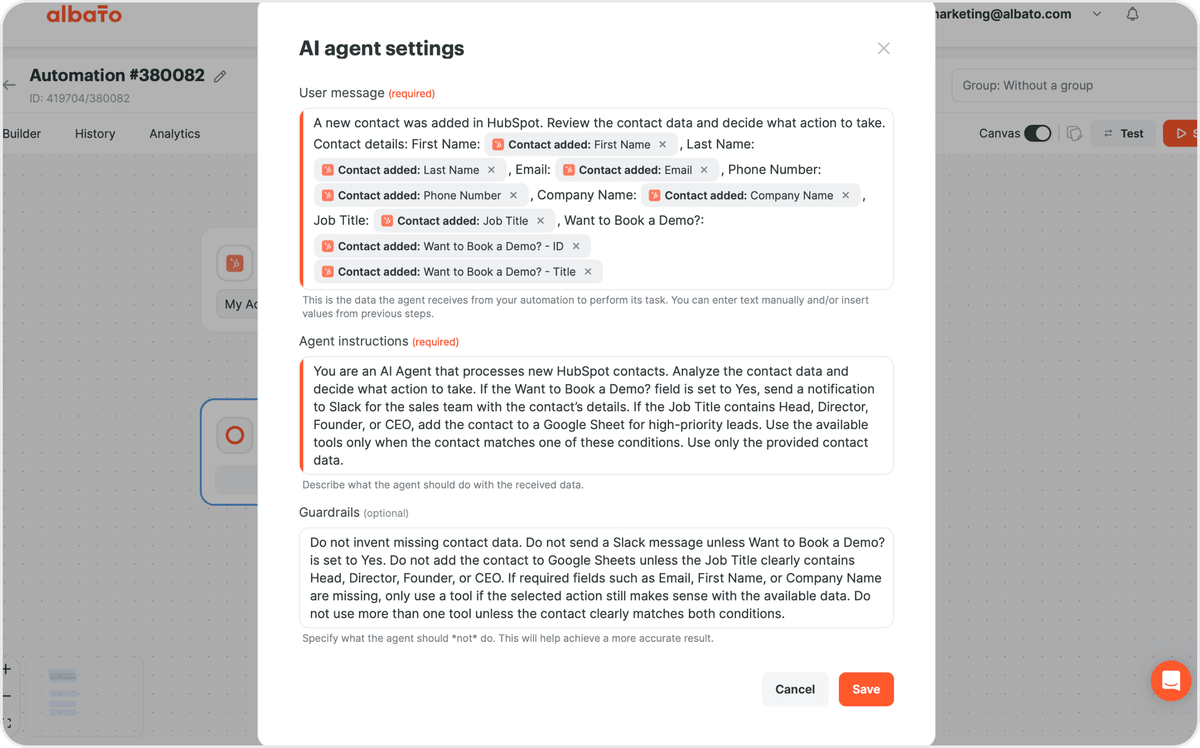
On the model question, Albato gives you a choice: its own built-in Albato AI (proprietary, the underlying model is not disclosed) with no external account to set up, or you bring your own provider such as OpenAI, DeepSeek, or Google Gemini with a connection and a model ID. For teams that do not want to manage a separate LLM contract, the built-in option removes a setup step.
💡 Tip. Turn on optional memory only for conversational, multi-turn agents like chatbots. For a lead-scoring or routing agent that runs once per record, memory adds cost and context you do not need.
Governance is handled through the guardrails field and the same run history you get for any Albato automation, so a bad decision is visible and the flow can be paused like any other. On cost, an AI Agent run bills as 3 transactions regardless of how many tools it holds, with a small token surcharge only when you use the built-in model. That flat base makes the bill easy to predict as volume grows, which is the opposite of credit-metered platforms where autonomous actions burn budget fast.
Field mapping is where the platform angle gets concrete. For any field in a tool action, you can hand the value to the agent with a per-field "Let the AI agent decide" toggle, or set it manually.
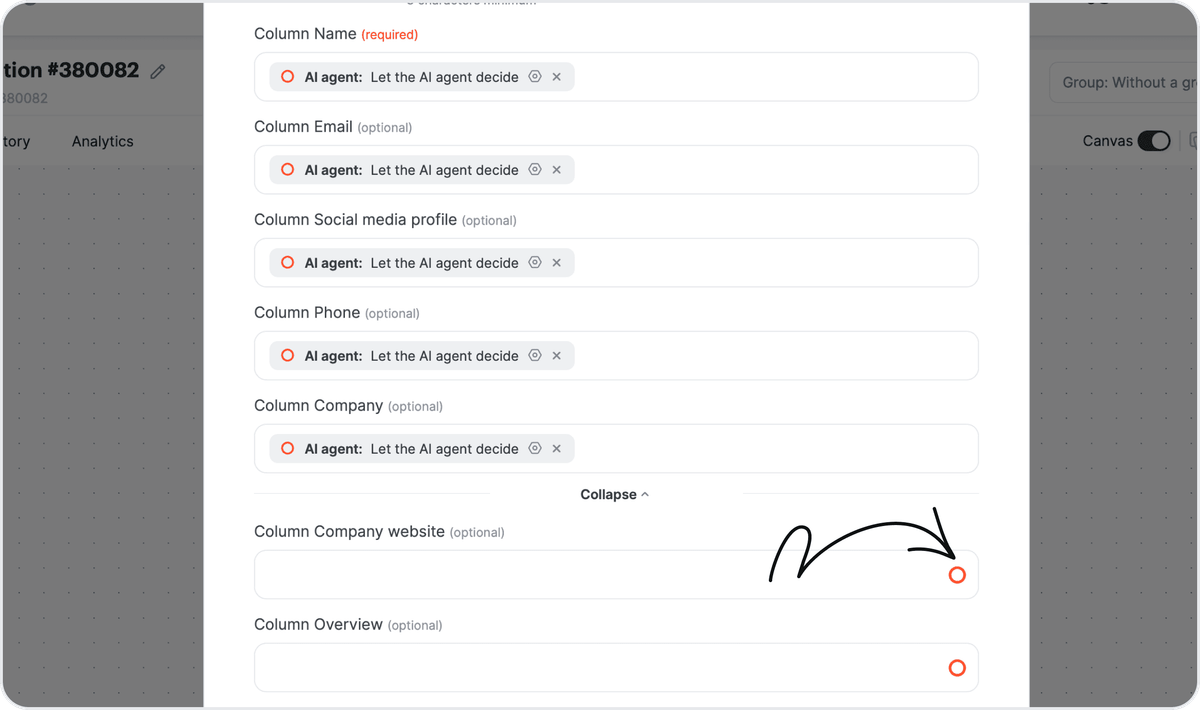
Because the agent runs inside a normal automation you already know, testing it on a live app costs nothing until it does real work.
If you are early in the concept and want the fundamentals first, our business guide to AI agents covers what they are and where they fit before you commit to a platform.
Creatio: for agentic workflow automation
Creatio is a leading agentic platform that automates CRM and workflows with AI embedded into its core. The platform enables organizations to build, deploy, orchestrate, and govern AI agents across customer-facing and operational workflows. With Creatio AI Studio, teams can create agents using natural-language prompts, visual designers, or developer tools, then connect them to enterprise systems through MCP, APIs, webhooks, and more than 700 marketplace integrations.
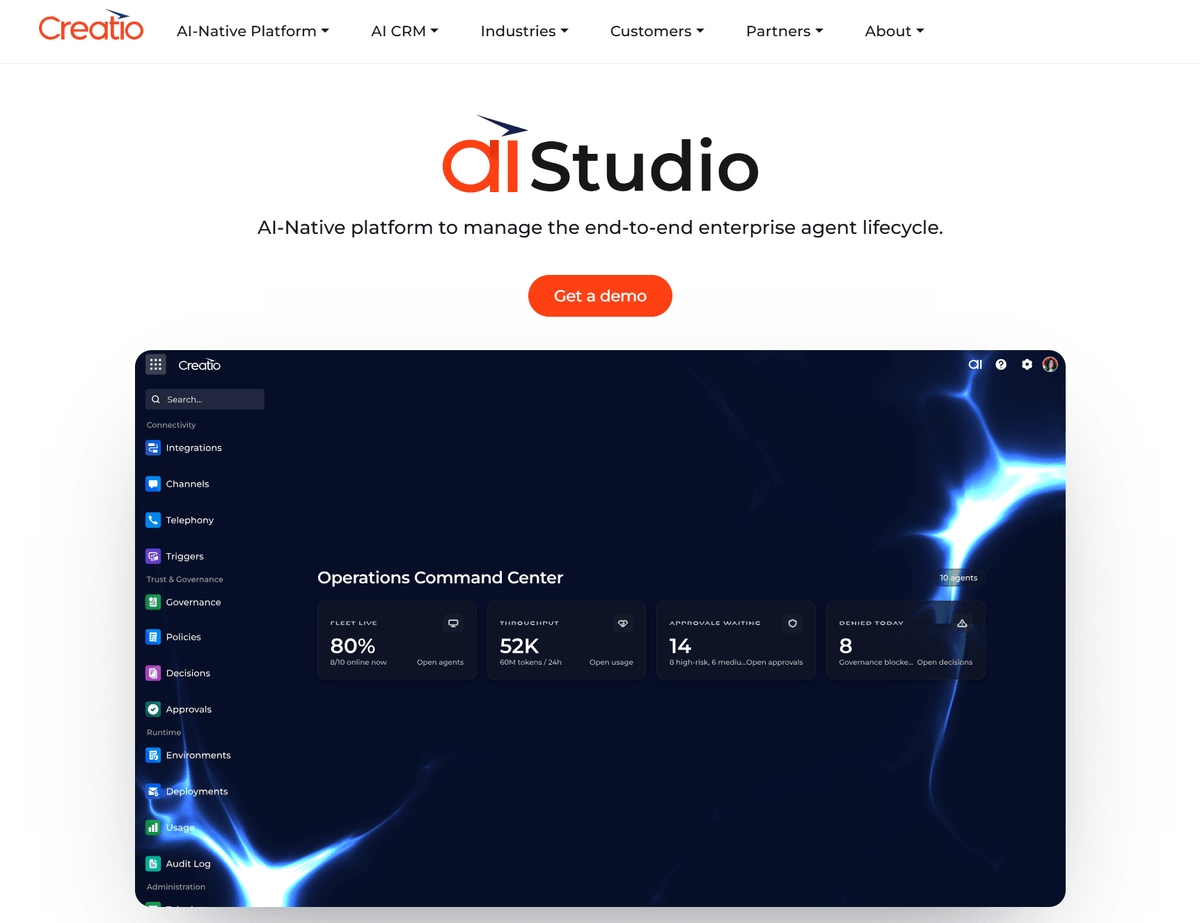
Creatio also supports multi-agent orchestration, allowing agents to share business context and collaborate across workflows. Through AI Twin, employees can create personal AI agents that automate routine tasks while operating within enterprise governance and security controls. The platform is model-agnostic, supporting OpenAI, Anthropic, Gemini, and bring-your-own-model deployments.
Microsoft Copilot Studio: agents for the Microsoft 365 world
Copilot Studio is the natural pick when your company already lives in Microsoft 365 and Azure. It lets you build agents that plug into Teams, SharePoint, and the wider Microsoft graph, and publish them where employees already work. If your data and identity already sit in that ecosystem, the integration work is mostly done for you.

The cost model is where buyers need to look twice. Copilot Studio bills in Copilot Credits, sold as tenant-wide packs of 25,000 credits at $200 per pack per month, with pay-as-you-go at $0.01 per credit, per Microsoft's own pricing. Credits are pooled at the tenant level, so the bill depends on how much your agents consume, not how many people use them.
⚠️ Important. Generative answers and autonomous actions consume credits far faster than scripted topics. Estimate agent volume conservatively before you buy packs, because usage-based metering scales with every autonomous decision the agent makes.
Governance is strong for regulated Microsoft shops: it inherits Azure identity, tenant controls, and admin policies. The tradeoff is gravity. Copilot Studio makes the most sense inside Microsoft and less sense if your stack is spread across independent SaaS tools.
LangGraph Platform: control for engineering teams
LangGraph Platform is built for teams that want to define agent behavior in code and keep full control over how it runs. The core LangGraph framework is open source and free under an MIT license, so you can build and deploy on your own infrastructure with no licensing fee. The commercial layer adds managed hosting, observability, and deployment tooling for teams that do not want to run all of it themselves.

This is the least no-code option on the list, and that is the point. You get graph-based orchestration, where each node is a step the agent can take, which suits complex branching logic that a visual canvas would struggle to express. For an engineering team shipping a custom agent, the tradeoff of writing code buys precision.
Pricing separates the framework from the tooling. LangSmith, the observability and deployment layer, offers a free Developer tier and a Plus plan at $39 per seat per month, per LangChain's pricing page, with trace overages billed on usage. That per-seat plus usage structure fits a defined team of engineers rather than a whole company of business users.
📊 Stat. In the same forecast, Gartner projects agentic AI could drive around 30% of enterprise application software revenue by 2035, up from 2% in 2025. The platforms that win that share will be the ones teams can actually operate at scale.
Vertex AI Agent Builder: for Google Cloud teams
Vertex AI Agent Builder fits teams already on Google Cloud that need retrieval, memory, and compliance handled by the platform rather than bolted on. It separates the concerns of agent development, data access, and operations, so you can build a single-agent app or a multi-agent system without tangling them together. Grounding agents in your own data with RAG is a first-class feature, not an add-on.

The strength is the same as the constraint: it assumes GCP. If your data warehouse, identity, and services already run there, Vertex removes integration friction and gives you enterprise controls out of the box. If they do not, you are buying into a cloud commitment to get the agent layer, which is a bigger decision than adding one tool.
Deployment and operations sit inside the Google Cloud console, so the people who manage your GCP environment also manage the agents. That is an advantage for teams with a platform engineering function and a mismatch for a lean marketing or ops team without one.
n8n: self-hosted agents on an execution model
n8n is the choice when you want to self-host your agents and pay by workflow run rather than by seat or credit. The Community Edition is free, open-source software with unlimited executions, so the real cost of self-hosting is the server you run it on. That makes it attractive for teams with the technical appetite to manage their own infrastructure and data.
The billing model is worth understanding because it is unusual. n8n charges per execution, where one execution is a single run of your whole workflow no matter how many nodes it contains, and there is no separate AI surcharge, per n8n's pricing. An agent workflow costs the same per run as any other workflow. Cloud plans start at Starter for €20 per month and Pro for €50 per month, with a self-hosted Business tier at €667 per month for SSO and higher volume.
🔧 How it works. Because n8n prices per execution, a chatty agent that loops many times inside one workflow run still counts as one execution. That can make heavy agent logic cheaper here than on a per-message platform, as long as you accept the self-hosting responsibility.
For a team weighing whether an agent is even the right tool for the job, the distinction between an agent, a chatbot, and plain workflow automation is worth settling first.
Which AI agent platform fits your situation
Match the platform to how you deploy and pay, not to the demo. If you want agents acting across many SaaS apps without managing servers or LLM contracts, Albato is the strongest fit thanks to its 1,000+ app reach and flat per-run cost. If your company runs on Microsoft 365, Copilot Studio removes most integration work. If your agents need to work on customer data across sales, marketing, and service, Creatio AI Studio builds them directly into the CRM, with enterprise governance and no per-seat limits on users or agents. If you have an engineering team that wants code-level control, LangGraph Platform gives it. If you are all-in on Google Cloud, Vertex AI Agent Builder keeps everything in one place. If you want to self-host and pay per run, n8n is built for that.
The common failure mode is picking on builder features and getting surprised by the runtime. A credit-metered platform can be cheap in a pilot and expensive at volume. A self-hosted platform can be free in licensing and costly in engineering time. Read the cost model as carefully as the feature list. Once agents are live across teams, a dedicated AI agent control plane is what keeps their cost, access, and behavior visible in one place.
Set up your first agent in Albato
The fastest way to get an agent running across your apps is to add it to an automation you already need. Start the automation with a trigger, add the AI Agent step, pick a model, write the three instruction fields, and connect the tools the agent can use. Because the agent runs as an action, it always has real trigger data to work with, and it can fill fields itself or leave them to you.
You can test the whole thing on Albato's free plan without a credit card, and swap the built-in Albato AI model for your own provider later if you prefer. Since the AI Agent lives inside a normal automation, everything you already know about triggers, actions, and run history applies to it.
FAQ
Still deciding which platform to run your agents on? These are the questions teams ask most before they commit.
What is an AI agent platform?
An AI agent platform is the software layer that runs, connects, and governs AI agents in production, not just the canvas where you build them. It handles orchestration, deployment, tool connections, logging, and cost, which is what separates a platform from a simple agent builder.
What is the best AI agent platform for connecting many apps?
Albato is the strongest for broad app coverage, with more than 1,000 apps and around 5,000 actions the agent can call as tools. That reach lets an agent take real actions across your stack rather than only answering questions.
How much do AI agent platforms cost?
It depends on the billing model. Microsoft Copilot Studio sells credit packs at $200 per 25,000 credits per month, LangGraph Platform has a free developer tier with Plus at $39 per seat per month, and n8n prices per workflow execution with a free self-hosted edition. Albato bills 3 transactions per agent run, which keeps costs predictable at volume.
Do AI agent platforms require coding?
Not all of them. Albato, Microsoft Copilot Studio, and Vertex AI Agent Builder are low-code or no-code, so a non-engineer can ship an agent. LangGraph Platform is code-first and suits engineering teams that want graph-level control.
What is the difference between an AI agent platform and an AI agent builder?
A builder is where you design the agent's logic and prompt. A platform is where you deploy it, connect it to your apps, monitor its runs, and control the cost. Most modern platforms include a builder, but the runtime and governance are what you are really buying for production.
Want to go deeper before you pick a platform? These guides cover the surrounding decisions.