In this article
Key Takeaways
- An AI agent can read what happened after each sales touch, send the right follow-up, and update the deal in your CRM on its own, so reps stop losing hours to the admin that sits between conversations.
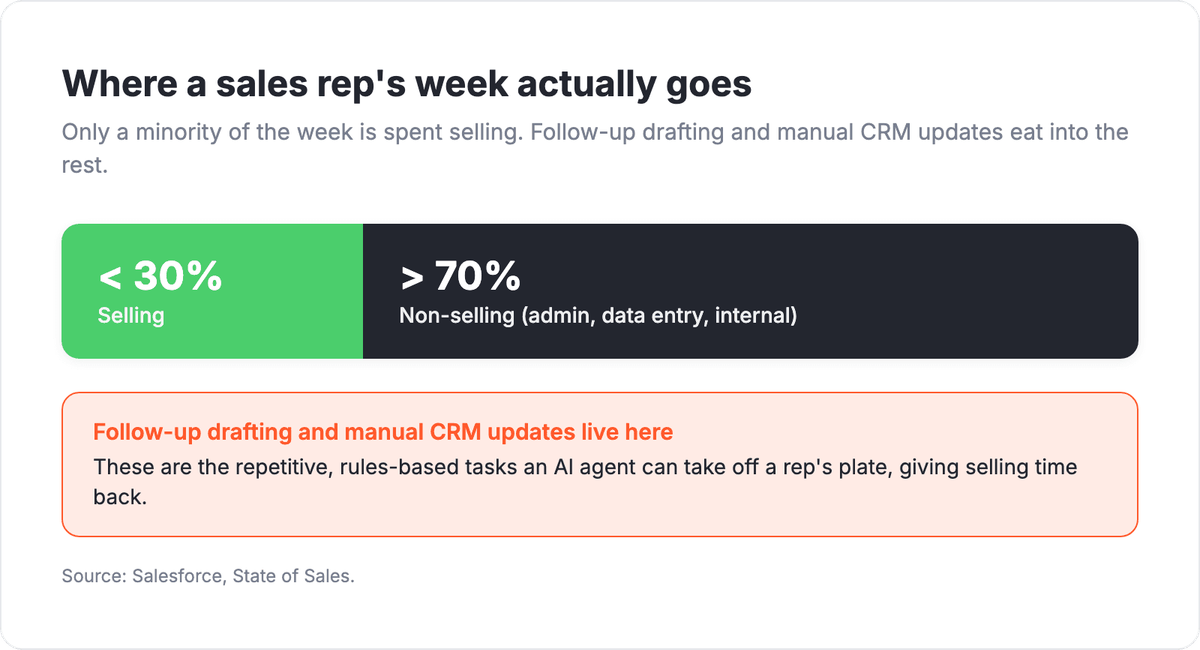
- The time this frees up is significant: Salesforce found sales reps spend less than 30% of their week actually selling, with most of the rest going to admin, data entry, and internal tasks.
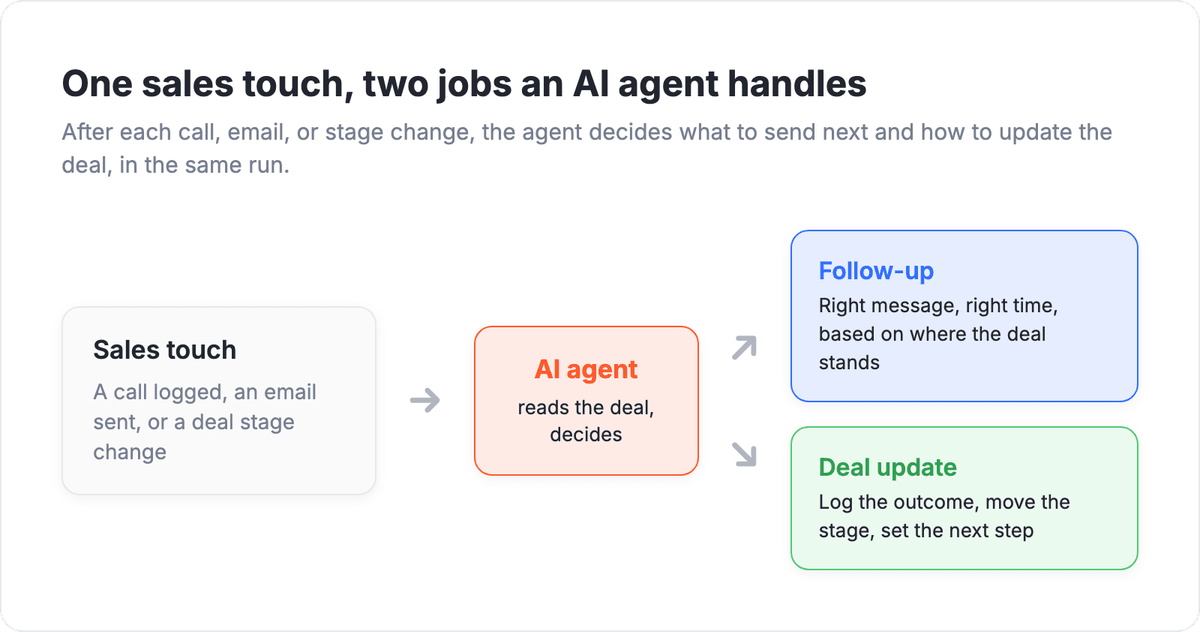
- The work splits into two jobs an agent handles well: follow-up (decide who to contact next and what to say) and deal hygiene (log the outcome, move the stage, set the next step).
- Unlike a fixed workflow, an agent reads the messy signals, a reply that says "reach out again after our board meeting," a call note, a bounced email, and picks the next action instead of following one rigid path.
Pipelines do not usually die from bad leads. They die from silence: a warm deal that never got its third follow-up, a call outcome that never made it into the CRM, a next step nobody set. The follow-up got skipped because a rep was mid-conversation with someone else, and the deal update got skipped because logging it felt like busywork. An agent does both in the seconds after the touch, while the context is still fresh.

Let us build your automation or AI Agent
Tell us which process eats your time. Certified Albato engineers take it from there, A to Z.
What "AI agent for sales" actually means
An AI agent for sales is an automation step that reads the outcome of a sales interaction, decides the next action, and carries it out, sending a follow-up or updating the deal record, instead of waiting for a rep to remember. It sits between "something happened with this deal" and "the right next thing gets done," which is exactly where manual pipelines leak.
The difference from a standard CRM automation is judgment. A rule can fire "if no reply in 3 days, send email B," and that works until a lead replies "not now, we just signed with someone for this year." A rigid sequence keeps nudging. An agent reads the reply, understands it as a soft close, updates the deal to nurture, and schedules a check-in for next quarter instead of firing the next canned email.
The two jobs an agent takes on after each touch are easier to see as a branch than as prose, so the diagram below maps one sales touch to the follow-up decision and the deal update it triggers.
One caution before you wire it into live pipeline: keep the agent on triage and admin, not on the close itself.
💡 Tip. Keep the agent on triage and admin, not on closing. Its job is to send the timely follow-up and keep the record honest so reps walk into every call with current context. Discovery, negotiation, and the close still belong to a person.
Why follow-up and deal updates are worth automating
The case for automating this is time, not headcount. Reps lose their most valuable hours to the small tasks that bracket every conversation, and those tasks are precisely the ones that decide whether a deal moves or stalls.
Salesforce's research put a hard number on the drain: sellers spend the majority of their week on non-selling work such as manual data entry, admin, and internal meetings, and under 30% of it in front of buyers. Every follow-up a rep drafts by hand and every deal they update manually comes out of that thin selling slice. Move those two jobs to an agent and the selling time goes back to selling.
The split is stark once you see it as a proportion rather than a sentence, and it points straight at the two tasks this article is about.
Speed compounds the effect, and the research on response time makes the point even sharper.
📊 Stat. HBR's audit of 2,241 companies found firms that made contact within an hour were nearly seven times more likely to qualify a lead than those that waited an hour longer. An agent that fires the first follow-up in seconds keeps deals inside that window that manual queues miss.
Automating the follow-up: what to send and when
The follow-up job is a decision about timing and message, not a fixed drip, and it picks up where an AI prospecting agent leaves off, once the first touch has gone out. After each touch, the agent reads what happened, a demo booked, a proposal opened, an email ignored, and picks the next move: a recap and next-step link after a good call, a gentle nudge after silence, a pause when the buyer asked for one.
Give the agent the signals and the rules, then let it choose. The input is the deal context (last message, stage, notes, timing), and your instructions describe the plays: follow up twice on an open proposal, never chase a deal tagged "do not contact," always reference the buyer's own words rather than a template. That is what separates a helpful nudge from an obvious autoresponder blast.
Persistence is where most reps fall short and an agent stays consistent. Follow-up sequences tend to die after a touch or two because a person forgets or gets pulled onto a louder deal. An agent runs the same disciplined cadence on every deal in the pipeline, so the quiet ones get the same attention as the noisy ones. For a related pattern on scoring and routing inbound before it reaches this stage, see our guide on AI agents for lead qualification.
Automating deal updates: keeping the CRM honest
The deal-update job is about keeping the record current without a rep typing it in. After a call or an email exchange, the agent logs the outcome, moves the stage if it changed, sets the next step, and updates fields like close date or deal amount when the conversation implies them. The pipeline reflects reality without anyone filling in a form.
This is the task reps skip most, and skipping it quietly wrecks forecasting. A deal stuck in "proposal sent" that actually went cold three weeks ago inflates the forecast; a deal that advanced but was never moved hides real momentum. An agent updates the stage the moment the outcome is clear, so managers read the pipeline instead of guessing at it.
The agent can also fill only the fields you trust it with. Lock the ones that must stay consistent, deal owner, product line, and let it decide the ones that follow from the conversation, next step and stage. You get a current record without handing over the parts that need to be exact.
Building the flow with Albato AI Agent
Albato's AI Agent is the practical way to run follow-up and deal updates in one scenario. It is a step you drop into an automation that starts with a trigger, a call logged, an email received, a stage changed, and it reads that context, decides the next action, and both sends the message and writes back to the CRM in the same run.
You give it three things. A model makes the decisions: the built-in Albato AI, which is proprietary and needs no external account, or a connected OpenAI, DeepSeek, or Google Gemini model. Instructions in plain language: the deal data as the user message, your follow-up and update playbook as the agent instructions, and guardrails like "never email a deal marked closed-lost." Tools are the actions it may call, drawn from around 5,000 actions across connected apps, so it can send the follow-up, update the deal stage, and set the next task itself.

Keeping it safe on live deals
The field-level control is what makes it safe to point at real pipeline. For any action field, you can set the value yourself or turn on "Let the AI agent decide" and add a field-level instruction, so the deal owner stays fixed while the next step and stage are chosen by the agent per deal. You keep the parts that must be consistent locked and let the agent handle only the judgment.

Each AI Agent run costs 3 transactions, plus a small token-based amount when using the built-in Albato AI model, so the cost tracks deal volume rather than a per-seat fee. You can build the whole follow-up-and-update flow on the free plan and wire it to the CRM and email tools your team already uses.
Where to keep a human in the loop
Automating this does not remove judgment; it moves it to the edges. Let the agent auto-send routine follow-ups and log clear outcomes, and have it flag the deals that need a person: a big-ticket account gone quiet, a reply that reads as a complaint, a stage change that would skip a required step. Reps spend their attention on the deals that actually need it.
Guardrails do the enforcing. Tell the agent what it may do on its own and what it must only suggest: it can log a call and send a recap, but it should propose, not execute, marking a deal closed-lost. As you watch its rationale hold up, you widen what it handles alone. If you are weighing this against a plain rules-based sequence, our explainer on AI agents versus workflow automation breaks down when each one fits.
The fastest way to see whether this fits your pipeline is to point it at one deal stage, let it run follow-ups and updates alongside your current process for a week, and compare how current the CRM stays. For the full build pattern, our checklist for building an AI agent walks through scoping, tools, and guardrails step by step.
FAQ
Here are the questions sales teams ask most often before pointing an agent at their pipeline.
How is an AI agent different from a CRM workflow or sequence?
A CRM sequence follows fixed rules: if no reply in three days, send email B. An AI agent reads the actual outcome of each touch, including free-text replies and call notes, then decides the follow-up and updates the deal itself. The sequence executes steps; the agent judges what the next step should be.
Will it email prospects or change deals without my approval?
Only within the guardrails you set. You define what the agent can do autonomously, such as sending a routine follow-up or logging a call outcome, and what it must flag for a human, such as marking a deal closed-lost. A common setup is auto-send on routine follow-ups and human review on stage changes that carry weight.
Do I need to connect my CRM for this to work?
Yes. The agent reads the deal context and writes the result back: log the call, move the stage, set the next step. A no-code integration platform connects your CRM, email, and calendar so the agent can read and act across all of them in a single run.
What does it cost to run per deal?
With Albato, each AI Agent run is 3 transactions, plus a small token-based charge if you use the built-in model. Cost scales with deal and touch volume rather than the number of sales seats, which is usually cheaper than adding admin headcount to keep the CRM current.
Want to go deeper? These guides cover related topics.