In this article
Key Takeaways
- An AI agent for marketing ops is a single automation step that reads each new lead, decides what to do with it, and runs the action, so you stop maintaining long chains of filters and routing rules by hand.
- The three jobs it handles best are enrichment (fill in missing firmographic fields), segmentation (assign a tier or persona), and routing (send the lead to the right owner, list, or nurture track).
- Speed is the payoff. A Harvard Business Review audit of 2,241 companies found that firms contacting a lead within an hour were about seven times more likely to qualify it than those that waited longer.
- In Albato, the AI Agent runs as a step after a form or CRM trigger, picks from around 5,000 actions as tools, and can fill fields on its own with "Let the AI agent decide".
Most marketing ops teams do not lack automation. They have too much of it: one routing rule per campaign, per region, per product line, and a spreadsheet nobody trusts that maps which rep gets which lead. An AI agent collapses that sprawl into one step that reasons about the lead in front of it.

Let us build your automation or AI Agent
Tell us which process eats your time. Certified Albato engineers take it from there, A to Z.
What an AI agent does for marketing ops
An AI agent for marketing ops is an automation step that reads an incoming lead, decides how to enrich, segment, and route it, and then executes those actions without you wiring a separate branch for every case. Instead of a static rule ("if country is Germany, assign to Anna"), the agent evaluates the record and picks the action that fits.
That matters because the work marketing ops automates is rarely clean. A form submission arrives with a personal email and no company name. A webinar export has job titles written five different ways. A paid campaign sends a burst of leads at 2 a.m. when no rule anticipated the volume. Rigid automations break on exactly these edge cases, and the lead sits untouched until someone notices.
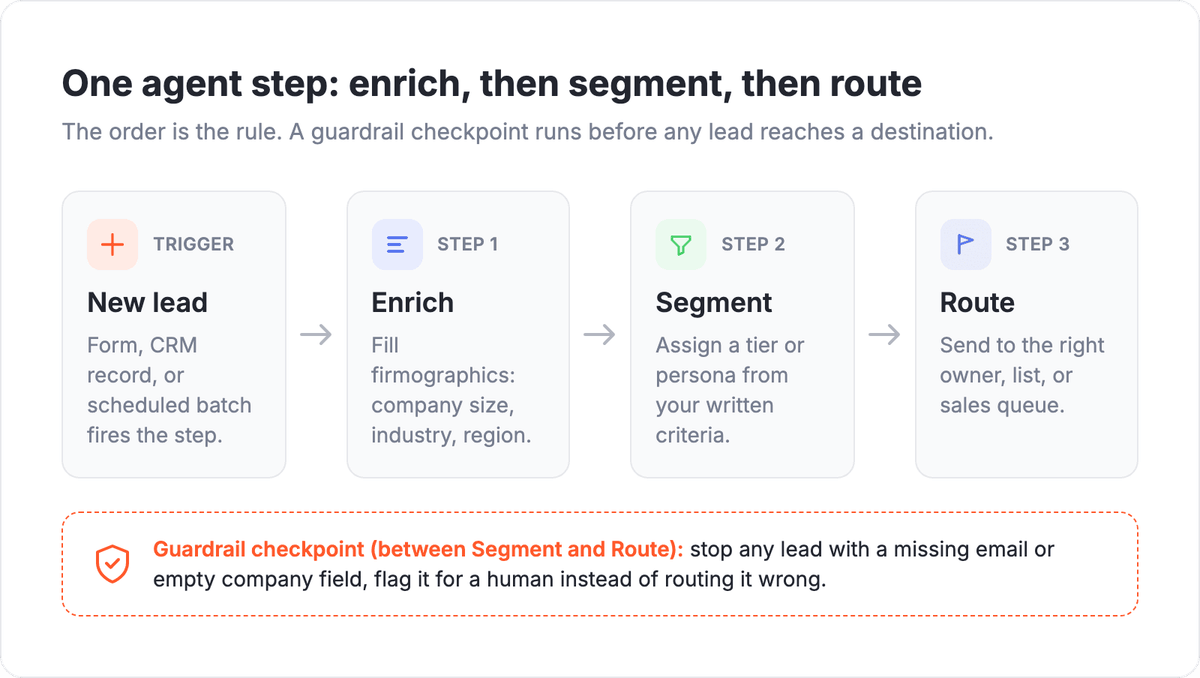
The agent handles the messy middle. It reads what came in, compares it against the instructions you wrote in plain language, and calls the right action: look up the company, tag the segment, create the CRM record, notify the owner. One step, adjusting per lead, instead of a routing map you have to keep patching.
💡 Tip. Start the agent narrow. Give it one job first (enrichment alone), confirm the output is clean for a week, then let it segment and route. An agent that does three things badly is harder to debug than three small steps you added one at a time.
Job 1: Enrichment that fills the gaps
Enrichment means completing a lead record with the data it arrived without: company size, industry, region, job function, sometimes intent signals. Marketers need it because a bare email and first name cannot be scored or routed with any confidence.
The manual version is a person tabbing between a lookup tool and the CRM, copying a headcount here and an industry there. It is slow, and the data goes stale the moment they finish. Contact records drift as people change jobs and companies rebrand, which is why an enrichment step that runs on every new lead beats a quarterly cleanup that is already out of date when it ships.
An AI agent does this by calling an enrichment or lookup action as a tool, reading the result, and writing the fields back to the lead. Where a value is ambiguous, the instructions tell it how to decide: normalize "VP Mktg", "V.P. Marketing", and "vp of marketing" into one clean title before anything downstream reads the field. If you want a step-by-step version of the lookup-and-write pattern for a specific tool, our guide to AI agents for lead qualification walks through scoring the enriched record.
💡 Tip. Enrich on entry, not in a quarterly cleanup. The moment a bad or thin record lands, it starts spreading into scoring, reporting, and outbound, and every downstream copy inherits the gap. Fixing it at the door is the cheapest place to catch it.
Job 2: Segmentation without a rule for every case
Segmentation is the agent reading an enriched lead and assigning it a bucket: a persona, an ICP tier, a product interest, a nurture track. The direct answer to "how does an AI agent segment" is that it compares the record against the criteria you described in words, then returns the label, rather than matching against a fixed if-then table.
This is where hand-built automation gets brittle fastest. Every new campaign or region adds another rule, rules start to conflict, and a lead that fits two segments falls through because nobody wrote the tiebreaker. The agent handles overlap by reasoning: you tell it "prioritize company size over job title when they conflict", and it applies that judgment consistently.
Keep the segments few and legible. Three or four tiers that a human can sanity-check beat fifteen micro-segments no one audits. The point of segmentation is a faster, correct decision about where the lead goes next, which is the entire premise of good lead capture: get the lead in, understand it, act on it before it cools.
Job 3: Routing that beats the clock
Routing is the payoff step: the agent sends the segmented lead to the right destination, whether that is a CRM owner, a Slack channel, a nurture list, or a sales queue. The value is speed. Leads decay by the minute, and the difference between a one-minute and a one-hour handoff shows up directly in conversion.
The Harvard Business Review study of 2,241 companies remains the clearest evidence: contact a lead within an hour and you are roughly seven times more likely to qualify it. An agent that routes the instant a form fires closes that gap without a human watching the queue overnight.
Routing is also where an agent avoids the classic round-robin failure, where a hot enterprise lead lands on a rep who is out of office. Because the agent reads the full enriched record, it can route on fit, not just on turn: enterprise fit to the named account owner, small business to the pooled queue, existing customer to their CSM.
⚠️ Important. Routing without enrichment is guessing. If the agent routes on a record that still has an empty company field, it will send good leads to the wrong place fast. Order matters: enrich, then segment, then route, in that sequence inside one agent or one short chain.
How the Albato AI Agent handles this
In Albato, the AI Agent is a step you drop into an automation to do exactly this enrich-segment-route work. It sits inside a scenario made of four parts: a model that makes the decisions, instructions you write in plain language, tools it is allowed to call, and optional memory for conversational flows. For marketing ops, you rarely need memory. You need the first three.
Setup follows the product's own flow. The agent runs as an action, so the automation starts with a trigger first: a new form submission, a new CRM record, a scheduled batch. You pick a model (Albato AI is built in, with no external account to set up, or you can connect OpenAI, DeepSeek, or Google Gemini). Then you write three instruction fields: the user message (the lead data coming in), the agent instructions (enrich the record, assign a tier, route to the right owner), and guardrails (never route a lead with a missing email, always normalize job titles first).

Tools are where the agent acts. You connect the actions it can call, an enrichment lookup, a "create CRM contact", a "post to Slack", from the roughly 5,000 actions Albato exposes as tools. For each field in an action, you either set the value yourself or hand it to the agent with "Let the AI agent decide", so it fills the CRM owner or the segment tag based on your instructions rather than a hardcoded value.

That is the whole pattern: one trigger, one agent step, a handful of tools. It replaces the routing map, the title-cleanup formula, and the three separate automations you used to keep in sync.
Before you scale it across every campaign, it helps to know what an agent run actually costs, because the pricing model is different from the per-rule automations it replaces.
🔧 How it works. Billing is per run, not per rule. An Albato AI Agent run costs 3 transactions regardless of how many tools it holds, plus 1 transaction per 2,000 tokens on the Albato AI model. Consolidating five routing automations into one agent step usually costs less than the five it replaces.
Governance: know what the agent decided
Once an agent starts making routing calls on its own, marketing ops needs to see what it decided and why, the same way you would review a rep's pipeline. This is the difference between a helpful automation and a black box that silently misroutes leads for a month before anyone checks.
Keep the guardrails explicit and logged: which fields the agent may write, which segments it may assign, when it must stop and flag a lead for a human. If you are running agents across several teams and want a single place to track what they build, the cost they run up, and the credentials they touch, Albato's AI agent control plane is built for that oversight. For a marketing ops team of one, the built-in guardrail field and a Slack notification on every routed lead are usually enough to start.
When not to use an AI agent
An AI agent is the wrong tool when the decision is genuinely fixed. If every lead from one form always goes to the same person with no exceptions, a plain filter is faster, cheaper, and easier to audit. Reserve the agent for the messy cases: variable input, overlapping segments, judgment calls a static rule cannot cover.
It is also the wrong tool when your data is too thin to reason about. An agent cannot segment on a company field that is empty across the board. Fix the intake first, so the lead arrives with something to work from, then let the agent enrich the rest. The clearest way to see where an agent fits versus a simple workflow is our breakdown of AI agent vs workflow automation. An SEO consultancy running lead forms for several clients, for example, would want each client's intake cleaned up before any agent touches the data.
What to check after you turn it on
Watch the first week closely. Pull a sample of routed leads and confirm three things: the enriched fields are correct, the segment matches what a human would have chosen, and the lead reached the right owner. Disagreements almost always trace back to a vague instruction or a missing guardrail, not the model.
Then measure the thing that pays for the project: time from form submission to first human touch. If it dropped from hours to minutes, the agent is doing its job. If it did not, the bottleneck is downstream, in how fast the owner acts once the lead lands, and that is a separate fix. If you want the full setup discipline before scaling, our 10-step AI agent checklist covers instructions, tools, and testing in order.
Ready to build the enrich-segment-route flow on your own stack? You can set it up on Albato's free plan, no card required.
FAQ
A few questions come up every time a marketing ops team weighs an agent against their current routing rules. Here are the ones worth settling before you build.
What is an AI agent in marketing operations?
It is an automation step that reads each incoming lead, decides how to enrich, segment, and route it, and runs those actions on its own. Unlike a fixed rule, it evaluates the record and picks the action that fits, so one step replaces many conditional branches.
Can an AI agent enrich leads automatically?
Yes. The agent calls an enrichment or lookup action as a tool, reads the result, and writes the missing fields (company size, industry, normalized job title) back to the lead. You describe how to handle ambiguous values in the instructions, and it applies that consistently on every new record.
How does an AI agent route leads?
After enriching and segmenting a lead, the agent sends it to the destination that matches its fit: a named account owner, a pooled queue, a nurture list, or a Slack channel. Because it reads the full record, it routes on quality and fit rather than on a simple round-robin turn.
Do I need to know how to code to set this up?
No. In Albato you add the AI Agent as a step after a trigger, pick a model, write the instructions in plain language, and connect the actions it may call. Fields can be filled manually or handed to the agent with "Let the AI agent decide".