In this article
Key Takeaways
- Good agent instructions have four parts: a clear role, the input the agent works with, the task it should perform, and the limits it must respect. Skip any one and the agent improvises.
- Prompts and guardrails are not the same thing. A prompt tells the agent what to do; a guardrail is the enforced rule it cannot break, even when the model would.
- Test an agent against the edge cases before you trust it. Watch it draft actions for a week before you let it write to live systems, so a bad instruction shows up in review and not in your CRM.
Writing an agent prompt is closer to writing a job description than writing a chatbot message. You are defining a role someone will fill on every run, not a one-off request, which is why a vague instruction that works in a demo falls apart the tenth time the input looks a little different.

Let us build your automation or AI Agent
Tell us which process eats your time. Certified Albato engineers take it from there, A to Z.
What makes an AI agent prompt different from a chatbot prompt
An AI agent prompt is an operating policy, not a single question. A chatbot prompt asks for one answer and you read it. An agent prompt sets the rules the agent follows every time it runs, deciding which action to take across your connected tools without you approving each step. That shift changes what a good instruction looks like.
With a chatbot, you can refine your question after seeing a weak answer. An agent runs unattended, so the instruction has to anticipate the cases you will not be there to catch. Prompt engineering for agents looks less like copywriting and more like systems design: you specify the role, what success means, which tools the agent can reach, and when it should stop or escalate.
💡 Tip. Before you write a single line, finish this sentence: "This agent exists to do X, using Y, and it must never Z." If you cannot fill in all three, you are not ready to write the prompt. You are still scoping the job.
The practical upshot is that an agent instruction fails quietly. A bad chatbot answer is obvious on screen. A bad agent instruction shows up as a wrong CRM field, a mis-routed lead, or a message sent to the wrong person, often days later. That is why the rest of this guide treats instructions as something you engineer and test, not something you dash off.
The four parts of a working agent instruction
Every reliable agent instruction covers four things: role, input, task, and limits. Miss one and the agent fills the gap with a guess. The four-part frame maps cleanly onto how agent platforms structure their setup, so you can write each part into its own field instead of stuffing everything into one paragraph.
Role tells the agent who it is and what it is optimizing for. "You are a lead qualification assistant for a B2B SaaS company. You score inbound leads and route them to the right rep." A role gives the model a lens for every ambiguous case.
Input names exactly what the agent receives on each run. This is the data from the previous step: the form submission, the new CRM record, the incoming ticket. If the agent is guessing at what it is looking at, it will guess wrong.
Task is the decision or action you want, in plain language. "Score each lead from 1 to 5 on fit, then assign leads scored 4 or higher to an account executive and leave a note explaining the score."
Limits are the boundaries. "Never contact a lead tagged as a competitor. If company size is missing, score it 3 and flag for manual review. Do not invent data that is not in the input."
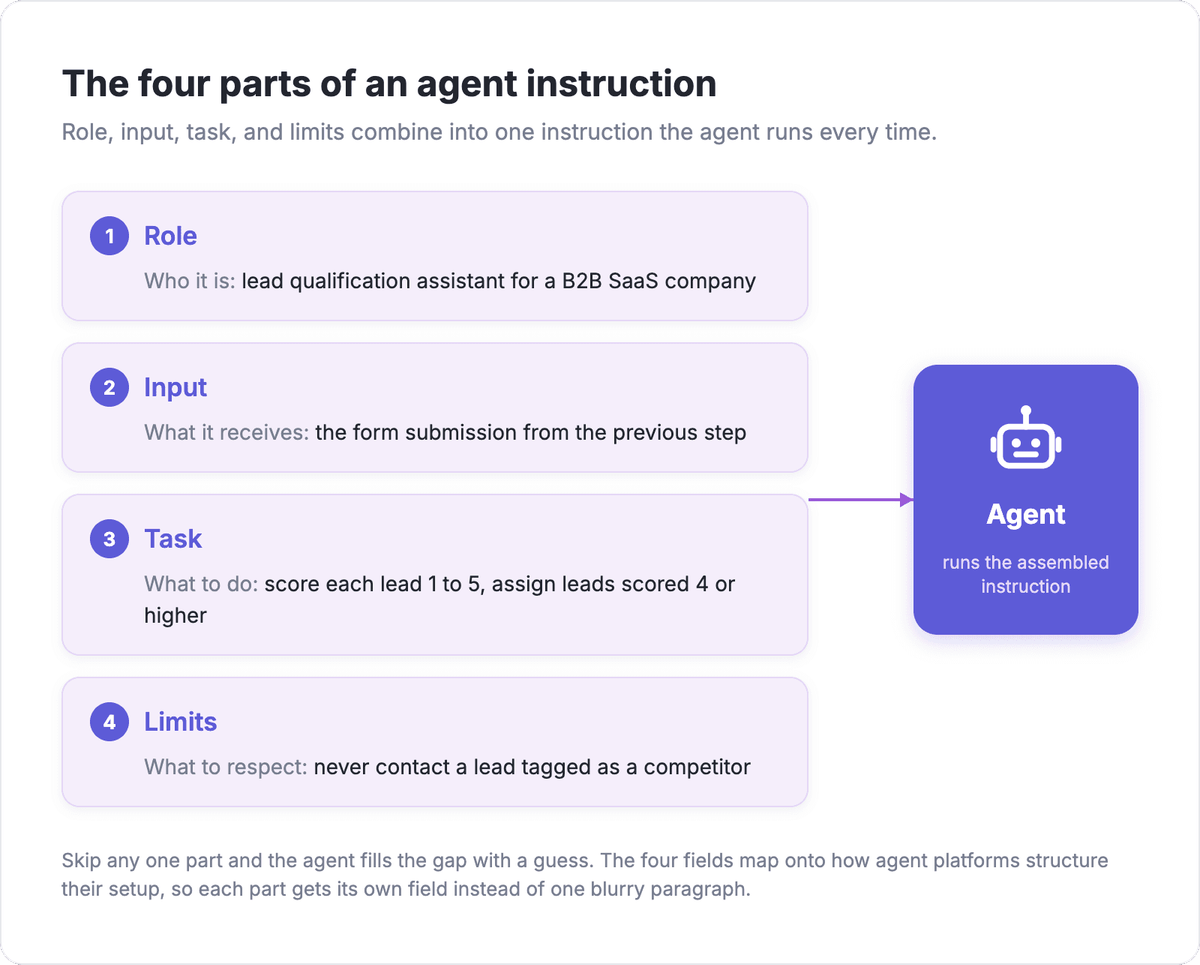
The infographic shows the four parts assembled into a single instruction, which is how they actually work together on a run rather than as four separate rules.
⚠️ Important. The limits section is the one people skip, and it is the one that saves you. An agent with a great role and no limits will confidently do the wrong thing at scale. Write the limits as if you are describing the mistakes a new hire might make on day one.
"Setting up an AI agent is basically onboarding a new employee. Not a senior hire who figures things out alone, more like a junior with a decent base but zero context on your company."
Mariia Sosnina, CMO at Albato
Write instructions the agent can actually follow
The single biggest lever is specificity. "Handle customer emails well" gives the model nothing to act on. "Read the incoming support email, classify it as billing, technical, or general, and create a ticket in the matching queue with a one-line summary" gives it a decision it can execute the same way every time.
Use concrete verbs and concrete outputs. Tell the agent what to produce, not how to feel about the task. A simple frame that works: name the role, give it the context it needs, set the constraints, and specify the format of the output you expect back. Role gives it a lens, context grounds it in your situation, constraints keep it in bounds, and format tells it the exact shape of the answer. Specificity beats cleverness every time.
State your assumptions in the prompt, because the agent does not carry them over. Unless you turn on memory, an agent does not remember previous runs, so anything it needs to know has to live in the instruction or the input. Do not assume it knows your product names, your team structure, or last week's decision.
🔧 How it works. When you hand a field to the agent instead of filling it yourself, the instruction for that field is doing the work. "Set the deal owner to the rep whose region matches the lead's country" is a per-field instruction the agent can follow. "Set the owner correctly" is not.
Keep each instruction focused on one job. If you find yourself writing "and also" three times, you probably have three agents, or one agent and two rules that belong in the limits. A tight, single-purpose instruction is easier to test and far easier to trust.
Prompts are not guardrails
This is the distinction that separates a demo from a production agent. A prompt is what you ask the agent to do. A guardrail is the rule that holds regardless of what the model decides. Prompts alone are not enough for anything that touches a real system, because a model can be talked out of an instruction, misread an edge case, or follow a malicious input.
Writing "never send more than 50 messages a day" in the prompt is a hope. Scoping the agent so it only has access to a tool that caps at 50 is a guardrail. The working approach in 2026 is defense in depth: assume some bad inputs will land and make sure a landed one cannot do much damage. The highest-value control is least privilege. An agent that cannot reach a payment action cannot be tricked into a payment, so give each agent the smallest set of tools its job requires and nothing more.
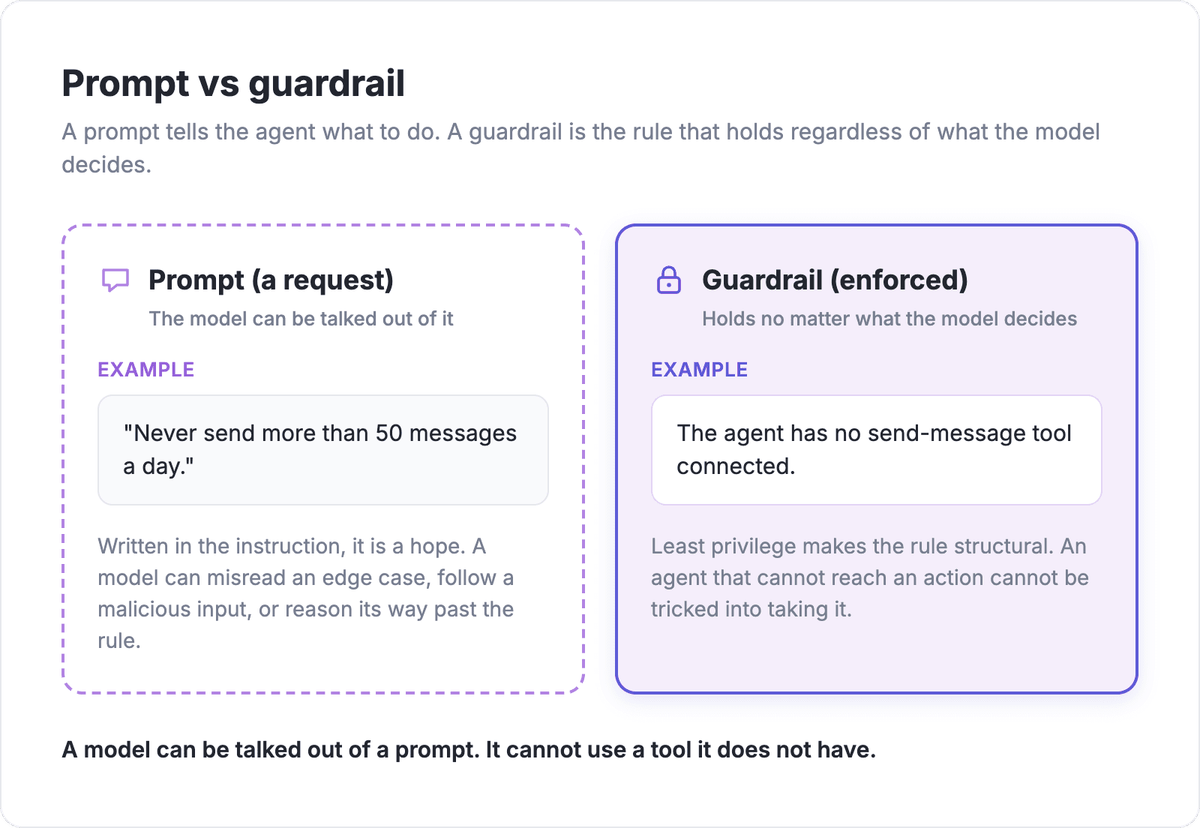
The contrast is what matters in practice: a model can be talked out of a prompt, but it cannot use a tool it does not have.
Keep a human in the loop for anything high-stakes. Let the agent draft the reply, propose the CRM update, or suggest the routing, and have a person confirm it until the agent has earned trust on the low-risk version of the task. That single step catches most bad instructions before they reach a customer.
How to structure instructions in the Albato AI Agent
The Albato AI Agent turns the four-part frame into three fields you fill in plain language, so the structure this guide recommends is built into the setup. It is a step you drop inside an automation: the automation starts with a trigger, such as a new form submission or a new CRM record, and the agent reads that data and decides which action to run across your connected apps.
You write the instruction across three separate fields, each with its own job. User message is the input, the data the agent receives from the previous step. Agent instructions is the role and the task, what the agent should do with that data. Guardrails is the limits, the rules the agent must respect. Splitting them this way is exactly the discipline the earlier sections argue for: the field labels stop you from cramming role, task, and limits into one blurry paragraph.

Each field holds up to 1,000 characters, which is a helpful constraint. If your instruction does not fit, it is usually doing too much and should be split into a tighter task. You pick the model that powers the agent, including the built-in Albato AI option, then connect the tools the agent is allowed to use by choosing an app, an action, and an account. Memory is a separate optional toggle: leave it off for one-shot tasks like the one above, and turn it on only for chatbot-style flows where the agent needs to remember earlier turns, which is exactly the "agents do not remember runs" gap discussed earlier.
Tools are where least privilege becomes concrete. You only connect the actions the agent needs, so an agent scoped to update CRM records simply has no send-message action to misuse. When you map the fields for an action, you can fill each one yourself or hand it to the agent with a per-field "Let the AI agent decide" toggle, with optional field-level instructions for the ones you want to guide.

Handing a field to the agent is the point where your instruction quality shows up in practice. A clear per-field instruction like "set the deal owner to the rep whose region matches the lead's country" is one the agent can execute the same way every run, while a vague "fill this in correctly" leaves it guessing. The fields you keep manual are your structural guardrails; the ones you delegate are where the agent earns its keep.
A worked example: instructions for a lead qualification agent
Here is the four-part frame applied to a real job, so you can see how the pieces fit. The task is qualifying inbound leads from a form and routing the good ones to sales. Each part goes into its matching field.
User message (input): "A new lead from our contact form. Fields: name, work email, company, company size, message." This tells the agent what it is looking at on every run.
Agent instructions (role and task): "You qualify inbound B2B leads. Score each lead from 1 to 5 on fit with our ideal customer profile: mid-market SaaS companies with 50 to 1,000 employees. Assign any lead scored 4 or 5 to an account executive and write a one-line note explaining the score." The role and the exact decision are both stated.
Guardrails (limits): "Never contact the lead directly. If company size is missing, score the lead 3 and flag it for manual review. Do not guess at data that is not in the form. Never route a lead tagged as a competitor." These are the rules the model cannot reason its way out of.
⚠️ Important. Notice how much of the quality lives in the guardrails, not the task. The task is one sentence. The limits are four, because that is where the real-world mess lives: missing fields, competitors in the pipeline, the temptation to invent data. Our full walkthrough of AI agents for lead qualification shows this same pattern end to end.
Once the instruction is written, connect only the tools the job needs: a CRM update action and an assignment action, nothing that can email the lead. That is the guardrail in structural form, matching the rule you wrote in the prompt.
Test your instructions before you trust them
An instruction that reads well is not the same as one that works. Before you let an agent run unattended, feed it the awkward inputs on purpose: the lead with no company name, the ticket in a language you did not plan for, the record with a field left blank. The way an agent handles the messy 10% tells you far more than how it handles the clean 90%.
Run the agent in a low-risk lane first. Let it draft and propose rather than write and send, and compare a week of its proposed actions against what your team would have done. Where they diverge, the instruction usually needs a sharper limit or a clearer task, not a different model. Setting the constraints first and iterating on the prompt inside those bounds is the pattern that holds up in production.
💡 Tip. Keep a short list of the specific failures you want to prevent, and re-run those exact cases every time you change the instruction. A regression test for prompts is just a saved set of nasty inputs and the right answer for each one.
Widen the agent's authority only after it has earned it on the narrow version. An agent that has quietly drafted correct lead scores for two weeks is a safe candidate for auto-assignment. One you just wrote is not.
Common prompting mistakes that break agents
The most frequent failure is the instruction that is too broad. "Manage our support inbox" is a wish, not a task. Break it into the specific decisions you actually want: classify the email, create the ticket, set the priority, draft a reply for review. Each of those is testable; "manage the inbox" is not.
The second is assuming context the agent does not have. It will not remember your last conversation, your naming conventions, or the decision you made last week, so any of that has to be in the instruction. The third is confusing a prompt with a guardrail, covered above, and the fourth is trying to prevent every edge case in prose when a structural limit, like not connecting a risky tool, does the job more reliably.
If you are choosing your first agent to build, borrow the pattern that survives: one clear job, a stated input, a specific task, tight limits, and only the tools the work requires. You can write that instruction and watch it run on Albato's free plan before you commit it to anything that matters. For the broader setup around the instruction itself, our how to build an AI agent checklist covers scoping, tools, and launch.
FAQ
The questions below cover the points people run into most often when they move from a demo prompt to an agent that has to hold up on every run.
How do you write good instructions for an AI agent?
Cover four things in every instruction: the role the agent plays, the input it receives, the task it should perform, and the limits it must respect. Be specific about the output you want, state any context the agent needs since it will not remember past runs, and keep each agent focused on a single job rather than a broad goal like "manage support."
What is the difference between a prompt and a guardrail for an AI agent?
A prompt is what you ask the agent to do; a guardrail is a rule that holds no matter what the model decides. Writing "do not send more than 50 messages" in the prompt is a request the model can misread or be talked out of. Scoping the agent so it only has a tool that caps at 50, or removing the send action entirely, is a guardrail that enforces the rule structurally.
Why do AI agents ignore parts of their instructions?
Usually because the instruction is too broad, assumes context the agent does not have, or buries the limits. Agents do not carry over memory between runs unless you enable it, so anything unstated gets filled with a guess. Splitting the instruction into role, input, task, and limits, and testing it against messy inputs, surfaces the gaps before they cause problems in production.
How should I test an AI agent's instructions before going live?
Feed it the edge cases on purpose: missing fields, unexpected formats, inputs it was not obviously designed for. Run it in a low-risk mode where it drafts or proposes actions a human confirms, and compare a week of its output to what your team would have done. Widen its authority only after it has handled the narrow version of the task correctly.
If you want to go deeper on the setup around the instruction itself, the guides below walk through the wider picture of building, comparing, and avoiding the common failures of AI agents.