In this article
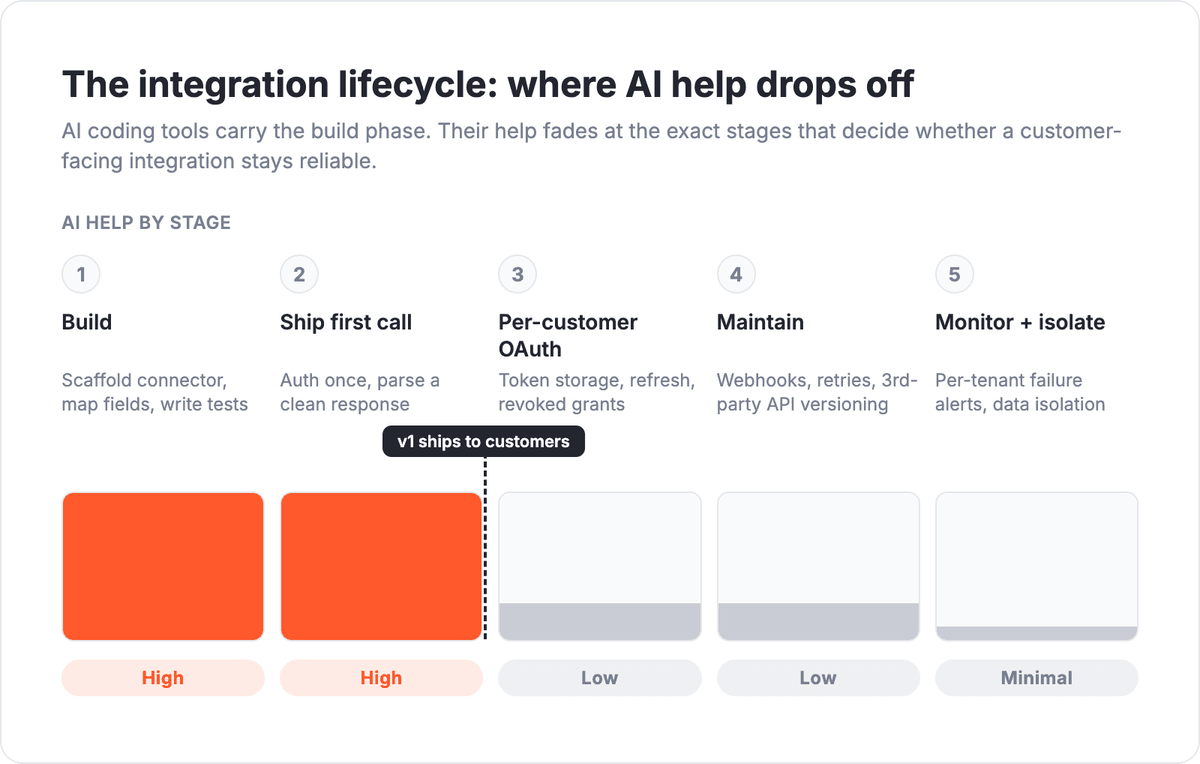
You can build an integration with AI coding tools in an afternoon. AI coding assistants scaffold a connector from API docs, map fields, write tests, and get the first live API call working faster than any engineer typing by hand. What they cannot do is own that integration once it ships inside a customer-facing product. Per-customer OAuth, token refresh, webhook retries, third-party API version changes, failure monitoring, and tenant data isolation stay on your team after v1 ships. That gap is the whole story, and it is where most engineering teams underestimate the real cost.
Albato Embedded is a white-label embedded iPaaS that gives SaaS companies 1,000+ native integrations plus a runtime layer that handles the operational half AI tools leave behind. This guide is written for engineers weighing "we'll just build it with Cursor" against buying a platform. It separates the work AI genuinely accelerates from the work that outlives your first commit, and shows where a runtime layer takes over.
Key takeaways:
- AI coding tools excel at the build phase: scaffolding connectors, field mapping, writing tests, and the first working API call.
- The operational half (per-customer OAuth, token refresh, webhooks, retries, API versioning, monitoring, tenant isolation) stays on your team after launch.
- A Stripe benchmark published in March 2026 found frontier coding models scored around 92% on full-stack tasks but struggled most with validating results, not generating code.
- Albato Embedded acts as the runtime layer for the second half: 1,000+ connectors, white-label OAuth, a Headless API, and MCP access for AI agents.
What building an integration with AI actually looks like
Building an integration with AI means handing an AI coding assistant the API documentation and letting it generate the connector code, the field mappings, and the test suite. The tool reads the spec, writes the client, and often produces a working first call within minutes. It is genuinely good at this, and for a one-off script or an internal prototype it can be all you need.
The strength is narrow and real. Tools like Cursor are strong at pattern-matching against well-documented APIs, filling in boilerplate, and catching obvious type mismatches. When the API has clean OpenAPI specs and predictable auth, a frontier coding model can take you from zero to a passing test suite with very little hand-holding.
Here is the honest split of what AI handles well at the build stage:
- Scaffolding a connector from docs. Point the tool at an API reference and it generates the client, request builders, and response parsers.
- Field mapping. Matching your data model to a third-party schema is repetitive work that AI does quickly and accurately.
- Writing tests. AI generates unit and integration tests against documented endpoints, including edge cases you might skip under deadline.
- The first working API call. Authenticating once, sending a request, and parsing a clean response is the demo moment AI nails almost every time.
That first working call is where a lot of teams declare victory. In a demo, it looks finished. For an internal tool with one account and one developer watching it, it often is.
What your team still owns after v1 ships
The work AI does not do shows up only after your integration is live in a customer-facing product with real users, real volume, and real edge cases. None of it is glamorous, and all of it is where integrations actually break.
Here is the operational half that stays on your team:
- Per-customer OAuth and token refresh. Every customer connects their own account. You store, rotate, and refresh tokens per tenant, handle revoked grants, and recover when a refresh fails at 3 a.m.
- Webhooks and retries. Inbound events arrive out of order, duplicate, or not at all. You build idempotency, dead-letter queues, and backoff logic so a dropped event does not silently lose data.
- Third-party API versioning. The APIs you integrate change without asking you. A deprecated field or a new required parameter breaks your connector, and someone has to notice and patch it.
- Failure monitoring. You need alerting that tells you which customer's integration broke, why, and how many records were affected, before the customer opens a ticket.
- Tenant data isolation. One customer's data must never leak into another's. Multi-tenant integration logic is where a small mistake becomes a security incident.
- The customer-facing connect UI. Users need a branded, self-serve way to authorize and manage their connections. That UI is a product surface, not a script.
An AI coding assistant can write a first draft of any one of these. What it cannot do is own them: notice when a vendor ships a breaking change, decide how to handle a token that will not refresh for one specific tenant, or carry the on-call pager when a webhook pipeline backs up. That ownership is the real cost of an integration, and it is recurring. For a deeper breakdown of what drives that recurring spend, see our analysis of why integration maintenance costs climb after launch.
If you are mapping the operational half against your own roadmap, a short walkthrough is usually faster than another internal spreadsheet.
Why AI-built integrations break after launch
AI-built integrations break after launch because the models are strong at writing code and weak at validating that the code actually worked in a live, stateful system. This is not a guess. In March 2026, Stripe's API Standards team published a benchmark testing whether AI agents can build real Stripe integrations across 11 reproducible environments covering backend, frontend, and browser-based checkout flows.
The results are worth reading in full, and the pattern is clear. Frontier coding models scored around 92% on full-stack API tasks and about 73% on the harder "gym" tasks. The failures were telling. In one common mode, the agent mistook an API error response for success and never validated the result, so the code looked done while the integration was quietly broken. In another, the agent got stuck inside a browser-based flow it could not recover from. The core limitation Stripe identified was not code generation. It was validation reasoning, state management, and recovery across multiple steps.
Building an integration with AI is fast at the build stage and unreliable at the validation stage. The model writes plausible code quickly, but it does not reliably confirm that the code produced the right result in a real system, which is exactly what a customer-facing integration demands. That is why an integration that passes a demo can fail in week three, when real data and real state expose the gaps the model never checked.
This maps directly onto what happens in production. An integration that works for the developer who built it, on their own test account, hits a wall when a thousand customers connect their own accounts with their own quirks. We covered the "works in a demo, breaks in week three" pattern and the cost of a self-built MCP server in a separate build-vs-buy breakdown, so we won't re-argue it here. The point for this guide is narrower: the failure is structural, not a tooling problem you can prompt your way out of.
The runtime layer: hand off the second half
The practical answer is not to stop using AI coding tools. It is to split the work. Let AI accelerate your product logic, and hand the operational half to a runtime layer built for it. That is what an embedded iPaaS does.
Albato Embedded is a white-label integration platform that runs inside your product and owns the parts AI leaves behind. Your team keeps writing product code with Cursor or any coding assistant. The connections, each customer's OAuth, token refresh, webhook handling, retries, connector upkeep when a third-party API changes, and the branded connect UI all run on Albato.
Concretely, the runtime layer gives you:
- 1,000+ pre-built, maintained connectors. When a vendor changes their API, Albato updates the connector. That upkeep never lands on your sprint board.
- White-label OAuth. Branded authorization pages so users connect their own accounts under your name, with token storage and refresh handled per tenant.
- A Headless API. Drive the entire integration lifecycle from your own backend and UI, with no Albato-branded surface, when you want full control of the experience.
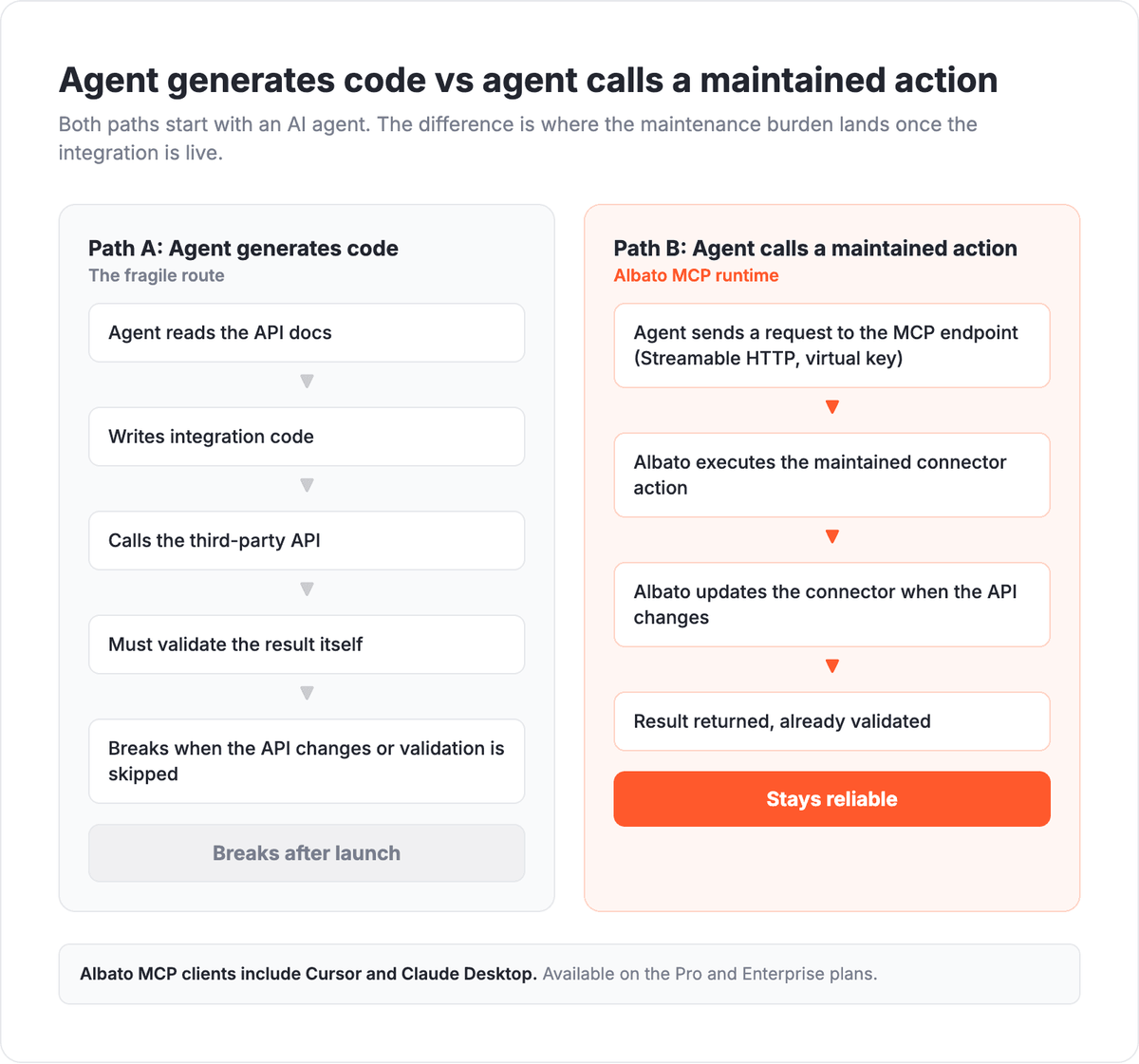
- MCP access for AI agents. Albato's MCP server exposes connected apps over Streamable HTTP, so an AI agent can call a maintained action instead of generating fragile integration code on the fly. If you are weighing the MCP route against writing connectors directly, our breakdown of MCP versus native API integrations covers where each fits.
This is a genuine build-vs-buy decision, and the right call depends on your team size, roadmap, and how customer-facing your integrations are. We walk through that decision, including when building in-house makes sense, in our guide to in-house integrations versus an embedded iPaaS. If you want the hard numbers behind building connectors yourself, the cost of API integration piece has the breakdown. And if the layer you are choosing is specifically an MCP server, our rundown of MCP server platforms for SaaS covers what to look for.
The split between building and buying becomes clearer once you map the second half against your own engineering roadmap.
What AI handles vs what your team still owns
The split below is the one to keep in front of you when you scope an integration project. AI owns the first column cleanly. The second column is recurring work that outlives the initial build, and it is where a runtime layer earns its place.
| Stage | AI coding tools handle this | Your team (or a runtime layer) still owns this |
|---|---|---|
| Build | Scaffolding a connector from docs, field mapping, writing tests | Deciding which integrations ship first and why |
| First call | Authenticating once, sending a request, parsing a clean response | Handling every auth path real customers hit |
| Auth at scale | Drafting an OAuth flow | Per-customer OAuth, token storage, refresh, revoked grants |
| Events | Writing a webhook handler | Idempotency, retries, ordering, dead-letter queues |
| Upkeep | Patching one known breaking change | Noticing third-party API changes across every connector |
| Operations | Generating log statements | Per-tenant failure monitoring and alerting |
| Isolation | Writing tenant-scoped queries | Guaranteeing data never crosses tenants in production |
| UX | Prototyping a connect screen | A branded, self-serve connect UI as a product surface |
When to choose a runtime layer over building it all
Choose a runtime layer when your integrations are customer-facing, multi-tenant, and expected to stay reliable without a dedicated integrations team babysitting them. If you are shipping one internal connector for your own ops team, AI coding tools plus a weekend may be the right call. The math changes the moment real customers connect their own accounts.
A few signals that point toward handing off the second half:
- Users connect their own third-party accounts, so you are running OAuth and token refresh per customer.
- Your integration catalog needs to grow past a handful of apps without growing your headcount.
- Integration reliability is a sales conversation, not just an engineering one.
- You want engineers writing product features, not carrying an on-call pager for other companies' APIs.
If most of those are true, the question is less "can AI build this" and more "who owns it at 2 a.m. in month six." That is the question a runtime layer answers.
Frequently asked questions
Can AI build my SaaS integrations?
AI coding tools can build the first version of an integration quickly: scaffolding a connector from docs, mapping fields, writing tests, and getting the first API call working. They do not own the operational half that keeps a customer-facing integration running, including per-customer OAuth, token refresh, webhook retries, and upkeep when third-party APIs change. For an internal prototype, AI is often enough. For a multi-tenant product, you still need a runtime layer.
What can't AI coding tools do for integrations?
AI coding tools struggle with validation and state, not code generation. A Stripe benchmark from March 2026 found frontier coding models often mistook an API error for success and did not validate the result. In production that shows up as integrations that pass a demo and fail once real customers, real volume, and third-party API changes hit them.
Can I connect Albato to Cursor?
Yes. Albato's MCP server runs over Streamable HTTP with a virtual key for authorization, and Cursor and Claude Desktop are named clients in Albato's MCP quickstart, alongside any MCP-compatible agent. Access is set up with your Albato manager rather than fully self-serve, and MCP is available on the Pro and Enterprise plans. This lets an AI agent call maintained connector actions instead of generating integration code on the fly.
Is it cheaper to build integrations with AI or buy an integration platform?
It depends on how customer-facing and multi-tenant your integrations are, and whether you count the recurring maintenance, not just the initial build. AI lowers the build cost but not the operational cost. For the full comparison, see our guide to in-house versus embedded iPaaS and the self-built MCP server cost breakdown.
The bottom line
AI coding tools changed the build phase of integrations, and that change is real. Scaffolding, field mapping, tests, and the first working call are faster than they have ever been, and your engineers should use every bit of that speed. What has not changed is the second half: the per-customer OAuth, the retries, the versioning, the monitoring, and the branded connect UI that decide whether an integration survives contact with real customers.
The teams that win here are not the ones that refuse AI or the ones that trust it blindly. They are the ones that let AI write product logic fast and hand the operational layer to a platform built to own it. Albato Embedded covers that second half with 1,000+ maintained connectors, white-label OAuth, a Headless API, and MCP access for AI agents, so your team ships features instead of maintaining other companies' APIs.
Book a demo to see how the split works for your product. Book a demo and we'll walk through exactly which operational work moves off your team.