In this article
Key Takeaways
- The five mistakes that most often kill AI agent ROI: chasing hype instead of a scoped use case, pointing the agent at the wrong work, buying "agent washing" dressed up as an agent, launching without guardrails or human review, and building from scratch when configuring an existing tool would win.
- Gartner expects over 40% of agentic AI projects to be canceled by the end of 2027, mostly because they are hype-driven proofs of concept with no clear business value.
- Buying an agent from a specialized vendor succeeds roughly twice as often as building one in-house, per MIT research, so the fix for most teams is configuration, not code.
Only 5% of generative AI pilots reach measurable revenue impact, according to MIT's State of AI in Business 2025 report, which studied 300 public deployments alongside 150 leader interviews. The gap between the 5% that work and the rest almost never comes down to the model. It comes down to five decisions made before launch.

Let us build your automation or AI Agent
Tell us which process eats your time. Certified Albato engineers take it from there, A to Z.
Mistake 1: Chasing the hype instead of scoping one measurable use case
The first mistake is starting with "we need an AI agent" instead of "we need to close this specific gap." Gartner attributes most agentic AI cancellations to projects that are early-stage experiments driven by hype rather than a defined business outcome. That is the difference between a project with a target and one with only an ambition.
A hype-first project has no number attached to it, so nobody can tell whether it worked. A scoped project names the trigger, the decision, the action, and the metric before anyone touches a builder. "Route inbound demo requests to the right sales rep and log the reason in the CRM" is scoped. "Use AI to improve sales" is not. That narrow framing is exactly how AI agents automate sales follow-up and CRM updates without drifting into vague goals.
⚠️ Important. If you cannot write down the one metric your agent should move (tickets deflected, leads routed, hours saved) in a single sentence, you are not ready to build it. That sentence is your ROI baseline, and without it every result is unfalsifiable.
Start with a process you already understand well enough to describe step by step. If you would struggle to hand the task to a new hire with written instructions, an agent will struggle too. Our guide on how to build an AI agent walks through scoping the first use case before any setup.
Mistake 2: Pointing the agent at the wrong work
The second mistake is aiming the agent where it looks impressive instead of where it pays. The same MIT research found that more than half of generative AI budgets go to sales and marketing tools, while the largest measurable return showed up in back-office automation: cutting outsourced work, trimming agency costs, and removing repetitive operational steps.
Customer-facing pilots feel like progress because they are visible, but they also carry brand risk and fuzzy attribution. Back-office work is the opposite. It is invisible, repetitive, and easy to measure, which is exactly what makes it a clean ROI target. Data validation, record enrichment, invoice matching, and internal routing rarely make a demo look exciting, and they are usually where the payback lives.
💡 Tip. A quick gut-check for target selection: if the task already has an SLA or a queue (support tickets, invoice approvals, data cleanup), it is measurable enough for an agent. If success is defined by a vibe ("better engagement", "more polish"), it will be hard to prove the agent moved anything.
Before you commit, list your candidate tasks and score each on two axes: how repetitive it is and how easily you can measure the outcome. Start with whatever ranks high on both. If you are weighing an agent against a fixed rules-based flow, our breakdown of AI agent vs workflow automation explains when each one is the cheaper choice.
Mistake 3: Buying "agent washing" instead of a real agent
The third mistake is paying agent prices for a rebranded chatbot. Gartner uses the term "agent washing" for vendors that repackage existing automation and assistants as agentic AI without real autonomous decision-making, and it estimates only around 130 vendors out of thousands making agentic claims actually deliver it.
The difference is concrete. A scripted chatbot follows a decision tree you built. A real agent reads the incoming data and decides which action to run on its own, then executes it across your connected tools. If something billed as an AI agent cannot take a live input and choose between multiple actions without you hard-coding every branch, it is automation with a new label.
Ask vendors one question during evaluation: show me the agent handle a case it was not explicitly scripted for. If the answer is a longer decision tree, you are looking at agent washing. The distinction between an agent, a chatbot, and a scripted flow is covered in detail in our AI agent explainer.
Mistake 4: Launching without guardrails or a human in the loop
The fourth mistake is giving an agent authority without limits. An agent that can decide and act is only as safe as the rules you set around it, and the projects that get pulled after launch are usually the ones that let the agent write to production systems with no boundaries and no review step. If you are thinking about governance and cost control for agents at scale, an AI agent control plane gives you the kill switch, permissions, and spend tracking that keep a fleet of agents safe.
Guardrails are not a nice-to-have you add later. They are the instructions that tell the agent what it must never do: which records it can touch, which actions need approval, what to do when it is unsure. A good setup also keeps a human in the loop for high-stakes decisions, so the agent drafts or proposes and a person confirms until trust is earned.
💡 Tip. Run any new agent in a low-risk lane first. Let it read and draft before it writes and sends. Watching a week of its proposed actions against what a human would have done tells you more about readiness than any accuracy score.
This is where scoping from Mistake 1 pays off again: a narrow agent with clear limits is far easier to trust than a broad one with vague authority. Widen its scope only after it has earned it on the narrow version.
Mistake 5: Building from scratch when configuring an existing tool would win
The fifth mistake is treating an AI agent as an engineering project when it is usually a configuration one. MIT's research also found that buying an agent from a specialized vendor succeeded about 67% of the time, while internal builds succeeded only a third as often. Building from scratch means owning the model plumbing, the integrations, the monitoring, and the maintenance, which is exactly where most projects stall.
For the majority of the use cases worth automating, the model is not the hard part. The hard part is connecting the agent to your CRM, your help desk, your billing tool, and your notifications, then keeping those connections working. A platform that already has those connectors turns a multi-month build into an afternoon of setup. If you are still choosing where to run the agent, our comparison of AI agent builders looks at how each platform handles connectors and setup effort.
How the Albato AI Agent solves the build-vs-buy mistake
Albato's AI Agent is a step you drop inside an automation, and it is built for exactly the teams who should be configuring rather than coding. Instead of wiring fixed conditions and branches by hand, you describe the task in plain language and the agent reads incoming data and decides which action to run. It has four parts: a model, instructions written as plain text, the tools it is allowed to use, and optional memory for conversational flows.
That structure maps directly onto the five mistakes above. You scope it by writing the instructions and guardrails as three separate fields, so Mistake 1 and Mistake 4 are handled in setup, not in code. You point it at back-office work by connecting the relevant actions as tools, since Albato offers around 5,000 actions the agent can call. And because it runs on connectors that already exist, you skip the from-scratch build in Mistake 5 entirely.

The instructions screen is where scoping and guardrails live. You write what the agent receives, what it should do, and the limits it must respect, each in its own field. When you connect a tool, you can fill each field yourself or hand it to the agent with a per-field "Let the AI agent decide" toggle, which keeps you in control of the risky fields while the agent handles the routine ones.

Billing is transaction-based: three transactions per run regardless of how many tools the agent has. You can use the built-in Albato AI model, which adds one transaction per 2,000 tokens, or connect an external provider if you already have one. Either way, there is no infrastructure to maintain, which is the whole point for a team trying to avoid Mistake 5.
How the five mistakes stack up
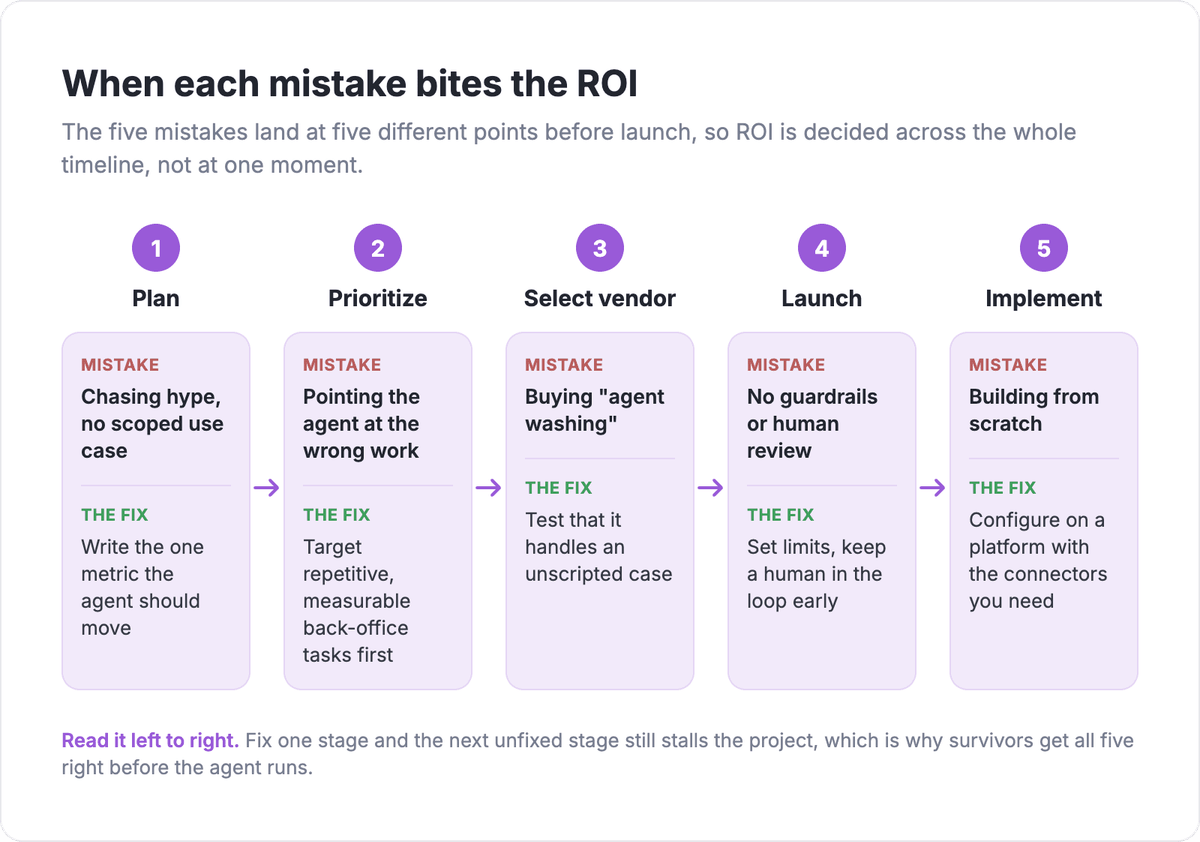
Each mistake fails at a different stage, which is why fixing one is not enough. The table below maps each one to when it bites and the single move that avoids it.
| Mistake | Where it kills ROI | The fix before launch |
|---|---|---|
| Chasing hype, no scoped use case | Planning | Write the one metric the agent should move |
| Pointing the agent at the wrong work | Prioritization | Target repetitive, measurable back-office tasks first |
| Buying "agent washing" | Vendor selection | Test that it handles an unscripted case |
| No guardrails or human review | Launch | Set limits, keep a human in the loop early |
| Building from scratch | Implementation | Configure on a platform with the connectors you need |
The through-line is that ROI is decided before the agent runs, not after. A scoped agent aimed at the right work, backed by a real platform and sensible limits, is the version that survives past the pilot. The map below shows where in the project each mistake bites, so you can see how the risk spreads across the whole timeline rather than landing at one point.
What the projects that survive do differently
The projects that make it past the pilot share a pattern that runs opposite to all five mistakes. They start narrow, aim at work they can measure, use a real agent rather than a relabeled chatbot, keep a person in the loop until trust is earned, and configure on top of existing connectors instead of building infrastructure.
That is not a coincidence. S&P Global Market Intelligence found that the share of companies abandoning most of their AI initiatives jumped to 42% in 2025, up from 17% the year before, with the average organization scrapping 46% of proofs of concept before production. The abandoned projects tend to be the broad, unmeasured, build-it-ourselves kind. The survivors are the boring, scoped, configured ones.
If you are choosing your first agent use case, borrow the survivors' playbook: one task, one metric, existing connectors, clear limits. You can set that up and watch it run on Albato's free plan before you commit budget to anything bigger.
FAQ
The questions below cover the decisions teams get wrong most often when they weigh, buy, or build an AI agent.
Why do so many AI agent projects fail to deliver ROI?
Most fail before launch, not because of the model. Gartner expects over 40% of agentic AI projects to be canceled by the end of 2027, largely because they start as hype-driven experiments with no defined metric. The common failure points are unclear scope, targeting flashy work over measurable work, and building from scratch instead of configuring an existing tool.
Should I build an AI agent in-house or buy one?
For most teams, configuring an existing platform wins. MIT's 2025 research found that buying an agent from a specialized vendor succeeded about twice as often as building one internally, because the hard part is usually the integrations and maintenance, not the model. Build in-house only when you have a use case no platform supports and the engineering capacity to own it long term.
What is "agent washing"?
Agent washing is when a vendor rebrands an existing chatbot or automation tool as an AI agent without adding real autonomous decision-making. Gartner estimates only around 130 of the thousands of vendors making agentic claims actually deliver it. The test is simple: a real agent handles inputs it was not explicitly scripted for, while a washed one just runs a longer decision tree.
How do I measure ROI on an AI agent before I scale it?
Define the single metric the agent should move before you build, such as tickets deflected, leads routed, or hours saved, and record its current value as a baseline. Run the agent in a low-risk lane where it drafts or proposes actions a human confirms, then compare its output to what the team would have done. That gives you a measurable readiness signal before you widen its authority.
Want to go deeper on scoping, building, and comparing agents before you commit? These related guides pick up where the five mistakes leave off.