In this article
Albato Embedded is a white-label integration platform for SaaS companies: one MCP endpoint that lets your customers' AI agents run actions across 1,000+ apps, under your brand, with no server per app for your team to host. That puts us on both sides of this question: a platform with one governed endpoint already performs the gateway role, and for us that role is a function of the platform rather than a separate product we sell.
Key takeaways:
- An MCP gateway is a control point between an AI agent and the MCP servers behind it: the agent connects once, and the gateway decides which tools it sees and where each call goes.
- A gateway is not a server: a server exposes one system's tools, while a gateway fronts many servers and adds curation, one auth surface, routing and policy.
- A registry answers what exists, not who may call it, and routes nothing. A gateway needs a list of what it routes to, so registry functions usually live inside it.
- Whose agents pass through the layer matters more than company size: internal agents need control, agents you ship to customers need multi-tenancy and your brand.
- If your integration layer already exposes a single MCP endpoint, it plays the gateway role, and a second gateway in front of it adds a hop without adding control.
What an MCP gateway is
An MCP gateway is a single control point that sits between an AI agent and the MCP servers behind it. The agent connects to one endpoint, and the gateway decides which tools the agent sees, authenticates the call, routes it to the right server, and records what happened. A bare MCP server does none of that.
The pattern came out of how teams adopted the protocol: Model Context Protocol standardized how an agent finds and calls a tool, which made the first integration easy and the tenth one awkward, because every app arrived as its own server, with its own auth, its own failure modes, and its own entry in the agent config. A shared front door was the operational answer. In SaaS that front door is often not a separate product at all, but the embedded iPaaS or white-label integration platform already sitting under the product.
Gateway, server, proxy, registry, router: what each term means
Six terms circulate here and they are not interchangeable: one answers the call, three decide where it goes, one is a catalog, and one belongs to a different layer of your stack.
| Term | What it is | What it solves | When it is your answer |
|---|---|---|---|
| MCP server | A service exposing one system's tools to an agent over MCP | Gives an agent a standard way to act in a specific app | An agent needs to work in one system you own or trust |
| MCP gateway | A control point in front of many servers, exposing one endpoint | Tool curation, one auth surface, routing, logging and policy | Several servers, several audiences, or rules about who calls what |
| MCP proxy | A pass-through hop that forwards MCP traffic to a server | Transport: reaching a local server remotely, TLS, basic access control | You need to relay traffic, not to govern it |
| MCP registry | A catalog of MCP servers with metadata on each one | Discovery and approval: what exists and what is sanctioned | Many teams pick their own servers and someone keeps the list |
| MCP router, hub or aggregator | Different names for one fan-out pattern: one entry, many backends | Collapsing many connections into one for the agent | Usually already inside your integration layer, as in how Albato MCP works |
| API gateway | An edge layer in front of your own HTTP services | Rate limits, keys, versioning and quotas for known endpoints | You publish APIs to developers, not tools to agents |
MCP gateway vs MCP server
An MCP server exposes the tools of one system to an agent. An MCP gateway sits in front of several servers and gives the agent one endpoint instead of many. The server answers the call. The gateway decides whether the agent ever sees that tool, which server receives the call, and under whose credentials it runs.
The two coexist: you add a gateway where the server count starts to create work, not in place of the servers.
MCP gateway vs API gateway
An API gateway stands at the edge of your service and manages traffic to endpoints that are already known: it checks a key, applies a rate limit, routes to a version. An MCP gateway stands inside the agent loop and shapes a choice the model has not made yet, because it sets which tools the model may consider. An API gateway that adds MCP support still sits at that HTTP edge, so curation is a separate job layered on top: filtering an agent's tool list is not the same work as filtering requests to known endpoints.
MCP gateway vs MCP registry
A registry is a catalog: which servers exist, who owns them, what they connect to, and whether they are approved. A gateway stands in the call path, so it can hide a tool, swap credentials, route to a different backend, or refuse the call. Anything that routes calls needs a list of what it routes to, which is why registry functions usually live inside a gateway. The reverse does not hold: a catalog enforces nothing, because no traffic passes through it.
Proxy, router, hub, aggregator: the same pattern under different names
Proxy, router, hub, aggregator and orchestration layer describe one architectural idea with different emphases: the hop, the path choice, the collapse of many backends into one surface. Read the capability list, not the noun: anything that only forwards traffic is a proxy, and anything that curates tools, holds credentials, routes calls and logs decisions is a gateway whatever the product name says.
What a gateway does that a bare MCP server doesn't
A gateway earns its place through four functions, each one something you would otherwise build into your agent or repeat in every server.
Tool curation. The gateway decides which slice of the catalog reaches the agent, so a support agent gets ticket and CRM tools while a billing agent gets neither. Without that filter, every connected server pushes its whole tool list at the model, which is the argument behind why one MCP server beats fifty. Our MCP tools reference shows what an agent sees through one endpoint.
One authentication surface. The agent authenticates to the gateway, and the gateway holds or brokers whatever the servers below it need. Provider credentials stay out of agent configs and out of the model's reach, and revoking access happens in one place. Albato issues revocable virtual keys for this, so a leaked client config costs one key rather than your real token.
Routing. The gateway maps an incoming tool call to the server, connector or account that should run it. Routing rules are where a gateway stops being a proxy, since the same tool name can resolve differently by caller, by tenant, or by the connection the end user authorized. Our MCP architectural principles set out the design rules behind one endpoint, including how each call is scoped to the end user whose credentials run it.
Observability and policy. Every call passes through one place, so the gateway can answer which agent called which tool, on whose behalf, and whether it was permitted. That record is what enterprise buyers ask for in security review, and policy lets you refuse a call before it touches customer data.
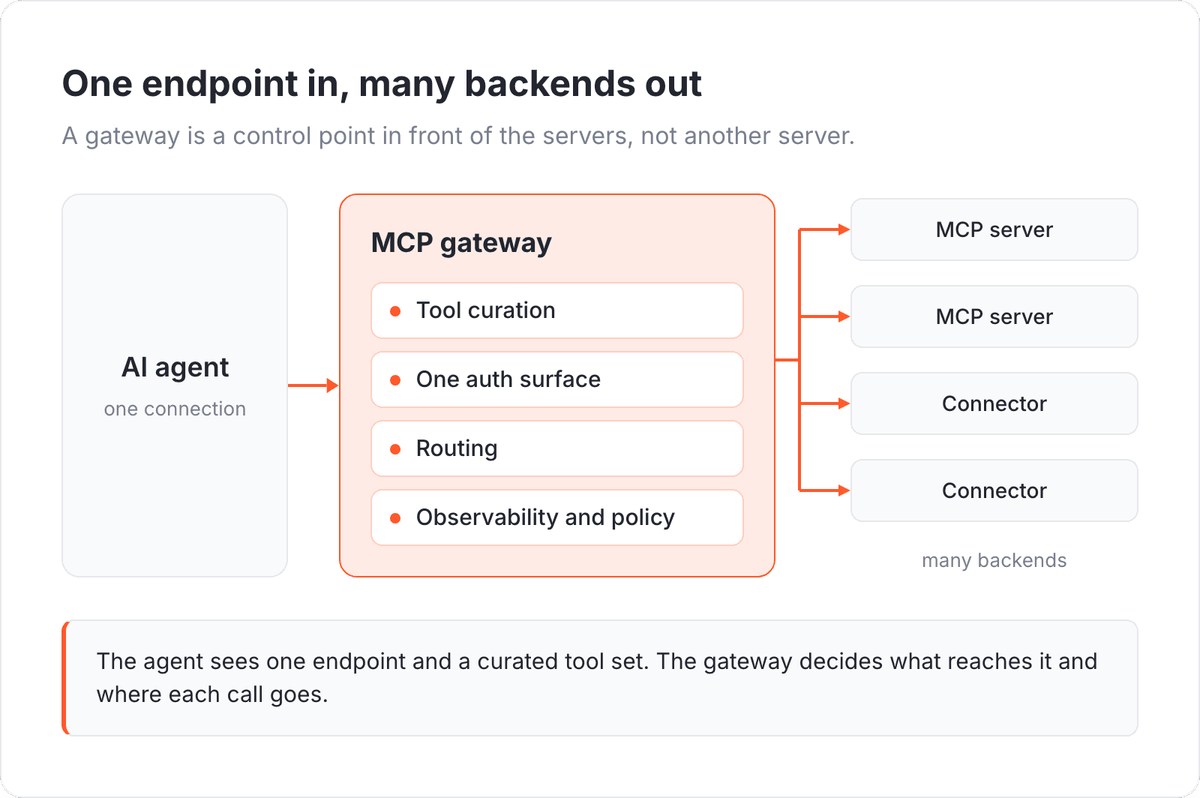
The four functions and the fan-out are what separate a gateway from a plain server, and they are the shape to keep in mind through the rest of this article.
When a SaaS product needs an MCP gateway
Five signals say yes, and they are product signals rather than vendor talking points: one is usually enough to justify the layer, three make it overdue.
- Your agent reaches more than a couple of services. Once it needs a CRM, a helpdesk and a billing system, per-server credentials, error handling and config entries start to dominate the work.
- Every customer connects a different set of apps. A fixed server list works for one company, while serving many means assembling the tool set per account, which is a routing job rather than a config file.
- You need to limit which tools a given user's agent can see. Role, plan tier and granted consent all shape the permitted set, and a filter above the servers is the only place to apply it consistently. The performance side of that case is in how too many MCP servers break an AI agent.
- You need one audit trail across every call. Security questionnaires ask who did what through the agent, and stitching that from several servers' logs is work you repeat at every review.
- You ship agents to customers under your own brand. Once the agent belongs to your product rather than your ops team, the control layer is part of what you sell.
If those signals describe an agent your customers will use, the fastest way to judge the layer is to see one governed endpoint working inside a product like yours.
When you do not need one
Four cases where a gateway adds a layer and little else.
- One agent, one or two servers. With a small fixed tool set, the agent can hold those connections directly, and a gateway buys an extra hop plus another component to run.
- Internal agents for your own team. When the users are colleagues, the tool set is stable and everyone shares one set of credentials, your existing access controls and audit logs usually cover the same ground.
- No agent in production yet. Until real users send real requests, the tool set you would curate is a guess. Ship the agent, watch which calls it makes, then decide.
- Your platform already exposes a single MCP endpoint. Curation, authentication, routing and logging happen there already, so a second gateway in front forwards traffic without adding control.
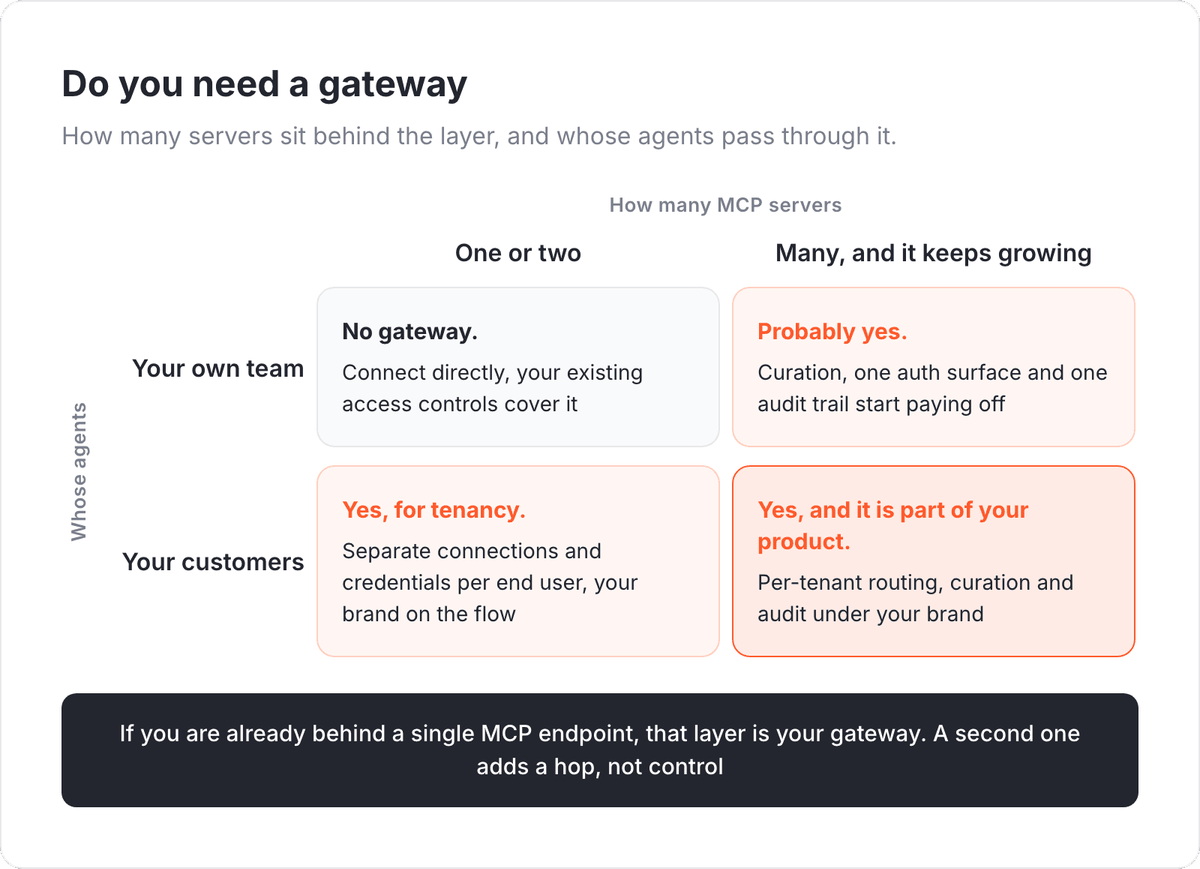
The matrix crosses two variables the two lists keep apart, so a product that reads as a clear no on server count can still be a yes the moment its agents belong to customers rather than staff.
Internal agents or agents you ship to customers: the split that decides your answer
Delivery model decides this, not headcount. The two modes are agents your own staff use and agents you ship to customers inside your product. Almost everything written about MCP gateways assumes the first: an IT team puts a control point in front of employee agents, so the requirements are inward-facing, namely which internal systems each department's agent may touch and how to evidence that in an audit.
The second mode is a product decision. When you ship agents to the customers of your SaaS, the same four functions have to work per tenant, so each end user's connections and credentials stay separate from every other account's and the whole experience carries your brand. The isolation work behind that is covered in multi-tenant MCP architecture for SaaS, and the platform types that deliver it are compared in how to choose an MCP server platform.
Teams that skip this distinction buy for the wrong mode. A control point built for internal governance can report beautifully on employee agents and still leave you writing tenant isolation and white-label flows yourself.
Where a gateway sits next to an integration platform
An integration platform that exposes a single MCP endpoint is already doing the gateway's work, because curation, authentication, routing and logging are what an integration layer does for a living. The agent connects to one endpoint, and the platform resolves which connector and which end user's connection the call belongs to, runs the action, and writes the record. The wider comparison between the protocol and that layer is in MCP compared with an integration platform.
For a SaaS product, this is usually where the decision lands: Albato Embedded gives your customers' agents one MCP endpoint to 1,000+ connectors, white-labeled so users stay inside your product, with credentials isolated per end user, SOC 2 Type 2 certification, GDPR compliance, and a typical go-live of 30 to 45 days. The platform behind it serves 250,000+ users and processes 250M+ transactions per month. The path from an agent to that endpoint is documented step by step in our MCP quickstart.
If you are weighing a gateway for agents your customers will use, a walkthrough of one endpoint inside your product is the fastest way to see whether that layer needs to be yours.
Frequently asked questions
What is the difference between an MCP gateway and an MCP registry?
A registry is a catalog of MCP servers: what exists, who owns it, and whether it is approved. A gateway sits in the call path, so it can curate tools, hold credentials, route calls and log them. A registry alone enforces nothing, because no traffic passes through it.
Can an MCP gateway limit which tools an agent sees?
Yes. The gateway assembles the tool list the agent receives, so it can expose a curated subset based on the user's role, plan or granted connections and hide the rest, and the agent cannot call a tool it was never shown. For what happens when nothing filters that list, see how too many MCP servers break an AI agent.
Is an MCP gateway the same as an API gateway?
No. An API gateway applies keys, rate limits and versioning to your own known HTTP endpoints at the edge of a service, while an MCP gateway manages an agent's access to tools inside the agent loop, including which tools the model may choose from.
Do I need an MCP gateway if I only have one MCP server?
Usually not. With one server and one agent the connection is direct, and a gateway adds a hop without adding control. That changes when different users should see different tools, when you serve multiple customers through that server, or when you need one audit trail.
Does an MCP gateway replace my MCP server?
No. Servers still expose the tools and execute the calls, while the gateway decides what the agent sees and where each call goes. With an integration platform behind a single MCP endpoint, that endpoint covers both roles for every app in its catalog.
The terms above map cleanly onto one architectural choice, and the three articles below go deeper on the pieces this guide only touches.