In this article
Your users keep asking for integrations you have not shipped yet. Every quarter the backlog grows: HubSpot, Asana, Slack, the CRM your biggest account runs on. Your engineering team could build these natively, but each one takes months to design, ship, and then maintain as APIs shift underneath it. Meanwhile trials stall when a key integration is missing, and support fills up with setup questions from users who cannot configure connections on their own.
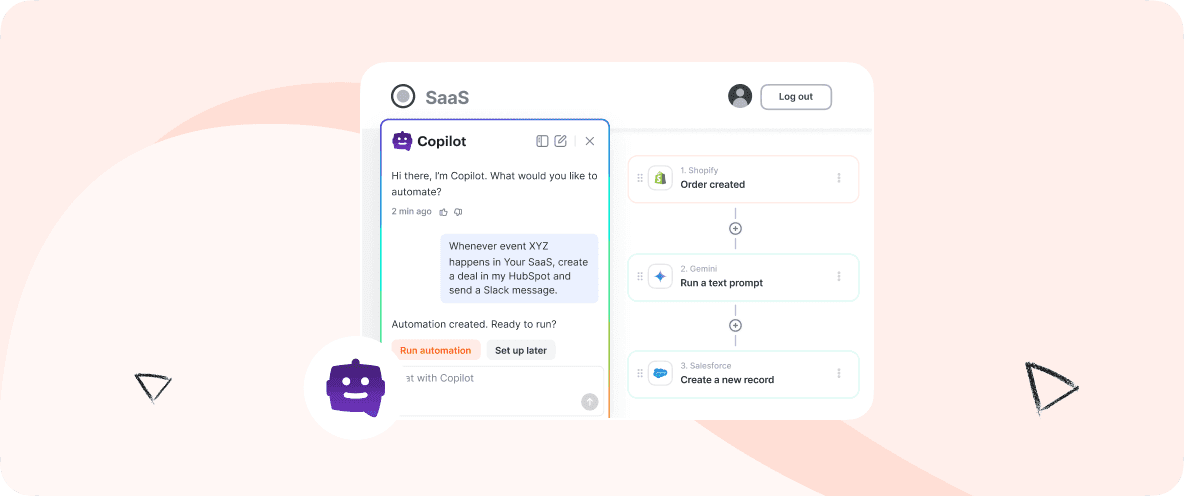
Albato Copilot is what you embed to take that whole problem off your roadmap. It is a conversational AI builder that lives inside your product: your users type what they want in plain English ("When a deal closes in HubSpot, create a project in Asana and assign it to me") and Copilot builds the automation for them. Your users get self-serve integrations without a single support ticket, and your team stops carrying the build-and-maintain burden. The entire experience runs under your brand, on your infrastructure, with Albato invisible behind it.
Key takeaways:
- Albato Copilot is a conversational AI builder embedded via iFrame directly inside your SaaS product. Users describe automations in plain language; Copilot builds them.
- It is fully white-labeled: your users see your brand, not Albato's.
- Custom LLM support lets you bring your own model or use Albato AI out of the box (the underlying model is proprietary and not disclosed).
- The Universal MCP Gateway connects Copilot to 1,000+ apps through a single standardized endpoint, with no API credential management required.
- Most partners go live in 30 to 45 days. The platform runs on Albato's infrastructure, which processes 250M+ transactions monthly for 250,000+ users.
What is Albato Copilot
Albato Copilot is a white-label conversational AI builder that embeds inside a SaaS product via iFrame, letting end users describe the automation they want in plain language and have it built automatically. It is not a chatbot and not a standalone tool: it deploys under your brand, on your domain, with no Albato branding visible to your users.
For a SaaS company, this matters because integration setup has always been the friction point between "user wants to connect their CRM" and "user actually connects their CRM." That friction is what turns into support tickets, stalled trials, and integration requests your team cannot build fast enough. Traditional builders require users to understand triggers, actions, and field mapping, so most non-technical users give up or open a ticket. Copilot replaces that process with a conversation, which means the integration workload your users generate no longer lands on your team.
It differs from generic AI assistants because it is purpose-built for workflow automation and connected to a live integration layer with 1,000+ apps. It does not just answer questions about automation: it builds them. For your product, that is the difference between listing integrations on a roadmap and shipping a working library your users can operate themselves.
How Albato Copilot works
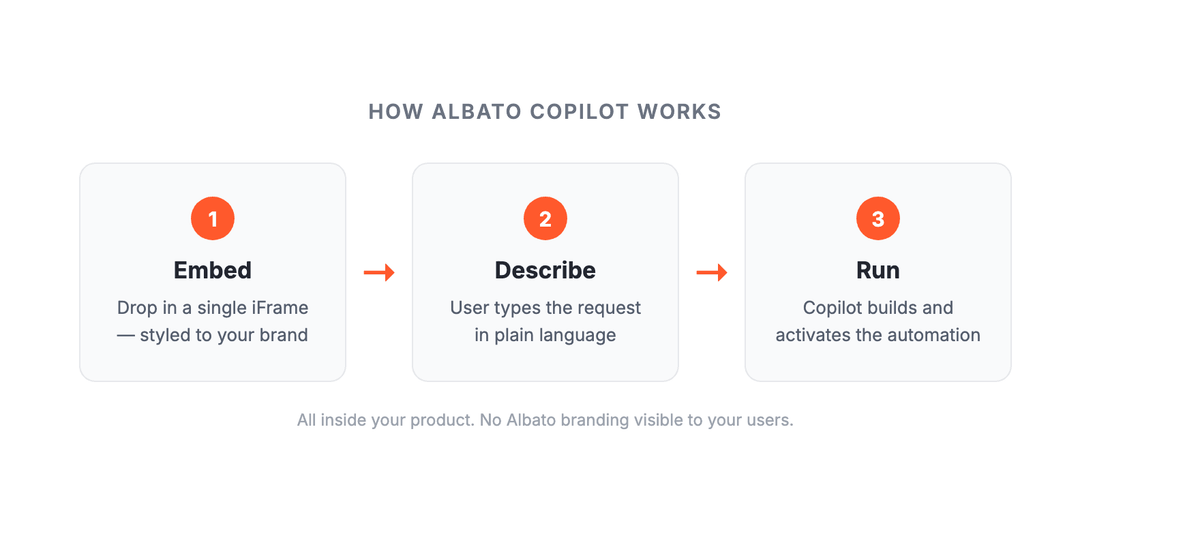
For your team, implementation follows three steps. The simplicity here is by design: the more complex the deployment, the fewer partners actually ship it, so the lift on your engineering side stays small.
Step 1: Embed. Your team drops Copilot into your application with a single iFrame, styled to match your brand. No separate login flow, no third-party onboarding. Your users access it from inside your product, as naturally as they access any other feature.
Step 2: Describe. From there, a user types their request in plain language: "When a new lead comes in from Facebook, add it to my HubSpot pipeline and send me a Slack notification." That is the full request. No field mapping, no trigger configuration, and no ticket for your support team.
Step 3: Run. Copilot builds the workflow, configures the connections, and activates the automation. The user never leaves your product and never encounters Albato's name, so the win reads as your product delivering, not a bolt-on tool.
What makes this work at scale is the Universal MCP Gateway underneath Copilot. Albato's MCP (Model Context Protocol) server gives Copilot a single standardized endpoint that reaches actions across 1,000+ connected apps. You manage zero API schemas and zero credential rotation. Copilot calls the gateway; the gateway calls the app.
What Copilot gives your users
The gap between "has integrations" and "users actually adopt integrations" is larger than most product teams expect, and it shows up directly in your metrics: adoption, retention, and support load. Copilot is designed to close that gap, which is where the business case sits for the SaaS company embedding it.
What your users get, and why it moves your metrics
Natural language builder. Your users describe what they want to automate in plain language, and Copilot builds a working workflow. No technical knowledge required, no setup screens to navigate, no documentation to read. That removes the activation barrier for the non-technical majority of your audience, so more of them actually connect integrations instead of abandoning them. Adoption is what turns your integration library into retention and higher LTV.
Fully white-labeled. Every visible element of the Copilot experience reflects your product's brand: your domain, your design system, your copy. White-labeling is available starting with the Pro plan. Your users never encounter Albato branding, so the feature reads as something you built, and the credit for the experience stays with your product.
For your product team
Custom LLM support. You can bring your own LLM, connect a self-hosted model, or use Albato AI out of the box. You can also shape each interaction with branded prompts and a custom knowledge base, so Copilot responds in the voice and style your product has established. The model powering Albato AI is proprietary and is not disclosed.
Data sovereignty. For teams with strict compliance requirements, Copilot supports on-premises deployment and self-hosted LLMs. If your product operates under data residency requirements, that need does not become a blocker. Albato is SOC 2 Type 2 certified and GDPR compliant.
Per-region knowledge base. You manage help articles, product documentation, and video content per region yourself, without developer tickets or waiting on releases. That keeps localized rollouts on your marketing timeline rather than your engineering backlog.
Token-based access control. Cap token limits per user and build Copilot usage into your product's billing model, so the feature can pay for itself rather than sitting as pure cost. This feature is coming soon.
The infrastructure behind Copilot
Copilot runs on Albato's integration platform, which handles 250M+ transactions every month for 250,000+ users. Albato Embedded carries a 4.6/5 rating on G2.
The platform is SOC 2 Type 2 certified and GDPR compliant, with AES-256 encryption at rest and TLS in transit. Albato processes data to run automations and does not use it for any other purpose. Recognition from G2 (High Performer and Regional Leader), Capterra (Best Ease of Use and Best Value), and Product Hunt (#1 Product of the Day) reflects the platform's track record with production workloads.
This infrastructure context matters for a specific reason: when you embed Copilot, you are not building on an experimental AI layer. You are embedding on a platform that SaaS companies have been running production integrations on for years.
The companies already on the platform include names your sales team will recognize:
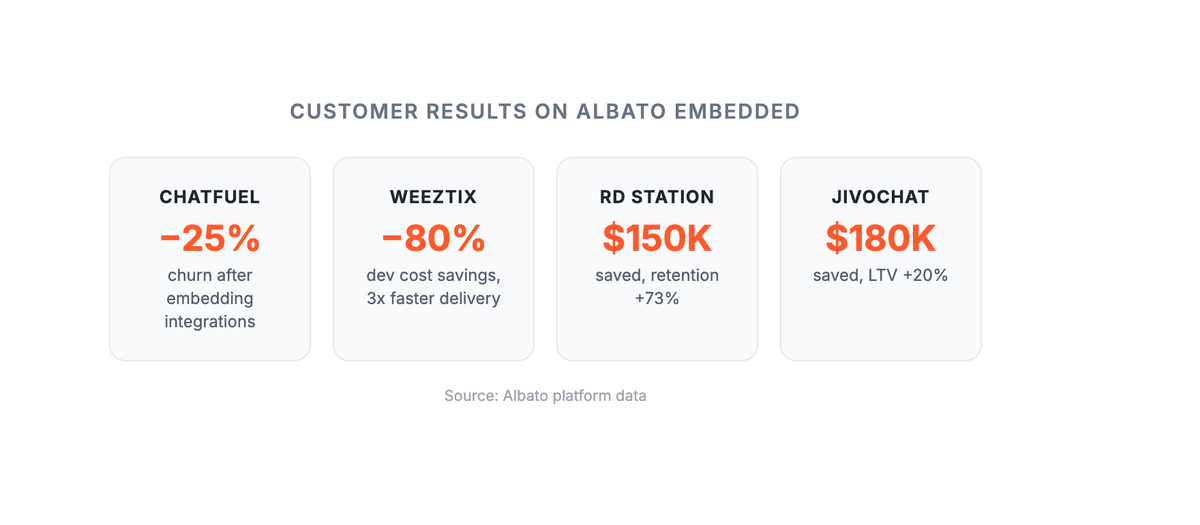
Chatfuel cut churn by 25%. According to Oleg Krasikov, CPO at Chatfuel: "With Albato Embedded, we've drastically cut down our integration delivery time, expanded into new markets, and freed up our dev team to focus on core product innovation."
Weeztix saved 80% on development. According to Jort Polderdijk, Head of Product at Weeztix: "With Albato, we have been able to embed integrations directly into the Weeztix dashboard, creating a truly seamless experience for our organisers."
RD Station saved $150,000 and lifted retention 73%. According to Bruno Ghisi, Co-founder and CTO at RD Station: "We are happy about our partnership! Thank you, Albato, for your efforts in delivering complex native integrations to our app marketplace!"
What an AI copilot inside a SaaS product does
An AI copilot inside a SaaS product builds and runs automations on the user's behalf. The user types what they want in plain language, and the copilot assembles the workflow: it picks the trigger, maps the fields, configures the connections, and switches it on. That is the line between a copilot and a support chatbot, which returns text and points the user at a help article instead of doing the work.
Three things have to be true first: a live connector library to build against, write access to the accounts the user has already connected, and guardrails so a vague instruction cannot damage data. That makes an in-product copilot an integration problem before it is a model problem, and it usually ships as one component of a white-label AI integration layer.
Who the copilot serves matters as much as what it does, and so does whose brand it wears. A copilot pointed at end users under your own name behaves like a product feature, so it has to match your UI, your login, and your pricing tiers, and keep each customer's credentials separate.
Albato Copilot is the end-user version of this pattern, running under the partner's brand. It embeds through a single iFrame and builds across 1,000+ apps with 20,000+ triggers and actions between them. It runs on the LLM you choose: your own model, a self-hosted one, or Albato AI, whose underlying model is proprietary and not disclosed.
Who Copilot is built for
Copilot fits best in B2B SaaS products where users need to connect the platform to other tools, but where most users are not technical enough to configure traditional integration builders on their own. Think companies in the 50 to 1,000 employee range, selling to ops teams, marketers, or sales reps who expect integrations to just work.
The clearest signal: a product where integration setup questions are a recurring support burden, or a product that loses trials to competitors because native integrations are missing. Teams that have tried building integrations in-house and found the maintenance cost outpaces the return (API changes, token refresh failures, versioning debt) are also a strong fit. With Copilot, all of that maintenance lives with Albato.
Research on how integrations drive SaaS retention shows that users who connect three or more integrations churn at measurably lower rates than those who do not.
If your users are primarily technical and prefer writing their own configuration, a visual builder or direct API access may fit better. Copilot targets the non-technical majority, not the power-user minority.
What you can offer your users on day one
Embedding Copilot lets you ship these capabilities to your audience without building any of the underlying workflows yourself. The 1,000+ app library already covers the automations your users ask for, so the value below is what your product can put in front of them from the start.
Project management automation. Give your users a way to turn Zoom call transcripts into tasks in their project management tool, with owners and deadlines assigned automatically. No copy-pasting, no manual entry, and no new feature request on your roadmap.
Sales team automation. Offer a workflow that monitors deal stage changes in the CRM, drafts personalized outreach, and routes messages for approval. The output mirrors what a dedicated SDR would produce, which is the kind of capability that keeps sales-driven customers on your platform.
Customer support routing. Let your users classify, tag, and route support tickets from multiple channels to the right queue automatically. They describe the routing logic in plain language, and Copilot applies it across the connected apps, so the value shows up without any configuration work from your team.
Data operations. Ship a workflow that combines enrichment, deduplication, and validation, handling messy real-world data and adapting when inputs vary from the expected format. That is a sticky, high-frequency use case you can own rather than cede to a third-party tool your users leave your product to reach.
These are not theoretical: they run on the same connector library and MCP Gateway that Albato's existing platform partners use in production.
Getting started with Copilot
Most partners launch within 30 to 45 days. The process starts with the iFrame integration (typically a few hours of engineering time), followed by configuring the knowledge base for your use case, testing the first set of workflows with your team, and rolling out to users.
Every plan includes a dedicated PM, CSM, and API engineer to guide the rollout. You are not handed documentation and left to figure it out. The team works with you through go-live and the first 30 days of user adoption.
Copilot is available on Albato Embedded's Pro plan and above. If you are evaluating what embedded iPaaS means for your product and whether Copilot fits your stack, the best starting point is the demo.
For teams weighing the build-vs-buy decision across integration approaches, the in-house vs. unified API vs. embedded iPaaS comparison covers the tradeoffs with specific cost figures.
Before embedding Copilot, most teams come back to the same short list of questions: model choice, branding, data handling, and how long a rollout takes. The answers below go through them in that order.Frequently asked questions
What is Albato Copilot?
Albato Copilot is a white-label conversational AI builder that embeds inside a SaaS product via iFrame. End users type what they want to automate in plain language, and Copilot builds the workflow automatically. It connects to 1,000+ apps through Albato's Universal MCP Gateway, so users can create automations across the tools they already use without leaving your product.
Can we use our own LLM with Albato Copilot?
Yes. Copilot supports custom LLM configuration: you can bring your own LLM, connect a self-hosted model, or use Albato AI out of the box. You can also customize prompts and maintain a branded knowledge base so Copilot responds in your product's voice. The underlying model for Albato AI is proprietary and is not disclosed.
Is Albato Copilot really white-labeled?
Yes. Copilot embeds on your domain via iFrame, matches your branding, and your users never see Albato's name or interface. White-labeling is available starting with the Pro plan. Every interaction happens inside your product, under your brand.
How does Albato Copilot handle data security?
Albato is SOC 2 Type 2 certified and GDPR compliant, with AES-256 encryption at rest and TLS in transit. Copilot also supports on-premises deployment and self-hosted LLMs for teams with strict data residency requirements. Albato processes data to run automations only and does not use it for any other purpose.
How long does it take to go live with Albato Copilot?
Most partners launch within 30 to 45 days. Every plan includes a dedicated PM, customer success manager, and API engineer to guide the rollout. The iFrame integration is a single drop-in implementation; the timeline mostly reflects configuration and testing of the workflows specific to your use case.