In this article
Key Takeaways
- An AI agent can read an incoming WhatsApp message, check free slots in Google Calendar, book the event, and reply in the same chat, without a human touching the calendar.
- You build it as one automation: a WhatsApp trigger, an AI Agent step, two Google Calendar actions, and a WhatsApp reply. Setup is a single flow, not a script.
- You need three things in place first: a WhatsApp Business API connection, a Google Calendar connection, and an AI model available on your plan.
Most businesses do not lose bookings on price. They lose them on reply lag. A lead who messages at 9pm and hears back the next morning has often already booked with whoever answered first. An always-on agent closes that gap by replying while the calendar is still open.

Let us build your automation or AI Agent
Tell us which process eats your time. Certified Albato engineers take it from there, A to Z.
Why manual WhatsApp booking leaks appointments
Booking by hand on WhatsApp is five small tasks stacked on one person: read the message, open Google Calendar, check whether the requested time is free, create the event, and type a reply. Each one is fast. The problem is that they only happen when someone is at the keyboard. Nights, weekends, and busy afternoons are exactly when inbound requests pile up and go cold.
WhatsApp raises the stakes because it is where the conversation already lives. In Brazil and much of LATAM it is the default sales channel, so a slow reply there is not a missed email, it is a missed customer who was ready to commit. The same channel already feeds deals into your pipeline through WhatsApp CRM automation, and booking is the next piece of that flow. The requests are also messy. People write "can I come in tomorrow around 3?" instead of a clean date, and a human has to translate that into an actual calendar slot before they can even check availability.
⚠️ Important. The single most common failure in manual booking is the double-book. Two people ask for the same Tuesday 10am within a few minutes of each other, both get a "yes", and someone has to walk one of them back. An agent that checks the calendar before every confirmation removes that risk.
When this automation is worth it, and when it is not
This pays off when you have steady inbound booking volume, a shared calendar that acts as your single source of truth, and business hours you can write down as a rule. Service businesses where the slot is the product fit best: clinics, salons, consultants, repair shops, agencies with discovery calls. If a real chunk of your day is spent typing "yes, that time works" into WhatsApp, that is the work to hand off.
It is not worth it yet in a few cases. If you take a handful of bookings a week, you can handle those by hand or with a basic appointment scheduling tool and skip the setup. If your appointments need human judgment before they are confirmed, like negotiating scope or triaging urgency, an agent should tee up the booking, not finalize it. And if you do not have one clean calendar of record, fix that first, because the agent is only as reliable as the calendar it reads.
One field decides whether the whole thing works: the message has to carry a date and a time, or the agent has to be told to ask for them. That rule lives in the instructions you give the agent, and it is the difference between a smooth booking and a confused back-and-forth.
What you need before you start
Three connections have to exist before you build the flow:
- A WhatsApp Business API connection (a personal WhatsApp number will not work for this).
- A Google Calendar connection to the calendar you want the agent to read and write.
- An AI model available on your plan. If Albato AI is not on your plan, connect another AI app that can process the message, such as Google Gemini, Claude, DeepSeek, or OpenAI.
How the AI agent handles a booking
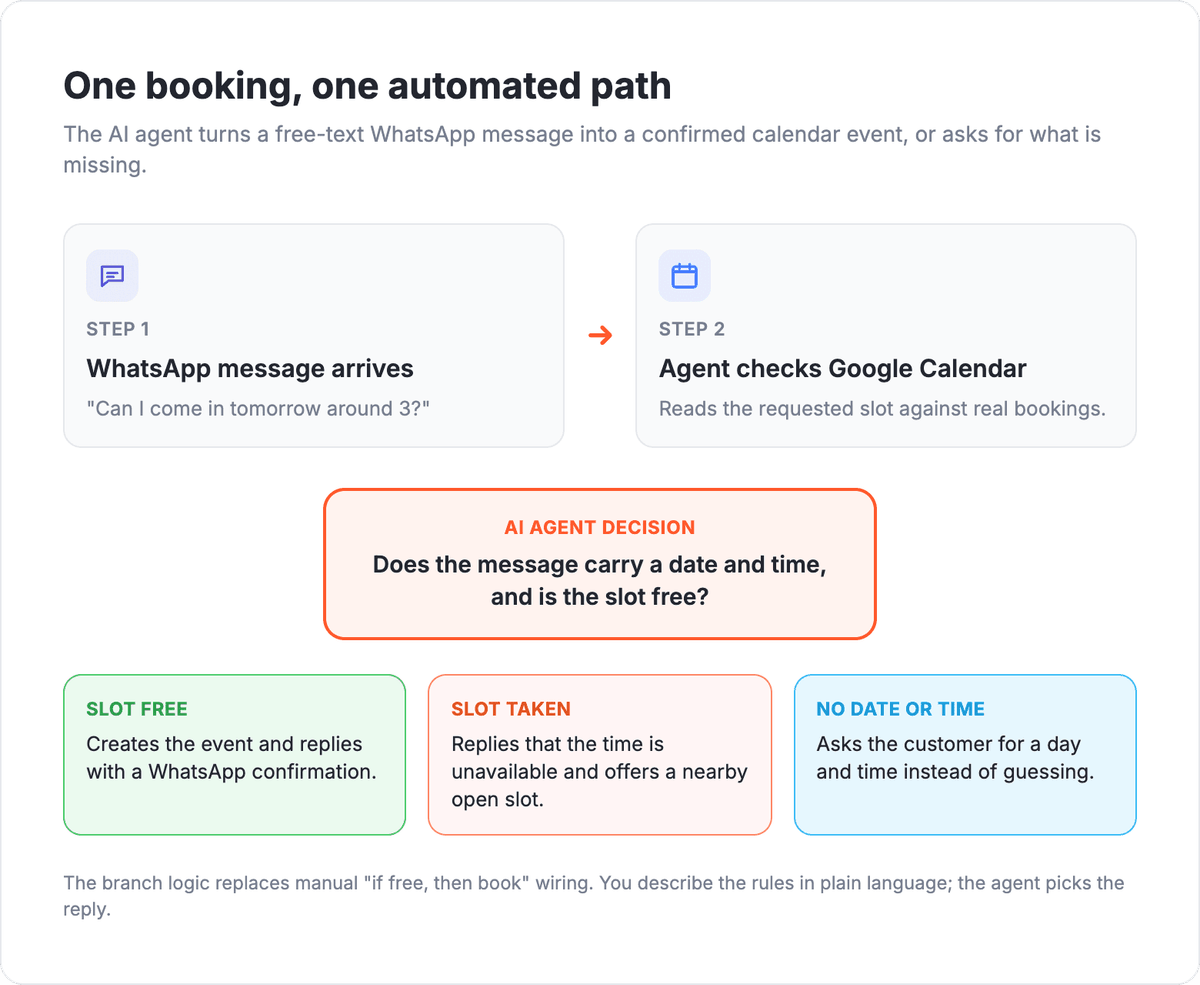
The whole thing is one automation built from a handful of blocks. Here is the shape of it, not every click. The diagram below maps the path from an incoming message to a booked event, including the branch the agent makes when a slot is taken or a date is missing.
First, you connect the two apps you will use. Under the Apps tab you click Add a Connection and set up WhatsApp and Google Calendar once. After that, they are available to every automation.
Next, you build the flow. The trigger is a WhatsApp Message Received event, so the automation fires whenever a customer writes in. Right after it, you add an AI Agent action. This is the decision-making layer: instead of wiring a fixed chain of "if the slot is free, then book" conditions by hand, you describe the job in plain language and let the agent choose what to do.
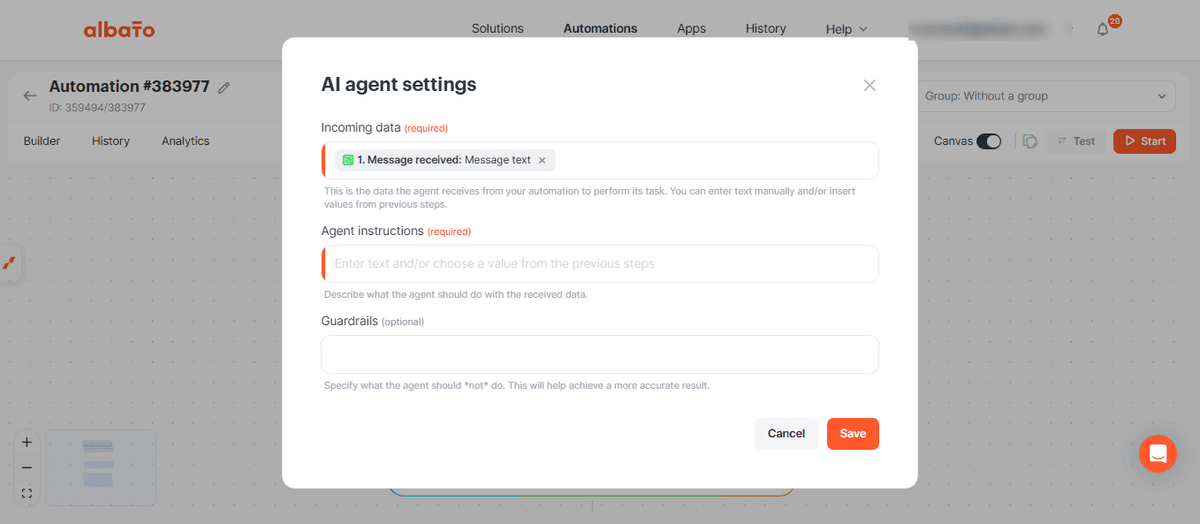
You give the agent three things: a model, the input (under Received Data, point it at the WhatsApp message text), and its instructions. In plain language, tell it to confirm the message has a day, month, year, and time, work out relative dates like "tomorrow" from when the automation runs, check the calendar for a clash, and reply in the customer's language.
🔧 How it works. A "tool" is an action from a connected app the agent is allowed to call, like Search Events or Add Event. You pick the tools; the agent decides when to use each one based on the message.
The screenshot below shows the instructions field, where you spell out the booking task in plain language.
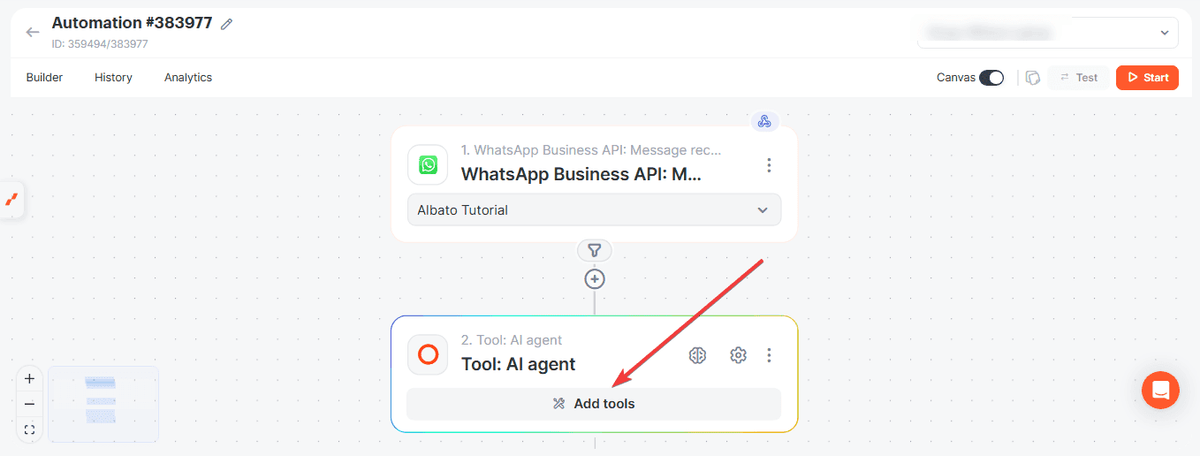
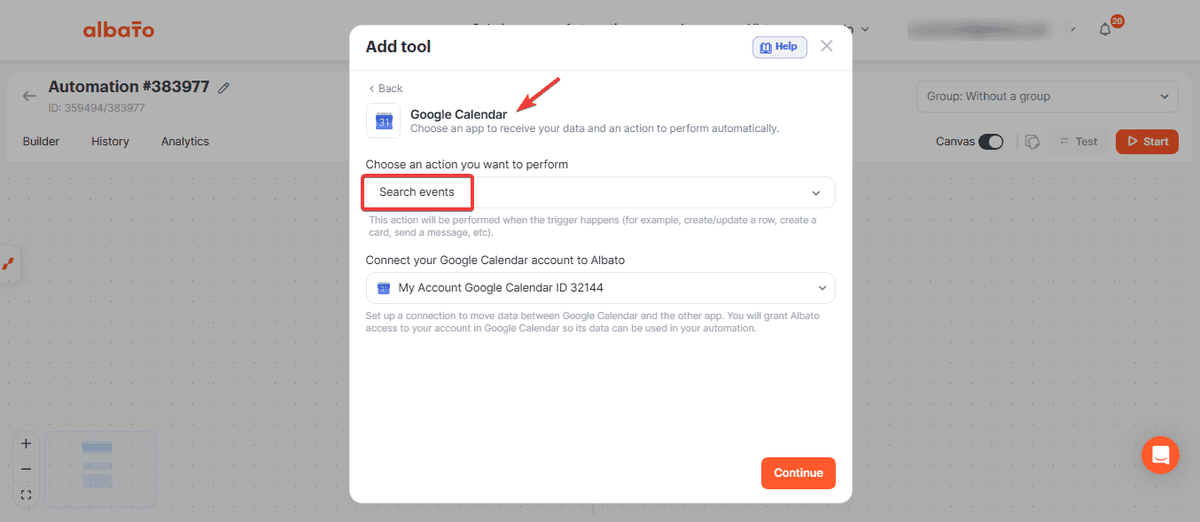
Then you hand the agent its tools. Click Add tools and give it the Google Calendar Search Events action with the Calendar ID it should check, plus an Add Event action to create the booking. A final WhatsApp Send Direct Message step sends the confirmation back. For most fields you can let the agent decide the value; the one you set by hand is the sender Phone ID.
The detail that saves you the most grief is the field-level instruction on the search: constrain it to business hours. Tell the agent to only look for availability Monday to Friday, 8am to 9pm, or whatever your real hours are, so it never offers a 3am slot.
Turn the automation on and test it with a few real messages. Full step-by-step version with every screen: the Albato Help Center guide.
The Albato AI Agent, in one line
The Albato AI Agent is an automation step that reads incoming data and decides which action to run on its own, built from four parts: a model, plain-language instructions, the tools it is allowed to call, and optional memory. For booking, that means one step judges whether a slot is free and which of several replies to send (booked, unavailable with an alternative, or "please give me a date and time"), instead of you branching every case by hand. The agent runs only as an action, so it always sits after a trigger. Albato AI is the built-in model, and you can also point the agent at OpenAI, DeepSeek, or Google Gemini if you prefer to bring your own.
What to check after you switch it on
The agent is only as good as the rules you give it, so the first day is about tightening those rules against real messages.
- Missing date or time. If a message has no date and time, the agent should ask for them rather than guess. Put that case in the instructions explicitly, or it will try to book something.
- Out-of-hours requests. Confirm the business-hours window in the Search Events instructions actually holds. Without it, the agent will happily find and offer a midnight slot.
- Relative dates. Test "tomorrow", "next Monday", and "this Friday". The agent computes these from the automation run time, so a wrong timezone shows up here first.
- Sender Phone ID. This is the one field you fill in by hand on the final WhatsApp step. If replies are not arriving, check it.
- Simultaneous requests. Two messages landing at once can still race for the same slot. For high volume, keep an eye on whether the same time gets confirmed twice.
💡 Tip. Keep your first prompt strict and add flexibility later. An agent that asks a clarifying question when unsure is far better than one that books the wrong slot and forces you to apologize.
What to automate next on the same stack
Once booking runs itself, the same two apps open up nearby wins:
- Send a WhatsApp reminder the day before each event, triggered off the Google Calendar entry.
- Push every booked lead into your CRM automatically, so sales sees the appointment without retyping it, the same pattern that turns WhatsApp messages into deals.
- Route no-shows into a follow-up sequence instead of letting them disappear.
If you are still deciding which tool should run the agent, the best AI agent builders comparison is a good next read, and the business guide to AI agents covers the fundamentals if this is your first one.
FAQ
Here are the questions people ask most before pointing a booking agent at their calendar.
Do I need to write code to set up a WhatsApp booking agent?
No. The whole flow is built in a visual automation builder: a WhatsApp trigger, an AI Agent step, two Google Calendar actions, and a reply. The instructions you give the agent are written in plain language, not code.
What happens if a customer asks for a time slot that is already taken?
The agent checks Google Calendar with the Search Events action before confirming. If the requested time is busy, you can instruct it to reply that the slot is unavailable and suggest a nearby open time, all in the language the customer wrote in.
Which AI model does the agent use, and what if Albato AI is not on my plan?
You pick the model when you add the AI Agent step. Albato AI is built in and needs no external account. If it is not on your plan, connect another AI app such as OpenAI, DeepSeek, Google Gemini, or Claude and select that instead.
Can the agent understand messages like "book me for tomorrow at 3pm"?
Yes, if you tell it to. In the instructions you ask it to calculate relative dates like "tomorrow" or "next Monday" from the time the automation runs, then turn that into a real calendar slot. Test these phrases early, since a timezone mismatch shows up here.
Does this work with the WhatsApp Business API, or a personal WhatsApp number?
It needs a WhatsApp Business API connection. A personal WhatsApp number will not work for automated triggers and replies at this level.
Want to go deeper? These guides cover related topics.