In this article
Albato has done one thing for years: connect your SaaS to other applications. More than 1,000 of them, with auth, actions, triggers and the infrastructure that has been carrying production traffic the whole time. That part doesn't change.
What changes is who sits on the other end of the connection. It used to be a person clicking through a builder. Now it's also agents. An agent can run a single action, assemble an automation that then runs on its own, or hand the whole job to the Albato agent.
Which of those matters to you depends on where your SaaS is today. Three starting points follow, and a company can be in two of them at once. Start with whichever sounds like yours.
Which of these is you?
- Want to give your users an automation builder?
- Want to give your own agent more reach?
- Want to give your team's agents one key?
Want to give your users an automation builder and lift retention and average contract value?
Then your job is the familiar one: put an automation builder in front of your users so they can connect their own systems without leaving your SaaS, under your own brand. Two pieces make that builder worth paying for, and one decision shapes how it looks.
Let your users describe an automation in plain words instead of building it
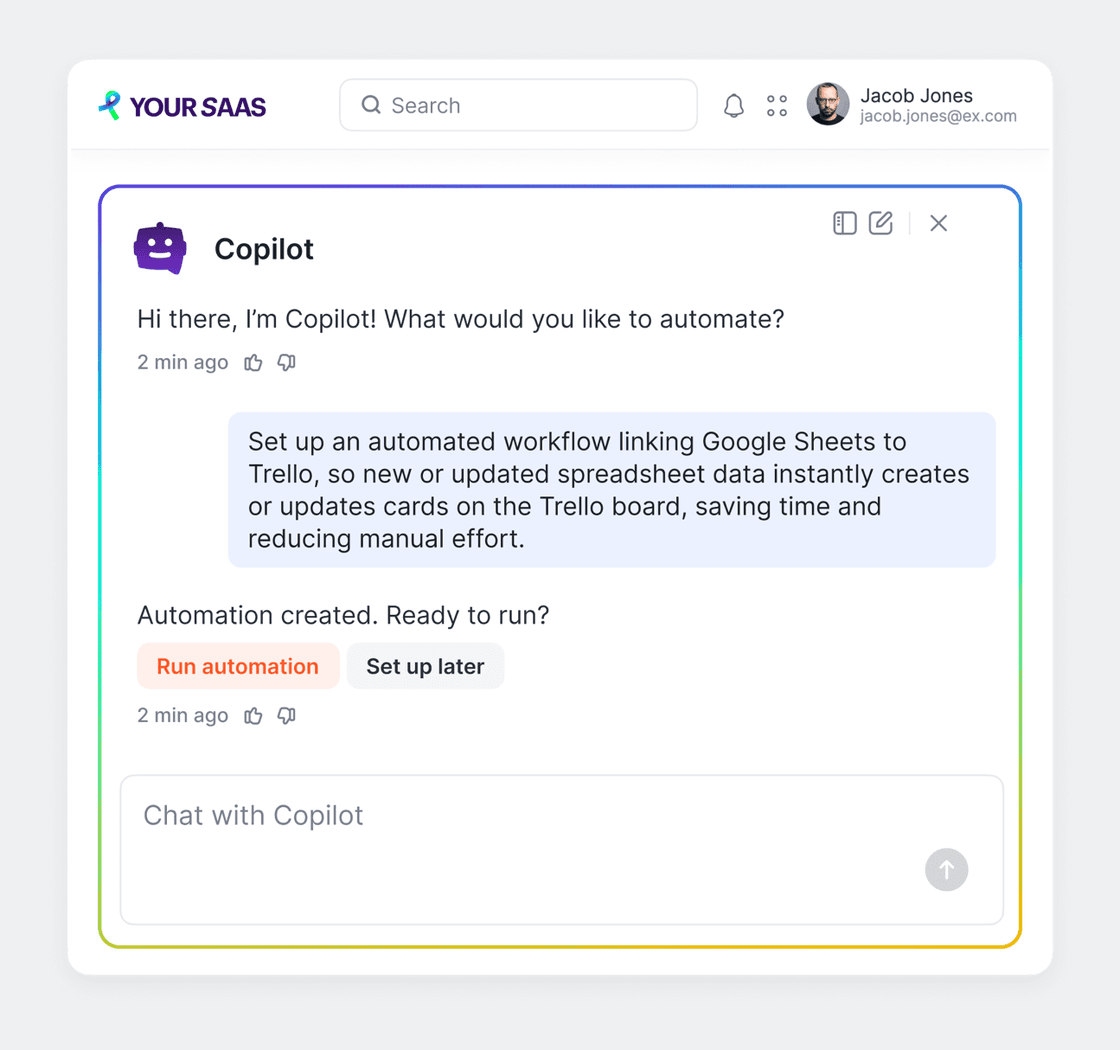
Copilot is a chat assistant inside the account. Your user describes the task in plain words, Copilot works out which services are involved, prompts them to create the missing connections, generates the automation and offers to check it before it runs.
Copilot is configurable per partner:
- Your own models and LLM providers
- Prompt switching
- Your own RAG
- A white-label knowledge base, so it builds automations that fit your SaaS
- Look and feel to match your SaaS
It embeds in your iframe, custom ones included, and we enable it on your contract when you ask.
Put an AI Agent inside the automation so your users stop building branches
The second piece is an AI Agent that lives inside an automation as a step. It reads the incoming data and decides which action to take, so your users stop building conditions and branches by hand.
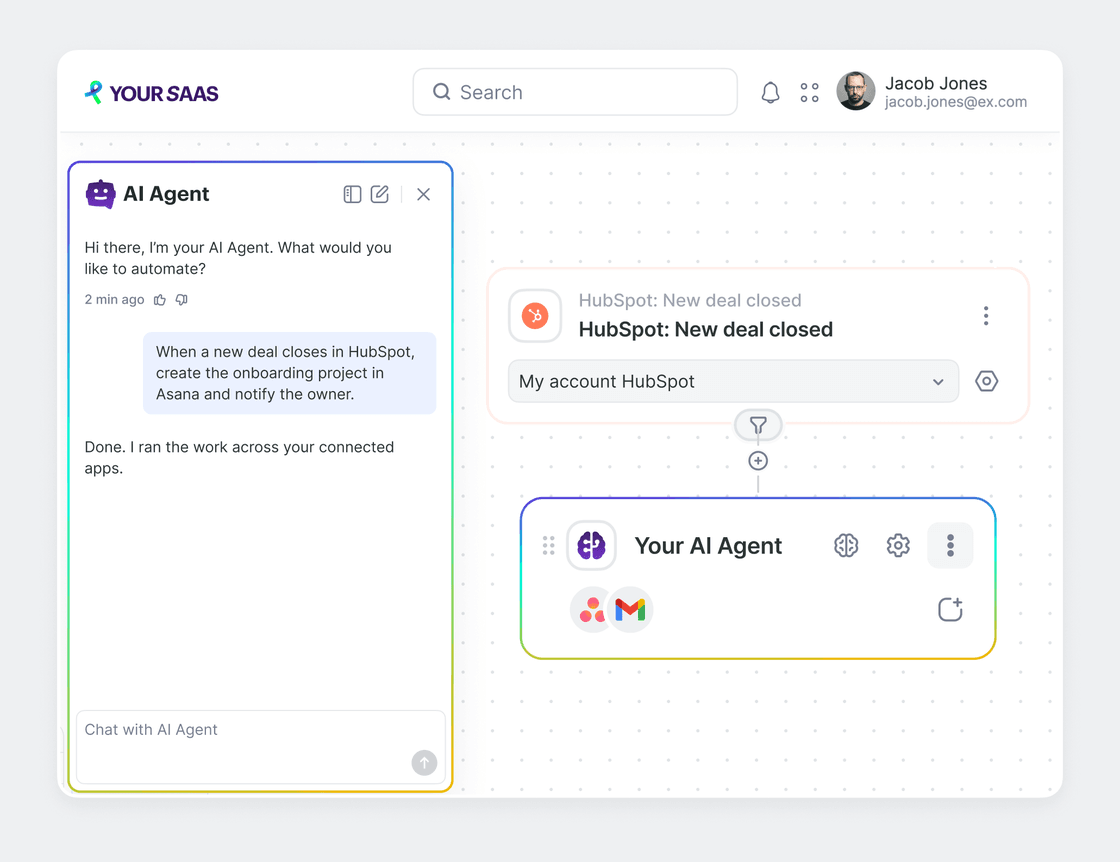
A simple example: a new request arrives, and if it is urgent the agent notifies the manager in a chat app, while if it needs a meeting the agent creates a calendar event. One step, no branching. Eight more that your users can build are in the AI agent use cases for SaaS rundown.
Underneath, the step has four parts:
- The model
- The instruction, a free-form prompt in any language
- The tools, any action from the apps your user has connected
- Memory between runs, off by default
It goes in as an action after a trigger: a webhook, a schedule, or an event in an app.
The built-in Albato AI model is the default and needs no separate LLM connection. Claude, OpenAI, DeepSeek and Google Gemini run on your own connection. For white-label partners the built-in Albato AI model is hidden from your users, both as an action and as an agent model, so the agent runs on your own LLM connection, and access is controlled by per-partner flags.
Ship it all under your own brand, on our interface or yours
In the white-label build nothing carries the Albato name, the assistant included: to your users it's simply Copilot.
You can take the ready-made interface in your embedded account's iframe, or go headless through the API, build the interface yourself and let Albato run underneath. Either way, user connections, OAuth and credential storage stay on our side.
Want to give your agent reach into your users' own systems and make it stronger?
Albato doesn't ship you a second agent. Yours stays the only thing your user talks to, and what it gets from us is reach: an Albato agent it can hand whole processes to, 1,000+ applications it can act in on behalf of your users, and a system of keys that keeps real tokens out of your prompts.
Let your agent deliver a whole process it didn't have to build
Single actions are the easy part. The hard request is the one where your user wants a process, something that keeps running after the conversation is over. Your agent hands that to Albato Copilot over the A2A (Agent2Agent) protocol. Copilot assembles the automation, asks a follow-up question when something is missing, and from then on it runs like any other automation, predictably.
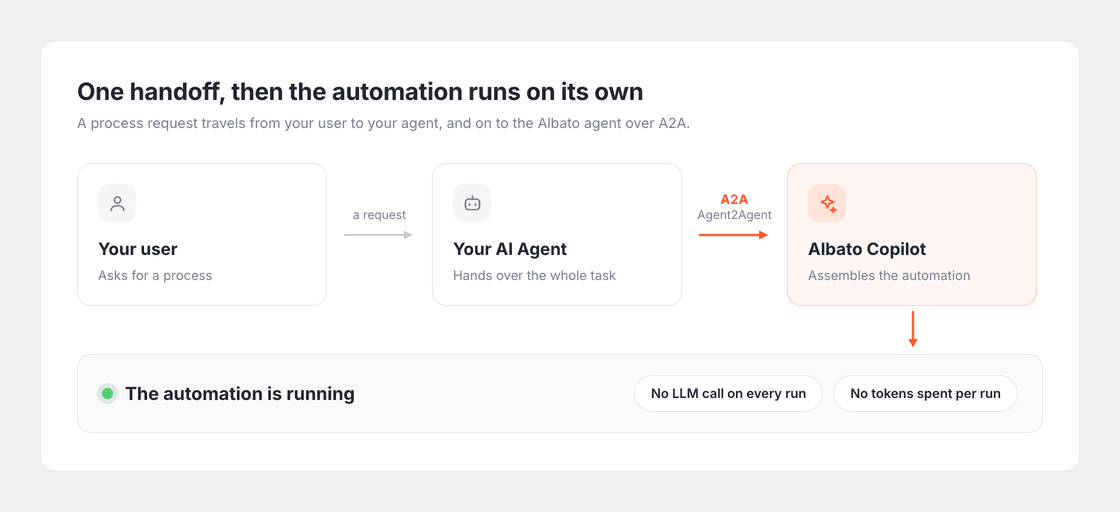
Take a request like "every new lead into HubSpot, then two more actions". Your user says it to your agent, your agent says it to ours, and the automation is ready in minutes. Your agent ends up delivering a process it didn't have to build.
Give your agent 1,000+ applications to act in, inside your users' own accounts
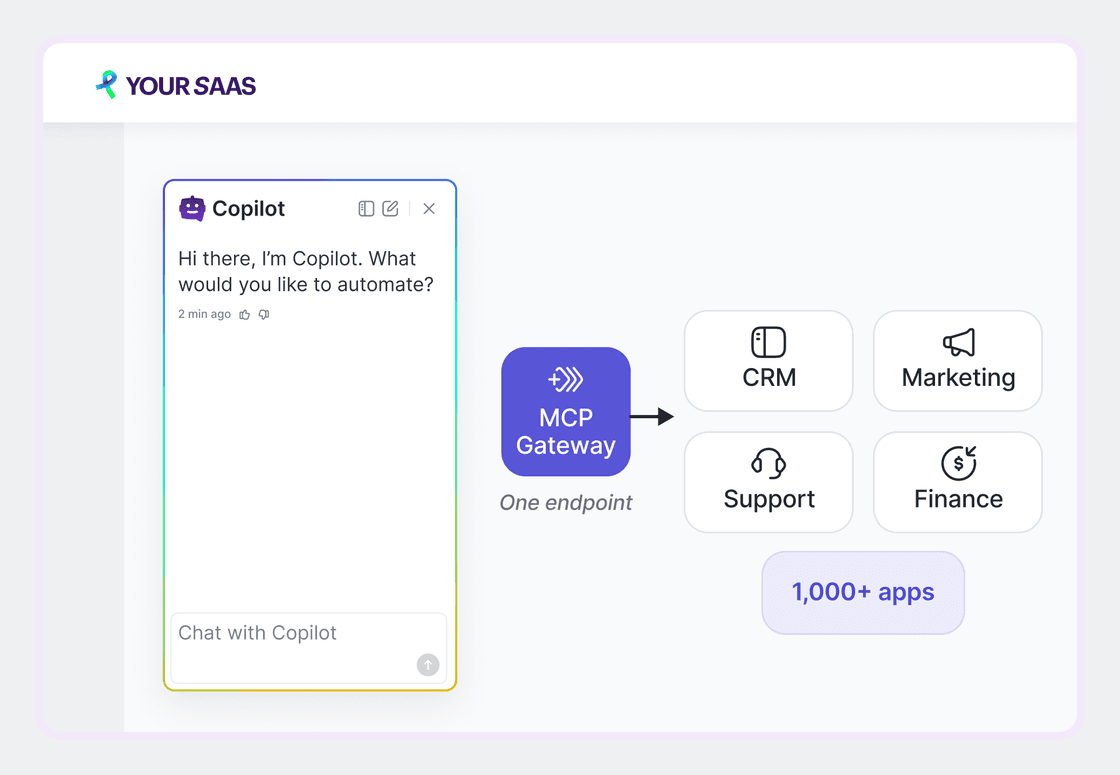
The Albato MCP server is a cloud server that gives your agent 1,000+ applications to work in. For an embedded partner the whole point is where it works: inside your own end users' accounts, through their connections and with their permissions. You could wire the public HubSpot MCP server into your SaaS without us. What's different is whose connection sits on the other side.
The path through a task is short. Your agent picks the application and the action, makes sure a connection exists and creates one through a connection link if it does not, then runs the action. It can touch several services in one call instead of a round trip per step, and it connects over streamable HTTP to any MCP-compatible agent, Claude Desktop and Cursor included. If your team is still mapping out how MCP and iPaaS split the work, the protocol talks to the agent while the platform handles the connections, the auth and the execution.
Reach the tools a generic API never covers, as ordinary actions
Your agent also reaches the tools that never made it into the Universal API: CRM analytics, campaigns, landing pages. The vendors' own MCP servers are wired into Albato, live for HubSpot, Slack, Notion and Stripe, and your agent sees their tools as ordinary actions. The request goes to the vendor MCP, system fields are filled in automatically, and the native route can be faster than the generic one.
Keep real tokens out of your prompts, with keys you can revoke
Your agent never holds an Albato token. It gets a short opaque virtual key instead, while the real token stays on the MCP server, out of your prompts and out of reach of the LLM provider.
Your Albato manager issues you a registration secret once. After that you register each of your users and get a key back for them. A key can carry an expiration date, and revoking one leaves the underlying Albato token untouched. It works with whatever platform your agent runs on: Claude, OpenAI, Archestra, Arcade.
If you also want your users building automations in chat, Copilot embeds in your iframe under your brand. Mention it when you book.
Want to give your team's agents access to corporate systems and stay in control of what they do?
This one isn't about your users at all. If your own people are working in Claude Code, Cursor or another agent environment, they need your corporate systems. The part of Albato built for that is MCP Hub, the one piece on this page that isn't in production yet: it's opening in early access.
Your company connects its systems to Albato once, and each employee and their agent reach those systems through one endpoint and a personal key.
One MCP endpoint for every system, without handing tokens to people or AI
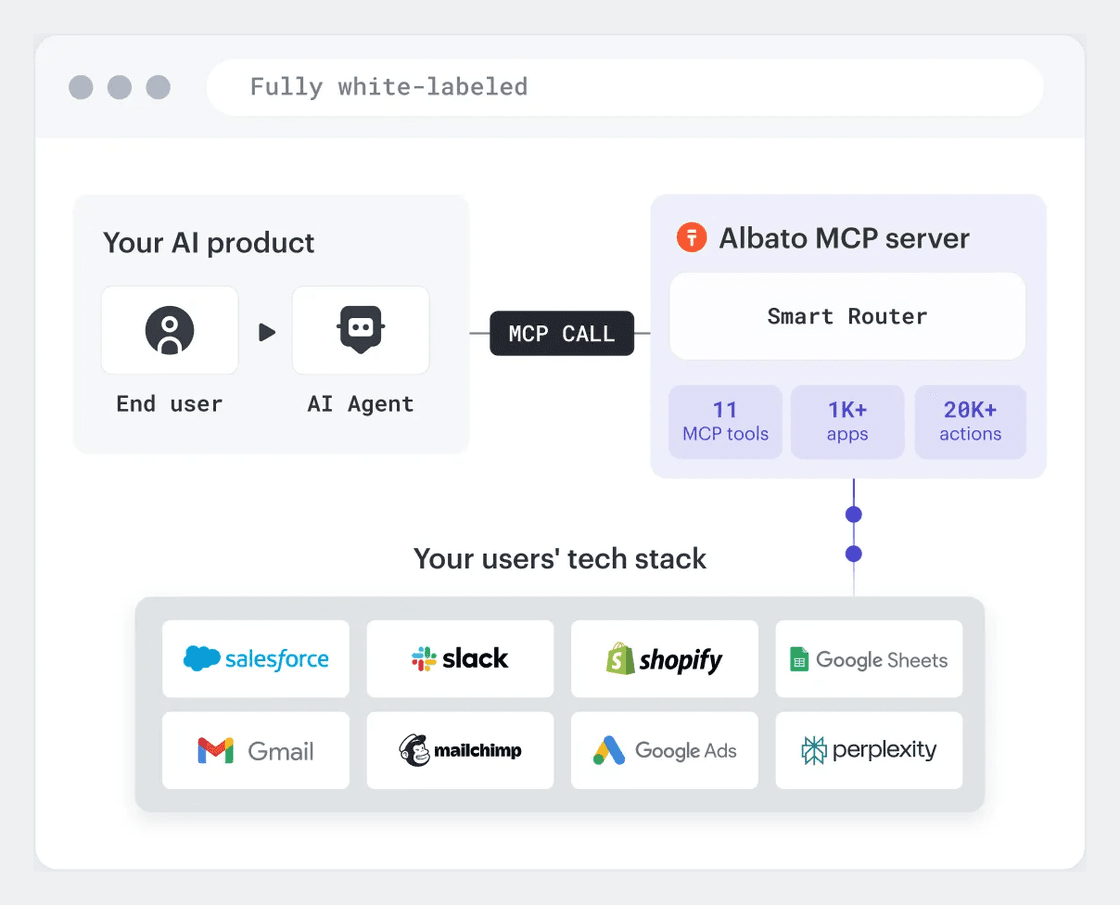
There's no setting up MCP, OAuth and access per application and per agent. One connection to Albato gives your agents 1,000+ applications plus the native MCP servers of HubSpot, Slack, Notion and Stripe, in Claude Code, Claude Desktop, Cursor or any MCP-compatible environment. The chain is short: an employee and their agent, a personal key, Albato, your company's connections, the applications.
The keys carry the security story. An employee gets a virtual key, and the real system tokens stay with Albato, never landing in a config, a prompt or with an LLM provider. Revoking a key is one action, with no password or token rotation in the systems themselves, and a key can expire on a set date, which covers a contractor for the length of a project. That's the part that matters when AI agents get access to production systems.
One HubSpot account, four sales reps, an agent each: every rep gets a key, HubSpot still sees a single account, and when someone leaves their key is revoked while the main connection carries on. Same trick for an agency, with one connection to the ad account and restricted keys for the account managers.
Control what your team's agents may do, and see everything they did
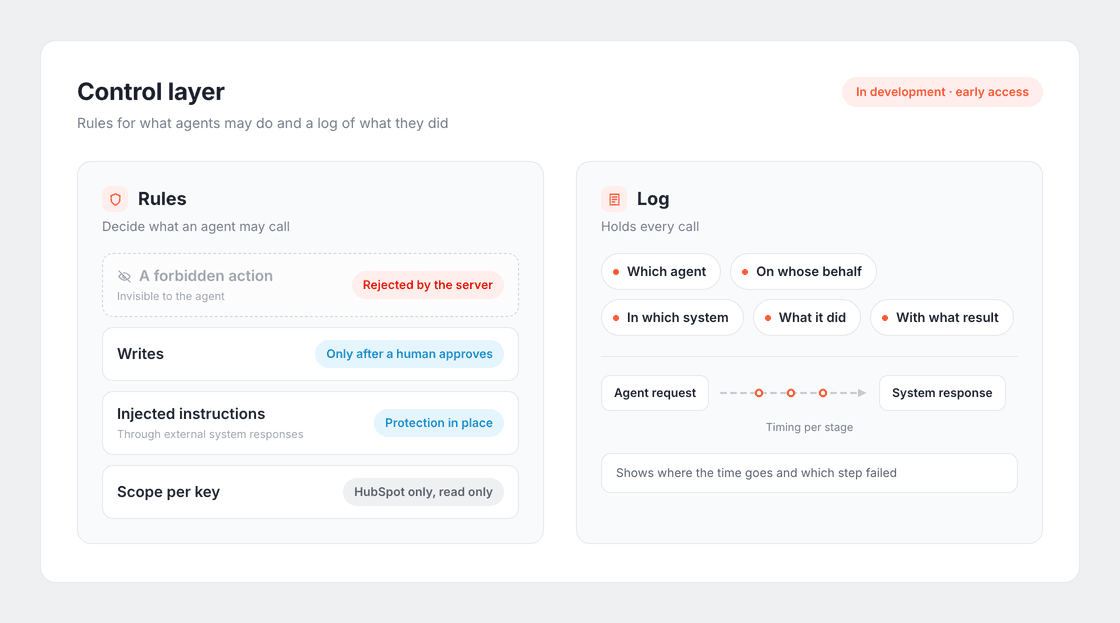
Access is the first job. The second is knowing and controlling what those agents do once they are inside your systems, and that second job is in development and opening in early access alongside the rest of MCP Hub.
Rules for agents set which actions an agent is allowed to call:
- A forbidden action is invisible to the agent and rejected by the server, so no prompt can talk its way around it.
- Writes happen only after a human approves them.
- There is protection against instructions injected through responses from external systems.
- Rules are set per key: HubSpot only, read only, for example.
The log holds every call, end to end from the agent request to the system response, with timing at each stage. It shows where the time goes and which step failed, and once it ships it's meant to be the record you take into a security review.
The third piece, also in development, is agents that work on their own. They receive business events without having to ask for them (a new deal, a ticket, a message) through webhooks and the API, and they run scheduled tasks such as sending you a report every morning.
Early access is open. If this is the part of the stack that worries you, say so when you book.
Where to go from here
Three starting points, one platform under all of them.
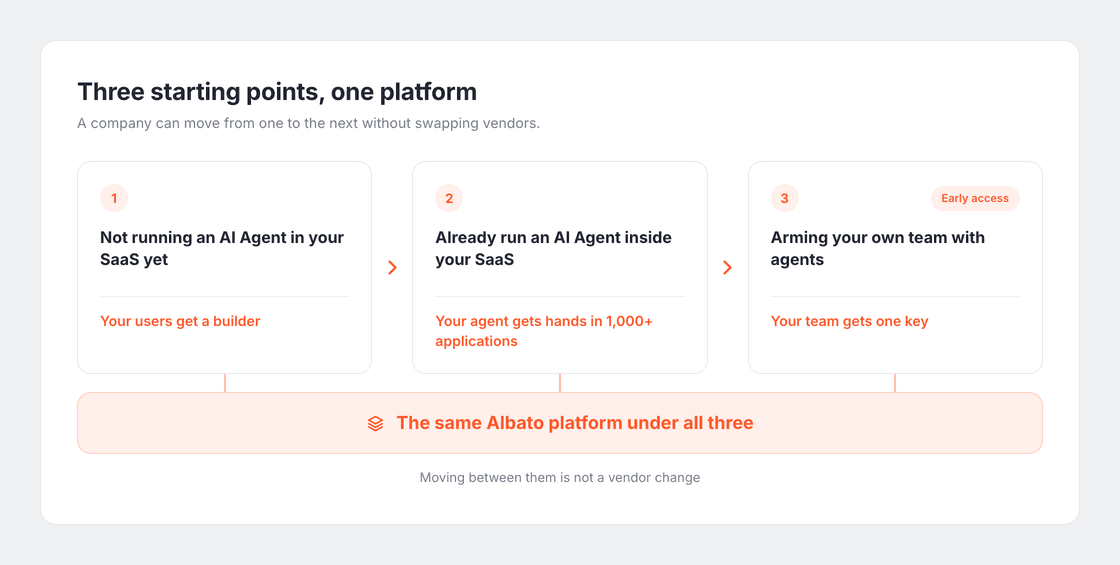
Whichever one you recognized, the platform underneath is the same: a builder you can put in front of your users, 1,000+ applications for an agent you already run, and one key for the agents your own team runs. Wherever you're starting, moving to the next one is a conversation with your Albato manager, not a vendor change.