In this article
Key Takeaways
- An AI agent can own first-line support (read the ticket, pull the customer's context, resolve the routine cases, and escalate the rest) while your team handles only what genuinely needs a human.
- The way to protect CSAT is not automating less; it is automating the right tickets and building a clean escalation path so nothing hard gets trapped in a bot loop.
- Gartner projects agentic AI will autonomously resolve 80% of common customer service issues without human intervention by 2029, with a projected 30% cut in operational costs.
- The difference from an old chatbot is action: an agent does not just answer, it looks up the order, issues the refund, updates the ticket, and hands off with full context when it cannot.
CSAT rarely drops because a bot answered a question. It drops when a bot answers the wrong question confidently, or when a frustrated customer cannot reach a person. Both are escalation-design problems, not reasons to keep everything manual.
What an AI support agent actually does
An AI support agent is an automation step that reads an incoming ticket, decides whether it can resolve it, and either takes the resolving action or routes the ticket to a human with the context attached. It replaces the manual first-touch triage that usually sits between "ticket created" and "agent picks it up."
The line that matters is action, not conversation. A traditional support chatbot answers with text and stops. An AI agent reads the ticket, checks the order status or account record, and then does something about it: sends the tracking link, processes the return, tags and reroutes the ticket. It resolves the case rather than just describing it.
💡 Tip. Start by automating resolution for the top 5 ticket types by volume, not by difficulty. Password resets, order status, and refund requests are usually the bulk of first-line volume and the safest to hand over, which frees your team for the long tail.
Why first-line automation is the CSAT lever, not the CSAT risk
First-line automation protects CSAT when it removes wait time from the cases that do not need a human, because speed on routine tickets is what customers actually rate. Most CSAT damage comes from queues and repeated explanations, not from a machine handling a simple request well.
The Gartner forecast frames the scale: 80% of common issues resolved without a human by 2029, with a 30% cut in operating costs. The point of that number is not headcount reduction; it is that four in five tickets are routine enough for an agent, which means your humans can spend their whole shift on the one in five that are hard, angry, or ambiguous. That is where satisfaction is won or lost.
📊 Stat. Read Gartner's projected cost cut the right way round. The saving is a byproduct of speed on routine tickets, not of cutting the team that handles the hard ones. If you automate to shrink headcount rather than to shorten queues, CSAT is what pays for it.
Step 1: Decide what the agent may resolve on its own
Draw the line before you build anything. Sort your ticket types into three buckets: resolve autonomously, resolve with a human check, and always route to a human. Password resets and order-status lookups sit in the first bucket. Anything involving money movement, account deletion, or an upset customer belongs in the last.
The three-bucket policy below is the decision aid your team will reuse most, so it is worth pinning up before you configure a single guardrail.

Write that policy as the agent's guardrails, in plain language. "Resolve status and tracking questions directly. For refunds under $50, process and confirm. For refunds over $50 or any billing dispute, gather details and route to a human." The clarity of this policy, not the model, is what keeps CSAT safe.
Step 2: Give the agent the customer's context
An agent is only as good as the data it can read. Before it decides anything, connect it to the systems that hold the customer's history: the helpdesk for the ticket, the order or subscription system for the account, and the CRM for the relationship. A refund decision made without order history is a guess; made with it, it is a resolution.
This is where the integration layer earns its place. The agent needs to pull the order, read the account tier, and write back to the ticket, which means those tools have to be connected. A no-code integration platform is what lets one agent reach across the helpdesk, the store, and the CRM in a single run instead of living inside one tool.
Step 3: Build the escalation path first, not last
The escalation path is the part that protects CSAT, so design it before the happy path. Every ticket the agent cannot confidently resolve should reach a human fast, with the full conversation, the customer's context, and the agent's own summary of what it already tried. A clean handoff feels smooth to the customer; a cold one, where the human starts from zero, is the thing that tanks satisfaction.
The flow below shows the difference: routine tickets resolve on the spot, while everything else is escalated with a context payload attached, so the human never starts cold.

Give the customer an exit at all times. A visible "talk to a person" option is not an admission of failure; it is the release valve that keeps a frustrated customer from rating you one star. The agent should also escalate proactively when it detects frustration or a repeated question, rather than looping. For a related pattern on AI-drafted replies, see our guide on auto-replying to customer emails.
Building the flow with Albato AI Agent
Albato's AI Agent runs this whole first-line flow as a step inside a scenario. The automation starts with a trigger, a new helpdesk ticket or inbound message, and the agent reads it, checks the customer's context through connected apps, and either resolves the case or routes it with a summary attached.
You configure it with three things. A model makes the decisions (the built-in Albato AI, which is proprietary and needs no external account, or a connected OpenAI, DeepSeek, or Google Gemini model). Instructions in plain language: the ticket as the user message, your triage policy as the agent instructions, and the escalation rules as guardrails. Tools are the actions it can call, drawn from around 5,000 across connected apps, so it can look up the order, post the reply, update the ticket status, and notify a human. Optional memory keeps context across turns for a back-and-forth conversation.

The field-level control is what keeps automated support safe. For any action, you decide which values are fixed and which the agent chooses, using "Let the AI agent decide" per field, so the ticket status it sets is controlled while the reply it writes is generated. You automate the mechanics and keep judgment on a short leash.

Each AI Agent run costs 3 transactions, plus a small token-based amount when using the built-in model, so support automation cost tracks ticket volume rather than seat count. You can build the triage-and-escalate flow on the free plan and connect it to the helpdesk and store tools you already run.
A worked example: routing Intercom chats with AI
Here is the flow above running on a real stack: Intercom for the inbox, Albato AI to read and answer, and Slack to keep the team in the loop. A new Intercom conversation comes in, the agent drafts and posts the reply, the conversation is closed, and a Slack message lands with the customer's original question so nobody is flying blind.
You build it in four moves inside one Albato automation. First, connect Intercom, an AI app, and your notification app under Apps, then start a new automation with the Intercom trigger New conversation.
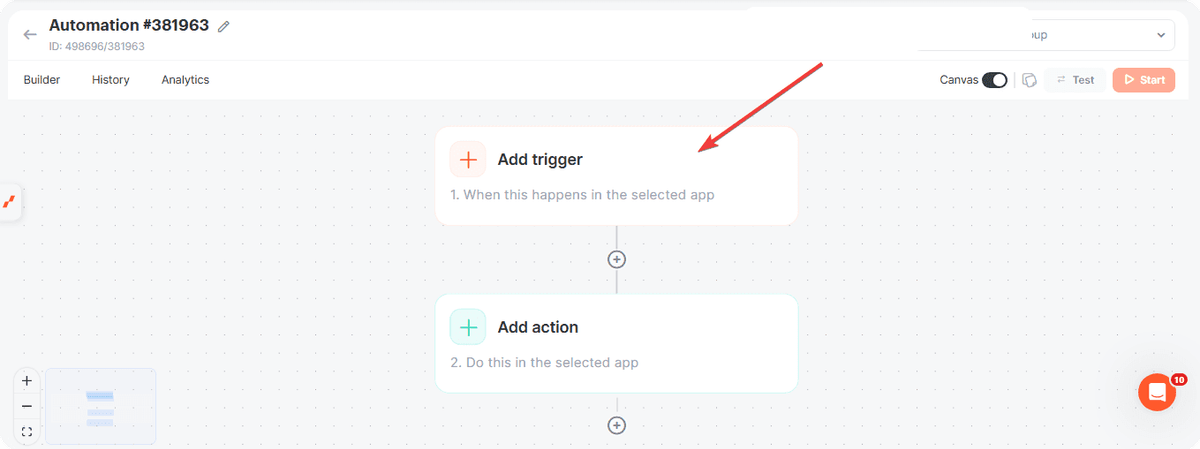
Second, add an Albato AI action, set its role to user, and build the message from the conversation's Body Source so the agent answers the customer's actual question rather than a generic prompt.
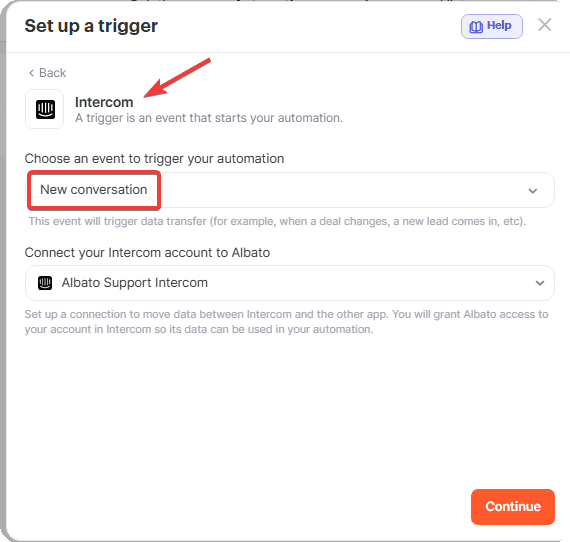
Third, post the reply and close the conversation back in Intercom with two Custom API requests, a reply to the conversation, then a close on its parts. Fourth, add a Slack action that sends the original message to a public channel so an agent can pick up anything the bot should not have closed.
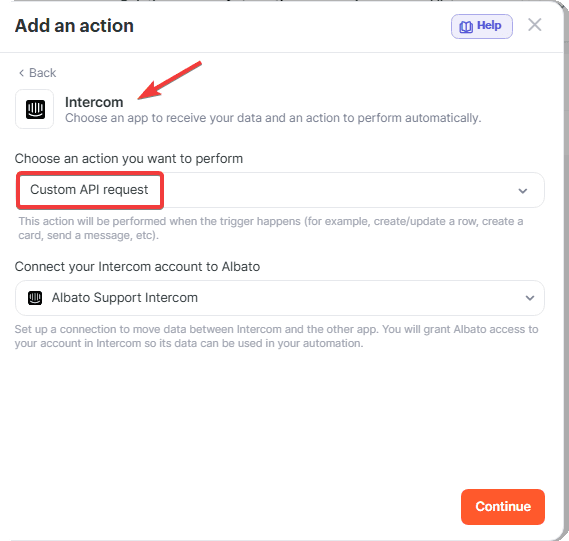
To route by topic instead of answering everything, open the trigger and add a filter where Body Source contains a keyword, then repeat the automation per keyword lane. If Albato AI is not on your plan, the same flow runs with a connected OpenAI, Claude, or Gemini app.
The full step-by-step version, with every screen and the exact Custom API request parameters, lives in our help center: how to route Intercom chats with AI in Albato.
How to measure whether it is working
Watch CSAT and escalation quality together, because one without the other misleads you. If CSAT holds or rises while the agent resolves more tickets, the automation is doing its job. If CSAT dips, the fix is almost always the escalation path or the autonomy policy, not the decision to automate.
Track three things: the share of tickets resolved without a human, CSAT split between agent-resolved and human-resolved tickets, and the rate of "bounce-backs" where a customer reopens a ticket the agent marked solved. A rising bounce-back rate is the early signal that the agent is resolving things it should have escalated, so tighten the guardrails there.
The safest way to find your own line is to run the agent on your top ticket types for a week and watch those three numbers before you widen its autonomy.
FAQ
Here are the questions support teams ask most often before handing first-line tickets to an agent.
Will automating first-line support hurt my CSAT?
Not if you automate the right tickets and build a clean escalation path. CSAT usually drops from queues, repeated explanations, and bots that trap customers, not from a machine resolving a simple request quickly. Keep a visible option to reach a human and escalate the hard cases with full context.
How is this different from the chatbot we already have?
A chatbot generates a reply and stops. An AI agent reads the ticket, checks the customer's order and account, takes the resolving action, and hands off to a human with context when it cannot. The difference is that it acts on your systems, not just talks.
What should never be automated?
Money movement above a threshold you set, account deletion, billing disputes, and any ticket where the customer is clearly upset. Put these in an "always route to a human" bucket in the agent's guardrails. The agent can still gather details first so the human starts with everything in hand.
Do I need to connect my helpdesk and store for this?
Yes. The agent has to read the ticket, look up the order or account, and write the result back, which means those tools must be connected. A no-code integration platform links your helpdesk, e-commerce, and CRM so the agent can act across all of them in one run.
Want to go deeper? These guides cover related topics.