In this article
Key Takeaways
- Zendesk, HubSpot Service Hub, and Salesforce Service Cloud score highest for CRM integration depth, but each one fits a different tech stack and budget.
- "CRM integration depth" measures bidirectional data sync, custom field mapping, and whether CRM events can automatically trigger helpdesk actions (and vice versa).
- 11 of 12 tools on this list have direct Albato connectors, so you can extend CRM sync to platforms that lack native connections.
- Below you'll find a scored comparison table, detailed reviews with pricing, and specific connector data for each tool.
Sales reps spend just 28% of their week actually selling, according to Salesforce's State of Sales research, with much of the remaining time lost to manual data entry between disconnected systems. When your helpdesk and CRM don't talk to each other, support agents duplicate the same problem: toggling between tabs, copying ticket details into deal records, and missing context that could resolve issues faster.
Quick Comparison Table
| Tool | Best For | Native CRM Integrations | Albato Connector | Starting Price | CRM Depth (/5) |
|---|---|---|---|---|---|
| Zendesk | Mid-market teams on Salesforce/HubSpot | Salesforce, HubSpot, Pipedrive (marketplace) | Yes (3 triggers, 7 actions) | $55/agent/mo | 4.5 |
| Freshdesk | SMBs in the Freshworks ecosystem | Freshsales (native), HubSpot, Salesforce (marketplace) | Yes (4 triggers, 10 actions) | Free; $15/agent/mo | 3.5 |
| Intercom | Product-led SaaS companies | Salesforce, HubSpot (deep native) | Yes (8 triggers, 18 actions) | $29/seat/mo | 4.5 |
| HubSpot Service Hub | Teams already on HubSpot CRM | Fully native (built-in) | Yes (21 triggers, 59 actions) | Free; $15/seat/mo | 5.0 |
| Hiver | Gmail-based support teams | HubSpot, Salesforce (via settings) | No | Free; $25/user/mo | 4.8 |
| Salesforce Service Cloud | Enterprise Salesforce teams | Fully native (built-in) | Yes (9 triggers, 23 actions) | $25/user/mo | 5.0 |
| Zoho Desk | Zoho ecosystem users | Zoho CRM (native) | Yes (5 actions) | Free; $8/agent/mo | 4.0 |
| Help Scout | Small teams, email-first support | HubSpot, Salesforce (marketplace) | Yes (4 triggers, 6 actions) | Free; $50/mo (usage-based) | 3.0 |
| Jira Service Management | IT and engineering teams | Salesforce, HubSpot (marketplace) | Yes (8 triggers, 13 actions) | Free (3 agents); $23.80/agent/mo | 3.0 |
| ServiceNow | Large enterprises | Salesforce (native), IntegrationHub | Yes (2 triggers, 4 actions) | Custom (~$130+/user/mo) | 4.0 |
| Front | Shared inbox teams needing CRM context | Salesforce, HubSpot (native) | Yes (3 triggers, 6 actions) | $25/seat/mo | 3.5 |
| JustCall | Phone and SMS support tied to the CRM record | Salesforce, HubSpot, Pipedrive (70+) | Via webhooks | $19/user/mo | 4.5 |
How We Ranked CRM Integration Depth
We scored each helpdesk on five criteria that determine how useful its CRM connection actually is in daily work, not whether a logo appears on the integrations page.
Native CRM connectors counts how many major CRMs the helpdesk connects to without third-party middleware. A tool with direct Salesforce and HubSpot integrations built by its own engineering team scores higher than one relying entirely on marketplace apps from outside developers.
Bidirectional sync checks whether data flows both ways. If a support agent updates a contact in the helpdesk, does the CRM record reflect that change? Tools that only push data in one direction (helpdesk to CRM, but not back) lose points here.
Field mapping evaluates whether you can connect custom fields between systems. This matters when your support team needs to see deal stage, contract value, or account tier without switching tabs. Platforms that only sync standard fields like name and email get a lower score.
Automation triggers measures whether CRM events can create helpdesk tickets, and whether ticket events can update CRM records. A deal reaching "closed-won" should be able to generate an onboarding ticket automatically. A critical support escalation should flag the associated CRM account.
Third-party extendability considers whether you can expand the integration through platforms like Albato, webhooks, or API. A helpdesk that supports only its built-in CRM connections with no way to customize earns a lower score than one that opens up its data for external automation.

Each tool below received a score from 1 to 5 based on these five criteria. Tools with deeper native integrations, bidirectional sync, and broader third-party compatibility score higher.
The 12 Best Helpdesk Tools Ranked by CRM Integration
1. Zendesk

Zendesk delivers some of the deepest CRM integrations available in the helpdesk category, particularly with Salesforce and HubSpot. The Salesforce integration syncs tickets, contacts, and accounts bidirectionally, and support agents can view deal stage, account owner, and revenue data directly inside the Zendesk ticket sidebar without opening another tab.

Let us build your automation or AI Agent
Tell us which process eats your time. Certified Albato engineers take it from there, A to Z.
The HubSpot integration works similarly: it pulls contact properties, deal information, and timeline events into Zendesk. Both integrations support custom field mapping and automation triggers, so you can route tickets based on CRM segments or create CRM tasks when specific ticket conditions are met.
Beyond Salesforce and HubSpot, the Zendesk Marketplace includes connectors for Pipedrive, Copper, and Microsoft Dynamics, though most of those are built by third parties with varying quality. For CRMs that lack a marketplace app, Albato's Zendesk connector (3 triggers, 7 actions) lets you build custom workflows. You could create Pipedrive deals from new tickets or sync Zendesk with HubSpot records on autopilot.
For a deeper look at what's possible, our Zendesk integration guide covers automation options beyond native connectors.
Pricing: Suite Team starts at $55/agent/month (billed annually). Suite Professional is $115/agent/month, and Suite Enterprise is $169/agent/month.
CRM Depth Score: 4.5/5. Strong native Salesforce and HubSpot integrations with bidirectional sync, custom field mapping, and automation triggers. Third-party CRM connectors available through the marketplace and Albato.
💡 Tip
Zendesk's AI Copilot add-on ($50/agent/month) includes smart ticket triage that uses CRM data for routing, plus auto-assist that can suggest or take next steps based on your procedures. It requires Suite Professional or Enterprise (not Suite Team), so budget $115/agent/month minimum before adding Copilot. If your team handles 500+ tickets per month with mixed account tiers, the triage alone can justify the cost.
Zendesk uses CRM data to route and suggest next steps, but the quality of those suggestions depends on the underlying procedures. Teams that need agents following a consistent process on complex tickets often pair the helpdesk with a knowledge platform like Stonly, which gives the AI structured, governed knowledge to work from rather than articles to summarize.
The next section covers a tool built more tightly around its own CRM ecosystem.
2. Freshdesk

Freshdesk integrates most tightly with Freshsales, its sibling CRM in the Freshworks ecosystem. That integration is genuinely deep: shared contacts, unified customer timelines, and the ability to convert support conversations into sales leads without leaving the interface. If your team already runs Freshsales, Freshdesk is the natural helpdesk pairing because no configuration is needed to get data flowing between them.
For teams on HubSpot or Salesforce, Freshdesk offers marketplace integrations that handle contact sync and basic ticket visibility. These connections lack the depth of the native Freshsales integration, though. The HubSpot connector syncs contacts and companies but doesn't support custom field mapping or bidirectional ticket-to-deal sync. The Salesforce integration is more capable but requires manual configuration through Freshdesk's admin panel.
Albato's Freshworks connector covers both Freshdesk CRM and helpdesk modules with 4 triggers and 10 actions. You can automate ticket-to-CRM workflows, sync contacts to external systems, and route Freshdesk events to tools outside the Freshworks ecosystem. Going further, AI agents for customer support can triage and resolve routine tickets before a human ever sees them.
Pricing: Free tier supports up to 2 agents. Growth starts at $15/agent/month (billed annually), Pro is $49/agent/month, and Enterprise is $79/agent/month.
CRM Depth Score: 3.5/5. Excellent within Freshworks, weaker outside it. HubSpot and Salesforce integrations exist but lack bidirectional custom field mapping.
3. Intercom

Intercom stands out for SaaS companies running conversational support where customer interactions often surface sales opportunities. The native Salesforce integration syncs conversations, contacts, and companies bidirectionally. Support agents can see open opportunities, contract value, and account ownership inside the Intercom inbox, and when a conversation is resolved or tagged, that data flows back into Salesforce as activities.
The HubSpot integration is equally strong. Intercom syncs contact properties, conversation events, and lead qualification data with HubSpot, so marketing and sales teams see full support context alongside their CRM records. You can trigger HubSpot workflows based on Intercom events, which is valuable for routing product-qualified leads from support conversations directly into sales pipelines.
Albato's Intercom connector is one of the most capable on the platform: 8 triggers and 18 actions. You can build Intercom automation workflows that go beyond native capabilities, such as tagging conversations in Intercom and creating leads in Pipedrive, syncing with Salesforce custom objects, or routing conversations to different CRMs based on user attributes.
Pricing: Essential starts at $29/seat/month (billed annually). Advanced is $85/seat/month, and Expert is $132/seat/month. Note that Fin AI resolutions cost $0.99 each on top of the base plan.
CRM Depth Score: 4.5/5. Deep native Salesforce and HubSpot integrations with conversation-level sync. Strong automation potential through Albato's 26 available operations.
4. HubSpot Service Hub

HubSpot Service Hub earns a perfect CRM depth score for a straightforward reason: it is the CRM. There is no integration to configure because tickets, contacts, deals, and conversations all live in the same database. When a support agent opens a ticket, they see the complete customer timeline, including marketing emails opened, sales calls logged, and deals in the pipeline, with zero sync delay.
This zero-configuration advantage matters most for teams already using HubSpot CRM. Ticket automation can reference any CRM property, so you can route tickets based on deal stage, lifecycle stage, or company revenue. Support interactions automatically appear on the CRM contact timeline, giving sales reps visibility into open issues before they pick up the phone for a follow-up call.
The limitation shows up when you need to connect Service Hub to tools outside HubSpot's ecosystem. Albato's HubSpot connector fills that gap with 21 triggers and 59 actions, letting you push ticket data to external tools, sync with a secondary CRM, or build cross-platform workflows. You could send a notification when a high-value customer submits a ticket, or create a task in your project management tool when a ticket reaches a specific pipeline stage.
Pricing: Free tools available. Starter is $15/seat/month (billed annually). Professional is $90/seat/month, and Enterprise is $150/seat/month (10-seat minimum).
CRM Depth Score: 5.0/5. Native CRM by definition. Zero configuration needed, and every CRM field is available in ticket context, automation, and reporting.
⚠️ Important
HubSpot's free tier includes basic ticketing and CRM access, but meaningful automation (custom workflows, SLA tracking, ticket routing rules) requires Professional at $90/seat/month. If CRM-driven ticket automation is the reason you're considering HubSpot, budget for Professional, not Starter.
Salesforce Service Cloud takes a different approach, embedding support directly in the CRM rather than connecting to it.
5. Hiver
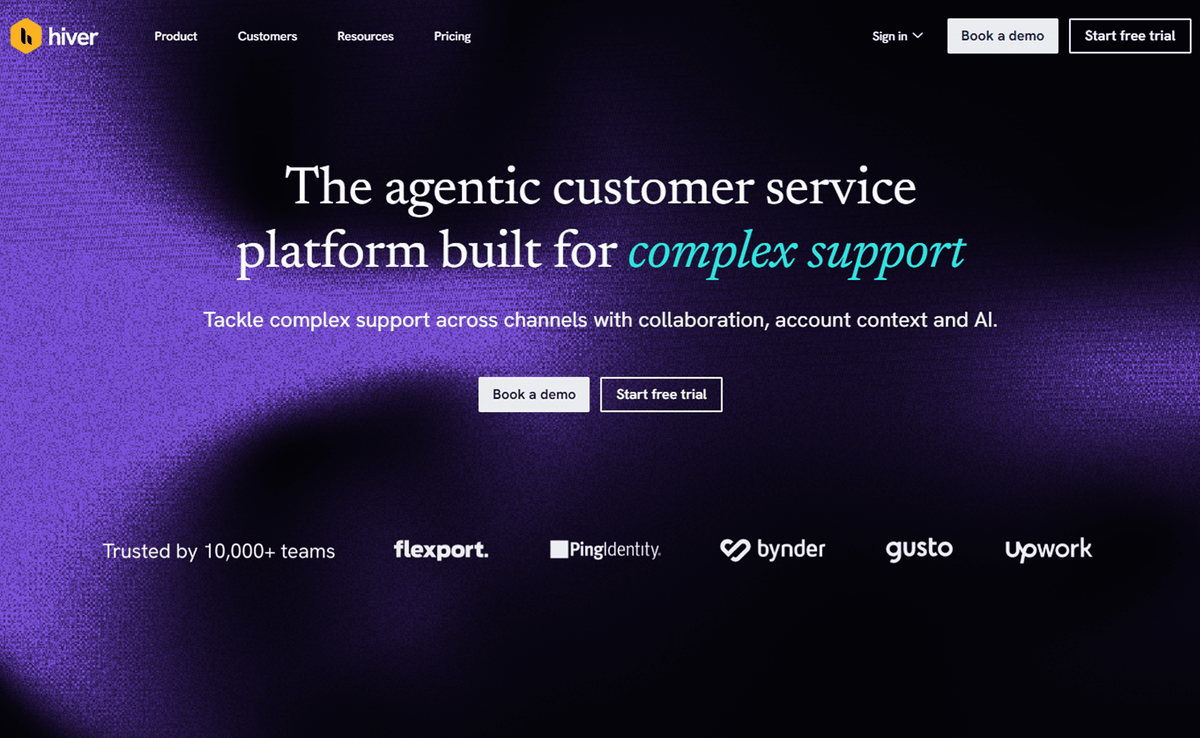
Hiver is an AI customer service platform purpose-built for complex, high-stakes support. Unlike tools focused primarily on deflection, Hiver enables teams to manage cross-team customer operations that span multiple channels and tools. This ensures that when support escalates an issue to engineering via Jira or Salesforce, the full conversation history and context remain intact across every handoff.
The platform provides a complete, account-centric view of every customer, pulling real-time data from systems like CRMs and ERPs, including revenue and renewal timelines, directly into the workspace. This deep context allows both human agents and Hiver’s reliable AI to respond with precision, grounding every reply in support docs and account data. Whether using Hiver in Gmail or the dedicated Hiver Omni platform, teams can automate complex requests while ensuring high-quality resolution across every ticket. Learn more about Hiver’s AI-native support.
Pricing: Growth starts at $25/user/month (billed annually), with Pro and Elite plans available for advanced AI and cross-team collaboration needs.
CRM Depth Score: 4.8/5. Exceptional for teams managing complex requests that require a unified customer timeline and real-time data sync across various enterprise systems.
6. Salesforce Service Cloud

Salesforce Service Cloud matches HubSpot's perfect score because it's also built directly into its parent CRM platform. Cases (Salesforce's term for tickets) are tied to accounts, contacts, and opportunities natively. Agents see the complete customer record, from open deals and past purchases to contract renewals and every previous interaction across sales, marketing, and support.
The platform's automation engine, Flow, lets you build multi-step processes that span sales and service departments. A closed-won deal can automatically generate an onboarding case. A pattern of repeated support cases can trigger an alert on the account record for the sales team to investigate. Einstein AI handles case routing, suggested replies, and sentiment analysis, all drawing from the unified CRM data model.
For teams that need to move data between Service Cloud and non-Salesforce tools, Albato's Salesforce connector provides 9 triggers and 23 actions. You can sync cases with project management tools, push resolution data to analytics platforms, or connect Salesforce with helpdesk tools your partners use.
Pricing: Starter Suite begins at $25/user/month (billed annually). Pro Suite is $100/user/month, Enterprise is $165/user/month, and Unlimited is $330/user/month.
CRM Depth Score: 5.0/5. Fully native CRM integration with cases tied to accounts, contacts, and opportunities. Einstein AI enhances routing and suggested responses using CRM context.
7. Zoho Desk

Zoho Desk delivers strong CRM integration for teams already running Zoho CRM, and that's its clear sweet spot. The native connection shares contacts, accounts, and tickets across both platforms. Support agents see CRM data (deal stage, revenue, account owner) inside Zoho Desk, and sales reps can view open tickets from within Zoho CRM without switching applications. Cross-module analytics let managers see how support interactions correlate with sales outcomes.
Zoho's Blueprint automation feature works across Desk and CRM, allowing you to define multi-step processes that span both products. You could automatically assign high-priority tickets to senior agents when the associated CRM account exceeds a certain revenue threshold, or flag accounts with recurring support issues for proactive sales outreach.
Outside the Zoho ecosystem, CRM integration options narrow. HubSpot and Salesforce connections exist through Zoho's marketplace, but they don't match the native integration's depth. Albato's Zoho Desk connector provides 5 actions for ticket management and contact search, letting you route Zoho Desk data to external CRMs without building custom webhook logic.
Pricing: Free tier supports up to 3 agents. Standard is $8/agent/month (billed annually), Professional is $14/agent/month, and Enterprise is $40/agent/month.
CRM Depth Score: 4.0/5. Excellent within the Zoho ecosystem with cross-module analytics and Blueprint automation. Limited depth with non-Zoho CRMs.
If none of the top six tools match your stack, the remaining six cover more specialized use cases, from Gmail-native support to enterprise ITSM. You can also bridge gaps between any helpdesk and CRM using Albato's visual workflow builder, which supports pre-built connectors for 10 of the 12 tools on this list plus webhook triggers for the rest.
8. Help Scout

Help Scout takes a simpler approach to CRM integration, which matches its positioning as an email-first helpdesk for small teams. The HubSpot integration (available on the Plus plan) syncs customer data and conversation history, giving agents CRM context inside the Help Scout sidebar. Salesforce and Jira integrations are also available on Plus.
The integration depth is lighter than what Zendesk or Intercom offer. Help Scout syncs contacts and conversation data but doesn't provide deep custom field mapping or bidirectional deal sync. If your team needs to see basic CRM context while handling email support, it does that well. If you need ticket events to trigger CRM pipeline changes, you'll need to build that workflow through an external tool.
Albato's Help Scout connector offers 4 triggers and 6 actions, enough to automate common needs like creating CRM contacts from new Help Scout customers or syncing conversation tags with CRM properties.
Pricing: Help Scout uses usage-based pricing (contacts helped per month, unlimited users). Free plan supports 50 contacts/month. Standard is $50/month (100 contacts), Plus is $75/month, and Pro uses custom pricing.
CRM Depth Score: 3.0/5. Basic CRM sidebar integration with HubSpot and Salesforce. Syncs contacts and conversations but lacks deep custom field mapping and bidirectional deal sync.
9. Jira Service Management

Jira Service Management (JSM) is built for IT service desks and engineering teams, so CRM integration is secondary to its ITSM strengths. Atlassian Marketplace apps connect JSM to Salesforce and HubSpot, and the depth of those integrations has improved significantly over the past two years.
The Salesforce connector lets support agents view CRM account data inside Jira issues and configure rules to create Jira issues when specific Salesforce events occur. The HubSpot connection works similarly, syncing contacts and sharing issue and deal data. These marketplace integrations require separate installation and configuration, so they aren't as tight as the native CRM connections in Zendesk or Intercom.
Where JSM genuinely shines is in cross-functional workflows between IT and customer-facing teams. Albato's Jira connector (8 triggers, 13 actions) lets you build automations like escalating customer-reported bugs from your CRM into Jira, or notifying CRM account owners when a Jira issue tied to their customer gets resolved.
Pricing: Free for up to 3 agents. Standard is $23.80/agent/month, and Premium is approximately $53.30/agent/month.
CRM Depth Score: 3.0/5. CRM integrations available through marketplace apps rather than native connections. Strongest for IT-to-CRM bridge workflows where engineering and support teams need shared visibility.
10. ServiceNow

ServiceNow Customer Service Management (CSM) targets large enterprises handling complex, multi-departmental service workflows. Its CRM integration centers on Salesforce, with a native connector that syncs accounts, contacts, cases, and entitlements bidirectionally. The integration supports custom field mapping, though configuring it requires ServiceNow admin expertise and typically takes weeks rather than hours.
ServiceNow's IntegrationHub provides a framework for building custom integrations with other CRMs and business systems. It's powerful but enterprise-oriented: expect dedicated implementation projects, not quick setups. For teams that need ServiceNow data flowing into a CRM without a full IntegrationHub build, Albato's ServiceNow connector (2 triggers, 4 actions) offers a lighter-weight alternative for basic record sync.
Pricing: Custom enterprise pricing. Industry estimates place CSM licenses at approximately $130-180/user/month depending on the edition and volume. Implementation costs typically run 3-5x the annual license fee.
CRM Depth Score: 4.0/5. Strong Salesforce integration and enterprise-grade IntegrationHub. Powerful for large organizations, but setup complexity limits accessibility for smaller teams.
📊 Stat
Poor data quality driven by silos costs organizations an average of $12.9 million per year, according to Gartner research. For ServiceNow-scale deployments, getting the CRM integration right from day one prevents compounding data quality issues downstream.
The next tool takes a different approach, building CRM context directly into a shared inbox.
11. Front

Front brings CRM integration directly into its shared inbox interface, with native Salesforce and HubSpot connectors that display CRM data in a sidebar alongside conversations. Agents can see contact properties, deal stages, and account history without switching applications. Conversation tags in Front can sync to CRM records, creating a basic bidirectional data flow.
The Salesforce integration stands out because it supports pulling in custom objects and fields, which puts Front ahead of several competitors on this list for CRM data visibility. The HubSpot integration syncs contacts and companies, with conversation data appearing on the HubSpot contact timeline. Both integrations require the Professional tier ($65/seat/month) or above.
Albato's Front connector provides 3 triggers and 6 actions for message sync and conversation management. For teams that need to connect Front to CRMs beyond Salesforce or HubSpot, Albato offers a no-code path without direct API work.
Pricing: Starter begins at $25/seat/month (billed annually). Professional is $65/seat/month, and Enterprise is $105/seat/month.
CRM Depth Score: 3.5/5. Good native Salesforce and HubSpot integrations with CRM sidebar and conversation sync. Custom Salesforce object support is a notable strength.
JustCall approaches the same problem from the phone and SMS side, where the CRM record is built from conversations rather than tickets.
12. JustCall

JustCall is a cloud-based communication platform that connects phone and SMS channels to your CRM. It suits sales and support teams that need every call and message logged in one place without manual effort. With native connectors for over 70 CRMs, including Salesforce, HubSpot, and Pipedrive, conversations land on the customer record automatically.
The platform covers click-to-call, power dialers, and AI conversation intelligence that produces call summaries and coaching insights. For a support team, that means the voice channel stops living outside the helpdesk: a call about an open ticket is attached to the same contact your CRM already knows.
JustCall has no native Albato connector, so bridging it to tools outside its own integration list runs through Albato's webhook trigger and its API.
Pricing: Essentials starts at $19/user/month billed annually, Team at $29/user/month, and Pro at $49/user/month.
CRM Depth Score: 4.5/5. Strong native integrations with bidirectional sync for calls and texts, backed by high-quality automation triggers through its direct CRM connectors.
How to Extend Your Helpdesk's CRM Integration With Albato
Not every helpdesk connects natively to every CRM, and even the best native integrations have limits on what they can automate. Albato bridges these gaps by connecting helpdesk tools to CRMs through pre-built connectors and a visual workflow builder that requires no coding.
10 of the 12 tools in this article have direct Albato connectors: Zendesk, Intercom, HubSpot, Salesforce, Help Scout, Jira, ServiceNow, Freshdesk, Zoho Desk, and Front. For Hiver and JustCall, Albato's webhook trigger provides a workaround.
Here are three practical workflows you can set up in minutes:
Zendesk ticket to Pipedrive deal. When a new ticket is created in Zendesk, Albato creates a deal in Pipedrive with the customer's name, email, and ticket subject. Sales teams immediately see which prospects have open support issues, without anyone copying data manually. Set up Zendesk + Pipedrive.
HubSpot deal stage change to Jira ticket. When a HubSpot deal moves to "closed-won," Albato automatically creates an onboarding ticket in Jira Service Management with the account details and deal value. The handoff from sales to implementation happens without a single manual step. Connect Jira with HubSpot.
Intercom conversation to CRM lead. When an Intercom conversation is tagged "sales," Albato creates a lead in your CRM with the conversation transcript, contact details, and tag data. Product-qualified leads route directly from support to the sales pipeline. Connect Intercom with HubSpot.
Understanding how AI-powered customer service automation complements these integrations can help you build a support stack where tickets, leads, and customer data flow between systems without manual work.
Try Albato free and connect your helpdesk to any CRM in minutes. No credit card required.

Track your helpdesk CSAT ratings outside the helpdesk
Most helpdesks show CSAT inside their own dashboard, which is fine until you want the raw ratings in a spreadsheet your whole team can slice, or an instant ping when a customer leaves a bad score. If you also gather feedback outside tickets, the same routing logic applies to dedicated survey tools that send responses straight into your CRM. If your helpdesk is Intercom, you can send every conversation rating to a Google Sheet and alert the responsible person in Slack the moment a rating comes back negative, all through one Albato automation.
The flow has three moving parts. Connect Intercom, Google Sheets, and Slack, then start an automation with the Intercom trigger Conversation Rating so it fires every time a customer rates a chat.
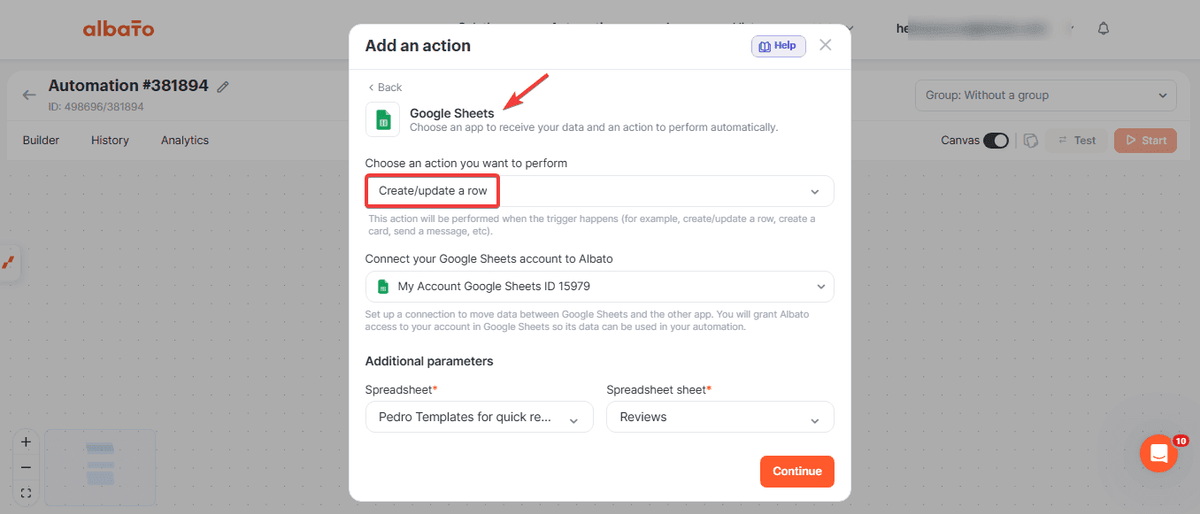
Add a Google Sheets step, action Create Spreadsheet Row, and map the Intercom fields you care about into columns: Contact Name, Contact Email, Conversation URL, Rating Message, and Rating Received. Every rating, good or bad, lands in the sheet, so you keep the full history for reporting.
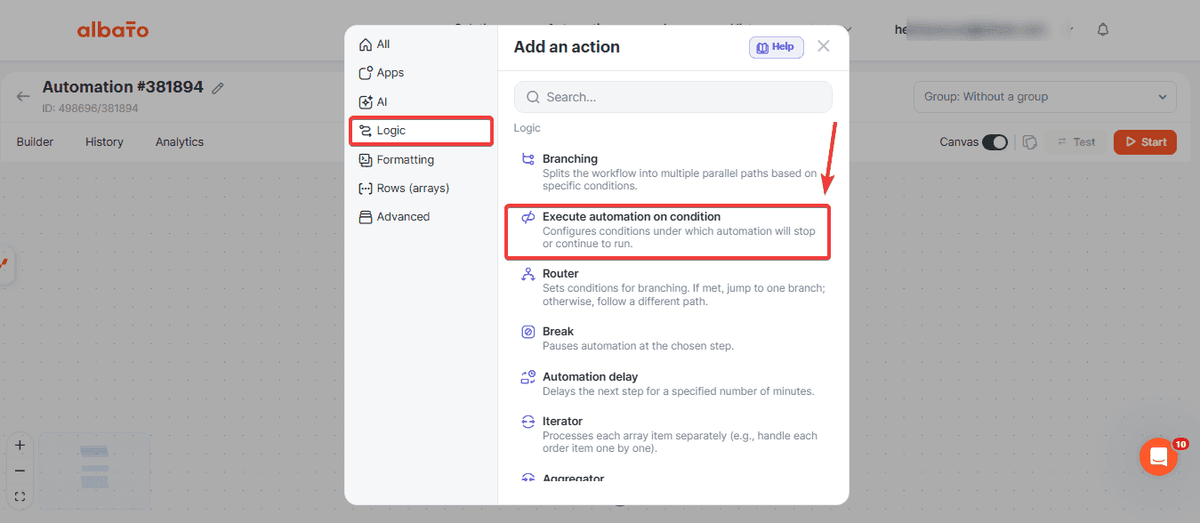
The Slack alert is gated behind a condition so it only fires on negative feedback. Add the Execute automation on condition tool from the Logic menu, set the rating parameter to Contains the value Bad, and put a Slack Send private message step after it. Capitalization has to match the exact value Intercom sends, and the rating scale can differ per workspace, so check yours before you set the condition.
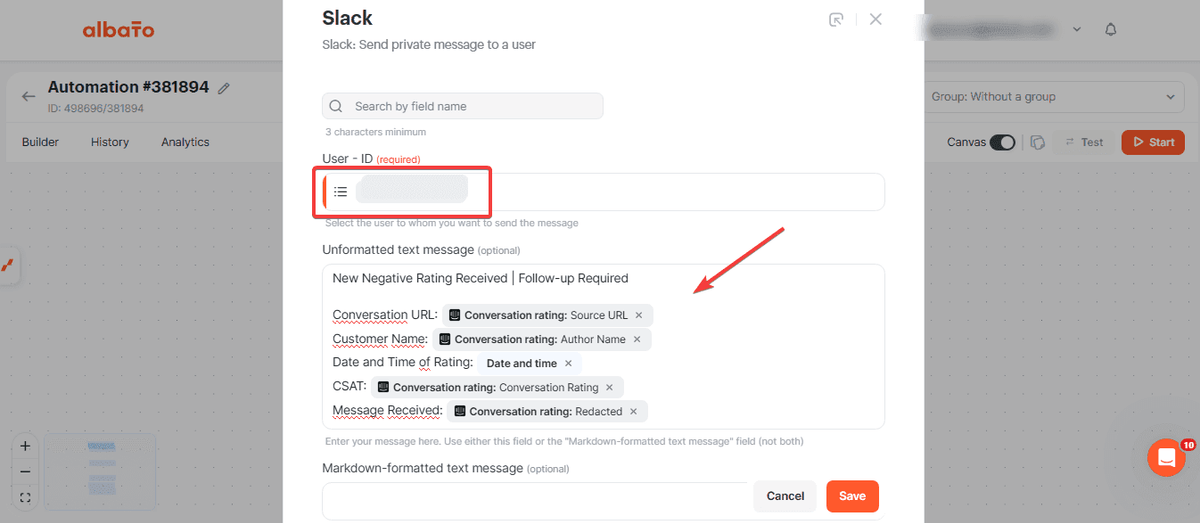
The full step-by-step version, with every screen and the exact field names, is in our help center: track Intercom chat ratings in Google Sheets with Slack alerts.
How to Choose the Right Helpdesk for Your CRM
Picking a helpdesk based on its CRM integration depth comes down to three factors: which CRM you already use, how much data needs to flow between systems, and whether your team can handle integration setup or needs it to work out of the box.
If you run HubSpot CRM: HubSpot Service Hub is the obvious choice. Zero configuration, full data access, and every automation can reference CRM properties natively. No integration to build or maintain.
If you run Salesforce: Zendesk or Salesforce Service Cloud. Service Cloud gives you native, zero-config integration within the Salesforce platform. Zendesk offers more workflow flexibility if your support team has specific needs that Service Cloud's interface doesn't accommodate.
If you run Pipedrive, Copper, or a smaller CRM: Zendesk or Intercom paired with Albato. Neither Pipedrive nor Copper has native integrations with most helpdesks, but Albato bridges that gap with pre-built connectors that take minutes to configure.
If you prioritize simplicity and email-based support: Help Scout for small teams, Hiver for Gmail-native teams. Both offer lighter CRM integrations that may be enough if your support volume is moderate and your CRM needs are basic.
If you need IT and customer service together: Jira Service Management for IT-centric teams, ServiceNow for enterprise environments. Pair either with Albato to push relevant ticket data to your customer-facing CRM.
For a broader look at choosing the right CRM to pair with your helpdesk, see our guide to CRM software solutions.
Find answers to common questions about helpdesk CRM integration below.
FAQ
What is the best helpdesk software for CRM integration?
It depends on which CRM you use. HubSpot Service Hub is the strongest choice for HubSpot CRM users because the helpdesk and CRM share the same database with zero configuration. Zendesk offers the deepest third-party CRM integrations, particularly with Salesforce. For product-led SaaS companies, Intercom's native Salesforce and HubSpot connections handle conversational support data exceptionally well.
Can I connect my helpdesk to a CRM without native integration?
Yes. Integration platforms like Albato let you connect helpdesks to any CRM through pre-built connectors or webhook triggers, with no coding required. You can set up workflows like creating CRM deals from new helpdesk tickets or updating ticket priority when a CRM deal stage changes. 10 of the 12 tools in this article have direct Albato connectors.
What does "CRM integration depth" mean for helpdesk software?
CRM integration depth measures how much data actually flows between your helpdesk and CRM, and how useful that exchange is. Surface-level integrations only sync contact names and emails. Deep integrations support bidirectional sync of tickets, deals, and custom fields, plus automation triggers where events in one system create actions in the other. A tool with high integration depth lets support agents see full customer context and lets CRM users see support history without switching platforms.
Is free helpdesk software good enough for CRM integration?
Free tiers from Freshdesk, HubSpot, Zoho Desk, and Jira Service Management handle basic ticket management, but CRM integrations are typically locked behind paid plans. HubSpot is a partial exception because basic CRM data is accessible on the free Service Hub tier, though advanced automation requires Starter ($15/seat/month) or above. Budget approximately $15-55/agent/month for meaningful CRM sync capabilities, depending on the tool and integration depth you need.
How do I choose between an all-in-one platform and a standalone helpdesk?
All-in-one platforms (HubSpot, Salesforce, Zoho) give you the tightest CRM integration because helpdesk and CRM share one database. The tradeoff is less flexibility: you're locked into that vendor's ecosystem for both functions. Standalone helpdesks (Zendesk, Intercom, Help Scout) let you pick the best tool for each job, but you need to build and maintain the integration between them. Platforms like Albato make standalone helpdesks connect to your CRM with reliability comparable to native integrations, which is worth considering if you prefer a best-of-breed approach.
Build your first helpdesk-to-CRM automation in minutes. No credit card, no code, no waiting for your vendor to ship the integration you need.
Build your first helpdesk-to-CRM automation in minutes. No credit card, no code required.