In this article
Key Takeaways
- The global appointment scheduling software market reached $546 million in 2025 and is projected to reach $1.9 billion by 2034 (14.7% CAGR), driven by sales teams that need bookings to flow directly into CRM pipelines.
- Five of the eleven tools reviewed here (Calendly, HubSpot Meetings, Acuity Scheduling, Cal.com, Square Appointments) have direct Albato connectors that auto-sync booking data to your CRM without manual entry.
- Top picks by scenario: Calendly for sales teams that need round-robin routing, HubSpot Meetings for teams already on HubSpot CRM, Acuity Scheduling for paid appointments and client intake, Cal.com for self-hosted open-source control, Square Appointments for retail and local services, Setmore for free-tier small teams up to four users.
Sales reps spend most of their time on non-selling work, and meeting coordination is one of the biggest culprits. A prospect books a demo through your scheduling link, but that booking never reaches your CRM. The rep starts the call without context. The deal record stays empty, and follow-up sequences never trigger. That gap between "meeting booked" and "pipeline updated" is where revenue leaks.

Let us build your automation or AI Agent
Tell us which process eats your time. Certified Albato engineers take it from there, A to Z.
How We Selected These 11 Scheduling Tools
We evaluated over 25 appointment scheduling platforms and narrowed the list to 11 based on four criteria: CRM integration depth (native connectors, webhook support, API access), pipeline-oriented features (round-robin routing, lead qualification, automated reminders), pricing transparency, and real-world adoption among sales, services, and small business teams. Each tool was tested for its ability to sync bookings with external CRMs through platforms like Albato.
For each tool, we checked whether an Albato connector exists, documented the data fields available through that connector, and verified pricing as of April 2026. All pricing reflects annual billing unless noted otherwise.
Comparison Table: 11 Best Appointment Scheduling Tools
The table below summarizes all eleven tools by their strongest use case, starting price, CRM integration depth, and whether an Albato connector is available for automated data sync.
| Tool | Best For | Starting Price | Free Plan | Albato Connector | CRM Sync |
|---|---|---|---|---|---|
| Calendly | Sales teams needing round-robin | $10/seat/mo | Yes (1 event type) | Yes | Native + Albato |
| HubSpot Meetings | CRM-native scheduling | Free (Starter $20/seat/mo) | Yes | Yes | Native CRM |
| Acuity Scheduling | Service businesses with payments | $16/mo | 7-day trial | Yes | Albato + native |
| Cal.com | Dev teams wanting open source | Free (Teams $15/user/mo) | Yes (self-hosted) | Yes | Albato + API |
| OnceHub | Enterprise lead routing | $12/seat/mo | Yes (basic) | No | Native CRM + API |
| Doodle | Group scheduling polls | $6.95/mo | Yes (limited) | No | Calendar sync |
| Setmore | Small businesses on a budget | $5/user/mo | Yes (4 users) | No | Basic integrations |
| Square Appointments | Retail and service with payments | Free (Plus $49/mo) | Yes (1 location) | Yes | Albato + Square POS |
| YouCanBookMe | Solopreneurs and consultants | $7/cal/mo | Yes (free forever) | No | Google/Outlook sync |
| Booksy Biz | Beauty and wellness professionals | $29.99/mo | 14-day trial | No | Google/Square sync |
| BILL | Turning booked work into invoices and payments | $45/user/mo | No | No | Via QuickBooks, NetSuite, Xero |
Below you will find a detailed breakdown of each tool, including features, pricing, pros and cons, and Albato integration options.
1. Calendly

Calendly is the scheduling tool most sales teams think of first, and for good reason. It handles the core job (letting prospects pick a time slot from your availability) cleanly, and its round-robin and collective scheduling features make it practical for teams that route meetings across multiple reps. The platform has expanded well beyond one-on-one booking into a full scheduling infrastructure for revenue teams.
Key features:
- Round-robin scheduling distributes meetings evenly across your sales team based on availability, priority, or a weighted algorithm
- Routing forms qualify prospects before they book by asking custom questions (company size, budget, use case) and directing them to the right rep or meeting type
- Automated reminders via email and SMS reduce no-shows, which remain one of the most consistent sources of lost pipeline time across B2B sales funnels
- Salesforce and HubSpot native integrations create CRM records the moment a meeting is booked
- Workflows that trigger follow-up emails or Slack notifications when meetings are booked, rescheduled, or cancelled
Pros:
- The free plan works well for solo users who just need basic one-on-one scheduling
- Routing forms have become a genuine lead qualification layer, not just a booking page
- The interface is polished enough that prospects rarely get confused during the booking flow
Cons:
- Round-robin scheduling requires the Teams plan ($16/seat/month), which is a steep jump from Standard ($10/seat/month) for small sales teams
- The free plan is limited to a single event type, which pushes most users to upgrade quickly
- Enterprise pricing starts at $15,000/year with no public per-seat breakdown, making it hard to budget before contacting sales
Albato integration:
Calendly has a dedicated Albato connector that syncs new bookings, cancellations, and rescheduled events directly to your CRM. You can build automations like "when a Calendly event is created, create a deal in Pipedrive and assign it to the matching rep" or "when a meeting is cancelled, update the deal stage in HubSpot and trigger a re-engagement email." This is especially useful if your CRM isn't HubSpot or Salesforce, since Calendly's native integrations don't cover every CRM. For teams that capture leads through forms, see how a form-to-CRM pipeline can work alongside your scheduling flow.
Pricing (April 2026):
- Free: 1 event type, unlimited meetings, 1 calendar connection
- Standard: $10/seat/month (annual), unlimited event types, multiple calendars, integrations
- Teams: $16/seat/month (annual), round-robin, routing forms, Salesforce integration
- Enterprise: from $15,000/year, SAML SSO, SCIM, admin management
Verdict: Calendly is the strongest choice for sales teams that need round-robin routing and CRM sync out of the box. The platform is mature, the booking experience is clean, and the integrations (native + Albato) cover most CRM setups. Just budget for the Teams plan if you need any team scheduling features.
2. HubSpot Meetings

HubSpot Meetings is built directly into HubSpot CRM, which means every booking automatically creates or updates a contact record. There is no export step, no third-party sync to configure for the basic flow. For teams already running HubSpot for marketing or sales, adding meeting scheduling takes about five minutes because the data structure and deal pipeline already exist.
Key features:
- Meeting bookings create CRM contact records automatically with full activity timeline attached
- Group meeting links let prospects book with multiple team members simultaneously (useful for sales + solutions engineer calls)
- Round-robin scheduling distributes bookings across your team based on availability and ownership rules
- Embedded booking pages in emails, landing pages, and chatbot flows keep the prospect inside your funnel
- Meeting outcomes feed directly into HubSpot deal stages, triggering automated sequences
Pros:
- Zero-friction CRM integration since the scheduling tool lives inside HubSpot's ecosystem
- The free plan includes meeting scheduling, basic CRM, and contact creation with no time limit
- Booking links inside HubSpot email sequences make the rep's outreach-to-meeting path shorter
Cons:
- HubSpot branding appears on the free plan booking pages and requires Starter ($20/seat/month) to remove
- Round-robin scheduling needs Sales Hub Professional ($100/seat/month), which is a significant jump
- If you don't use HubSpot CRM, this tool has almost no standalone value
💡 Tip
If your team uses HubSpot CRM but needs scheduling features beyond what the free plan offers, consider using HubSpot Meetings for basic bookings while connecting a dedicated tool like Calendly through Albato's HubSpot connector. You get Calendly's superior routing logic while keeping all data flowing into HubSpot automatically.
Albato integration:
HubSpot has a comprehensive Albato connector that covers contacts, deals, companies, and activities. While HubSpot Meetings data flows natively within HubSpot, Albato lets you push that booking data outward: to a Slack channel for real-time notifications, to a Google Sheet for reporting, or to another CRM if your team uses both HubSpot and a second system. You can also learn how to set up your HubSpot integration through Albato for more advanced workflows.
Pricing (April 2026):
- Free: meeting scheduling, CRM contacts, HubSpot branding, 1 scheduling link per user
- Starter: $20/seat/month, removes branding, 2 pipelines, email templates
- Professional: $100/seat/month, round-robin, sequences, forecasting
- Enterprise: $150/seat/month, custom objects, advanced permissions
Verdict: HubSpot Meetings is the obvious pick if HubSpot is already your CRM. The scheduling-to-pipeline path is instant, and you avoid the integration overhead that every other tool on this list requires. The downside is that advanced scheduling features like round-robin live behind expensive Sales Hub upgrades.
3. Acuity Scheduling

Acuity Scheduling (owned by Squarespace) is built for service-based businesses that need to handle appointments, payments, and client management in one booking flow. Unlike sales-focused tools like Calendly, Acuity lets clients book services, pay upfront, fill intake forms, and receive automated reminders, all before the appointment happens. This makes it particularly strong for consultants, coaches, healthcare providers, and creative agencies.
Key features:
- Customizable intake forms collect client information (goals, preferences, medical history) at booking time so you arrive prepared
- Built-in payment processing through Stripe, Square, and PayPal lets you require deposits or full payment at booking
- Package and membership management for recurring clients (buy 10 sessions, use them over time)
- Timezone-intelligent scheduling detects the client's timezone automatically, reducing the back-and-forth that plagues international scheduling
- Multi-calendar support lets you manage multiple team members, locations, or service types from one account
Pros:
- The intake form builder is more flexible than most scheduling tools, letting you qualify and prepare before the meeting
- Payment collection at booking reduces no-shows more effectively than email reminders alone
- Squarespace integration is native and clean if you already use Squarespace for your website
Cons:
- No free plan, only a 7-day trial, which puts Acuity at a disadvantage for bootstrapped teams testing multiple tools
- SMS reminders require the Growing plan (from $27/month annual), adding cost for a feature that's free on Calendly's paid tiers
- The interface feels dated compared to newer tools like Cal.com, though functionality is solid
Albato integration:
Acuity has a dedicated Albato connector that lets you push new appointments, client data, and scheduling changes to your CRM or project management tool. A common workflow: "when a new appointment is booked in Acuity, create a deal in your CRM, send a Slack notification to the assigned team member, and add a row to your Google Sheet tracker." This is especially valuable because Acuity's native CRM integrations are limited compared to Calendly or HubSpot.
Pricing (April 2026):
- Emerging: $16/month (annual), 1 staff, basic scheduling
- Growing: $27/month (annual) or $34/month (monthly), SMS reminders, packages, memberships
- Powerhouse: $49/month (annual), 36 calendars, HIPAA, multi-timezone
- Enterprise: custom pricing
Verdict: Acuity is the right tool if your business revolves around paid appointments, intake forms, and client packages. It handles the full service-booking workflow better than any general-purpose scheduler. For pure sales meeting scheduling, Calendly or HubSpot Meetings are better fits.
⚠️ Important
If you're in healthcare or deal with sensitive client data, note that HIPAA compliance is only available on Acuity's Powerhouse plan ($49/month). The Emerging and Growing plans don't qualify, which means you'd need to budget for the higher tier from day one.
4. Cal.com
Cal.com takes a different approach to scheduling by making the entire platform open-source.

Cal.com is the open-source alternative to Calendly. The self-hosted version is completely free (you run it on your own infrastructure), and the hosted SaaS version starts at $0 for individuals. For technical teams that want full control over their scheduling infrastructure, data storage, and customization, Cal.com offers flexibility that proprietary tools don't: you can modify the booking UI, own your data, and avoid vendor lock-in entirely.
Key features:
- Open-source codebase (AGPLv3) that you can self-host, fork, and customize with no licensing fees
- Unlimited event types, calendars, and workflows on the free plan (hosted version)
- App marketplace with integrations for Stripe, PayPal, Google Meet, Zoom, and more
- Round-robin and collective scheduling available on the Teams plan
- API-first design lets developers build custom booking flows into their products
Pros:
- Self-hosting eliminates recurring subscription costs entirely for teams with dev resources
- The free hosted plan is genuinely generous: unlimited calendars, event types, and basic workflows
- Custom branding and white-labeling are available without enterprise pricing
Cons:
- Self-hosting requires server management, updates, and security maintenance that non-technical teams shouldn't take on
- The Teams plan ($15/user/month) adds up quickly for larger organizations
- The UI is functional but less polished than Calendly for prospects who are booking
Albato integration:
Cal.com has a dedicated Albato connector with 5 triggers that let you push new bookings, cancellations, and rescheduling events to your CRM or any other tool in your stack. A typical setup: "when a new booking is created in Cal.com, create a deal in your CRM and notify the assigned rep in Slack." This gives Cal.com users the same no-code CRM sync that Calendly and Acuity offer.
Pricing (April 2026):
- Free: unlimited calendars, event types, workflows (hosted)
- Teams: $15/user/month, round-robin, team scheduling
- Organizations: $37/user/month, SAML SSO, HIPAA, sub-teams
- Enterprise: custom pricing
- Self-hosted: free (your own infrastructure costs)
Verdict: Cal.com is the best pick for developer-centric teams that want scheduling infrastructure they fully control. If your engineering team can handle self-hosting, the cost savings are real. The Albato connector now gives Cal.com users no-code CRM sync comparable to Calendly, though the booking UI is still less polished for non-technical prospects.
5. OnceHub (ScheduleOnce)

OnceHub (formerly ScheduleOnce) has evolved from a simple scheduling tool into a lead engagement platform. Its strongest feature is its routing engine, which qualifies and routes inbound leads through booking flows based on form responses, geographic location, or account ownership rules. This makes OnceHub particularly appealing to mid-market and enterprise sales teams that need sophisticated lead distribution.
Key features:
- Chatbot-to-booking flows capture, qualify, and route visitors directly from your website to the right rep's calendar
- Smart forms with conditional logic collect lead data and branch the booking path based on answers
- Lifecycle webhooks track every interaction from first website visit through booking confirmation
- Master pages let you embed booking widgets across multiple sites while managing scheduling rules centrally
- Team-based routing by territory, round-robin, or account ownership
Pros:
- The lead routing engine is more sophisticated than Calendly's routing forms for complex org structures
- Chatbot-to-booking sequences feel natural to visitors and reduce the drop-off between "interested" and "booked"
- The free tier (Basic plan) is functional enough for solo users to evaluate the platform
Cons:
- The interface has a steeper learning curve than simpler tools, with more configuration screens than most teams expect
- No Albato connector, limiting no-code CRM sync options
- Pricing can be confusing with multiple seat-based tiers and add-ons
No Albato connector. OnceHub does not have a direct Albato connector. The platform offers its own CRM integrations (Salesforce, HubSpot, Microsoft Dynamics) and webhook support for custom setups. If your CRM is not on that list, you'll need to use OnceHub's API for automated sync.
Pricing (April 2026):
- Basic: Free, limited features
- Schedule: $12/seat/month, booking pages, calendar integrations
- Route: $23/seat/month, routing, forms, conditional logic
- Engage: $47/seat/month, chatbots, lifecycle tracking
- Enterprise: custom pricing
Verdict: OnceHub is the right choice if lead routing complexity is your primary challenge. Teams with territory-based assignment, multi-step qualification, or chatbot-to-booking workflows will find more depth here than in Calendly. For simpler scheduling needs, it's overkill.
6. Doodle

Doodle takes a different approach than most tools on this list. Instead of "here's my availability, pick a slot," Doodle asks "what times work for everyone?" This group polling model makes it ideal for scheduling meetings with multiple external participants who don't share a calendar system, like cross-company calls, board meetings, or multi-stakeholder demos.
Key features:
- Group polls let you propose multiple time slots and have participants vote on their availability
- Booking pages for one-on-one scheduling (similar to Calendly) added alongside the polling model
- Calendar integrations with Google Calendar, Outlook, and iCal to avoid double-booking
- Admin dashboard for teams to manage multiple booking pages and group polls centrally
- Custom branding removes Doodle's logo on paid plans
Pros:
- Group polling is genuinely useful for meetings where traditional scheduling links don't work (external stakeholders, committees, advisory boards)
- The interface is simple enough that participants with no tech background can vote on times
- Connecting calendars blocks already-taken slots automatically during poll creation
Cons:
- The free plan shows ads to your invitees, which looks unprofessional for client-facing interactions
- No CRM integration at all (native or via Albato), so bookings stay inside Doodle unless you export manually
- Limited to 10 time slots per poll on the free plan, which restricts flexibility for complex scheduling
💡 Tip
Group polling tools like Doodle exist specifically to compress the back-and-forth of coordinating meeting times across people who do not share a calendar system. They solve a different problem than pipeline-oriented schedulers and rarely replace them; pair Doodle for external coordination with a CRM-connected tool for sales bookings.
No Albato connector. Doodle does not integrate with Albato, and its CRM sync options are minimal. The platform focuses on scheduling coordination rather than pipeline management. If feeding meeting data into your CRM is important, consider using Doodle for group polls alongside a pipeline-connected tool like Calendly or HubSpot Meetings for sales bookings.
Pricing (April 2026):
- Free: group polls (10 time slots max), booking page, ads shown to invitees
- Pro: $6.95/month (annual), ad-free, custom branding, reminders
- Team: $8.95/month per user (annual), admin dashboard, team features
- Enterprise: custom pricing
Verdict: Doodle is the best tool for group scheduling coordination, not for sales pipeline management. Use it for multi-stakeholder meetings and advisory calls, but pair it with a CRM-connected scheduler for your actual sales bookings.
7. Setmore

Setmore targets small businesses that need straightforward appointment scheduling without the complexity (or cost) of enterprise-grade tools. Its free plan supports up to four users with basic booking, payment processing, and calendar sync, making it one of the more generous free tiers in this category. The platform is popular with local service businesses: salons, clinics, repair shops, tutoring services.
Key features:
- Free plan for up to 4 users with 200 appointments per month and Stripe/Square payment integration
- Online booking page that works on mobile and can be embedded on your website or social profiles
- Two-way calendar sync with Google Calendar and Outlook on paid plans
- Automated email and SMS reminders to reduce no-shows
- Class and group booking for businesses that run group sessions
Pros:
- The free tier supports 4 users, which is more than most competitors offer at no cost
- Payment integration is available even on the free plan (via Stripe or Square)
- The booking page builder is simple enough that non-technical business owners can set it up in minutes
Cons:
- The 200 appointment monthly cap on the free plan becomes a bottleneck quickly for active businesses
- Two-way calendar sync and SMS reminders require the Pro plan ($5/user/month annual), which is cheap but still a paid upgrade for features competitors include free
- No Albato connector and limited CRM integrations, so booking data stays mostly inside Setmore
- The platform lacks advanced features like routing, conditional booking logic, or intake forms
No Albato connector. Setmore does not have a direct Albato connector. Its integration options are limited to Zoho CRM, Salesforce (via third-party), and basic calendar syncs. For businesses that need booking data to flow into a broader CRM or marketing stack, Setmore's ecosystem feels constrained compared to Calendly or Acuity.
Pricing (April 2026):
- Free: up to 4 users, 200 appointments/month, Stripe/Square payments
- Pro: $5/user/month (annual) or $12/user/month (monthly), unlimited appointments, 2-way sync, SMS reminders
- Team: custom pricing, advanced admin features
Verdict: Setmore is a solid choice for small service businesses that want free scheduling with payment processing. The 4-user free tier and Stripe/Square payments handle most local business booking needs. For sales pipeline, CRM integration, or team routing, it's too limited. Teams that capture leads through forms might also want to look at lead capture tools that feed directly into their pipeline.
8. Square Appointments

Square Appointments is the scheduling arm of Square's broader business platform. If your business already uses Square for point-of-sale, payments, or inventory, adding appointment scheduling creates a unified system where bookings, payments, and customer records live in one place. The tool is designed for service-based businesses (salons, spas, repair shops, consultants) rather than pure sales teams.
Key features:
- Built-in payment processing through Square with automatic invoicing and no-show fee capabilities
- Instagram and Google integration lets clients book directly from your social profiles and Google Business listing
- Customer profiles store booking history, payment records, and notes in one view
- Multi-location management on the Plus plan for businesses with multiple sites
- Automatic text and email reminders with customizable timing and messaging
Pros:
- The free plan is genuinely free for single-location businesses with one staff member, including payment processing
- The Square ecosystem (POS, inventory, payroll, marketing) creates a unified business platform that standalone schedulers can't match
- Google integration means clients find and book you directly from search results
Cons:
- Payment processing fees (2.6% + $0.10 per transaction) apply even on the free plan
- The scheduling UI is functional but not as polished as Calendly or Cal.com for the booking experience
- Limited to service-based business workflows; lacks sales pipeline features like lead qualification or round-robin routing
Albato integration:
Square has a dedicated Albato connector that lets you sync customer data, payment events, and booking information to your CRM or marketing tools. You can build workflows like "when a new appointment is booked in Square, create a contact in your CRM and add them to a post-appointment follow-up sequence." This is useful for businesses that want their scheduling data connected to a broader marketing and sales stack beyond Square's native ecosystem.
Pricing (April 2026):
- Free: 1 location, 1 staff, booking page, payment processing (2.6% + $0.10 per transaction)
- Plus: $49/month per location, up to 5 team members, multi-location, custom notifications
- Premium: $149/month per location, unlimited team members, resource management
Verdict: Square Appointments is the best scheduling tool for businesses already in the Square ecosystem. The unified payments-bookings-inventory experience is hard to replicate with separate tools. For pure sales scheduling or CRM-first workflows, Calendly or HubSpot are better aligned. If your team supports customers through live chat alongside bookings, connecting both data streams through Albato keeps your CRM complete.
9. YouCanBookMe

YouCanBookMe (YCBM) is a scheduling tool built for solopreneurs, consultants, educators, and small teams that need a booking page connected to Google Calendar or Outlook. It's less feature-rich than Calendly or HubSpot Meetings, but its simplicity and affordable pricing make it attractive for individuals who want a professional booking experience without managing a complex platform.
Key features:
- Deep Google Calendar and Outlook integration with real-time availability sync
- Customizable booking pages with branding options (colors, logo, custom URL) on paid plans
- Automated SMS and email reminders with customizable follow-ups
- Payment collection through Stripe for paid consultations
- Tentative booking mode holds time slots until you confirm, useful for high-touch scheduling
Pros:
- The booking page customization options are extensive for the price point, giving small businesses a professional look
- Tentative booking is a unique feature that lets you screen bookings before they're confirmed
- The 30-day money-back guarantee on paid plans means you can test with real clients before fully committing
Cons:
- No Albato connector and minimal CRM integration options, so booking data doesn't flow into pipeline tools automatically
- Team features are limited compared to Calendly Teams or OnceHub for multi-rep scheduling
- No round-robin or lead routing, making it unsuitable for sales teams distributing meetings
No Albato connector. YouCanBookMe does not integrate with Albato. The tool syncs with Google Calendar and Outlook for availability, and offers Stripe for payments, but CRM connectivity requires manual work or custom webhook setups. For consultants who also need CRM data flow, Acuity with Albato is a better option.
Pricing (April 2026):
- Free: forever plan with basic features (1 calendar, 1 booking page)
- Individual: $7/calendar/month (annual), paid bookings, basic customization
- Professional: $10.80/calendar/month (annual) or $14/month (monthly), full customization, SMS, branding
- Teams: custom pricing
Verdict: YouCanBookMe is a good fit for solopreneurs and consultants who want a polished booking page at a reasonable price. It handles one-on-one scheduling cleanly. For teams, sales pipeline integration, or multi-rep routing, it lacks the features and integrations you'd need.
10. Booksy Biz

Booksy Biz is the go-to appointment and business management platform for beauty and wellness professionals: barbers, stylists, nail techs, and salon owners. It pairs scheduling and payments with a marketplace of 44+ million customers actively searching for local services, making client discovery a core part of the product rather than an afterthought.
Key features:
- 24/7 online booking with real-time availability, automatic confirmations, and a client-facing app for self-booking anytime
- Built-in payment processing via mobile, card reader, and Tap to Pay, with free next-day payouts and 30-minute fast payouts for a 1.5% fee
- No-show protection through deposit requirements, automatic cancellation fee enforcement, and a waitlist that fills opened slots
- Boost feature that promotes your profile to Booksy's consumer base, with no monthly fee and a one-time 30% charge on each new Boost client's first visit only
- Client management with centralized profiles, custom intake forms, liability waivers, and full booking history
Pros:
- Flat pricing includes every feature (SMS marketing, gift cards, memberships, reporting) with no tiered plan locks
- Marketplace visibility is unmatched for barbershops in metropolitan areas, where client discovery through Booksy can replace paid advertising entirely
- Setup takes under five minutes and the 14-day free trial requires no credit card
Cons:
- Per-staff pricing may add up fast: a three-person team costs around $70/month and a five-person team around $110/month
- Inventory, shifts, and memberships are only accessible on the web and tablet version, not the mobile app
No Albato connector. Booksy Biz does not integrate with Albato. Native integrations cover Google Calendar, Square, Instagram, Facebook, and Google Maps. Businesses needing automatic CRM sync should consider other platforms, which have dedicated Albato connectors.
Pricing (April 2026):
- Base plan: $29.99/month for 1 user, all features included
- Additional staff: +$20/month per user
- Unlimited staff flat rate: $119.99/month
- Boost: free to enable, 30% one-time fee on first Boost client visit only
Verdict: Booksy Biz is the strongest pick for solo barbers and stylists in metropolitan areas who want scheduling, payments, and client acquisition in one platform. The flat feature set and marketplace access are real advantages for beauty professionals building a clientele. The absence of an Albato connector is the main limitation for businesses that need booking data flowing into a broader CRM stack.
11. BILL
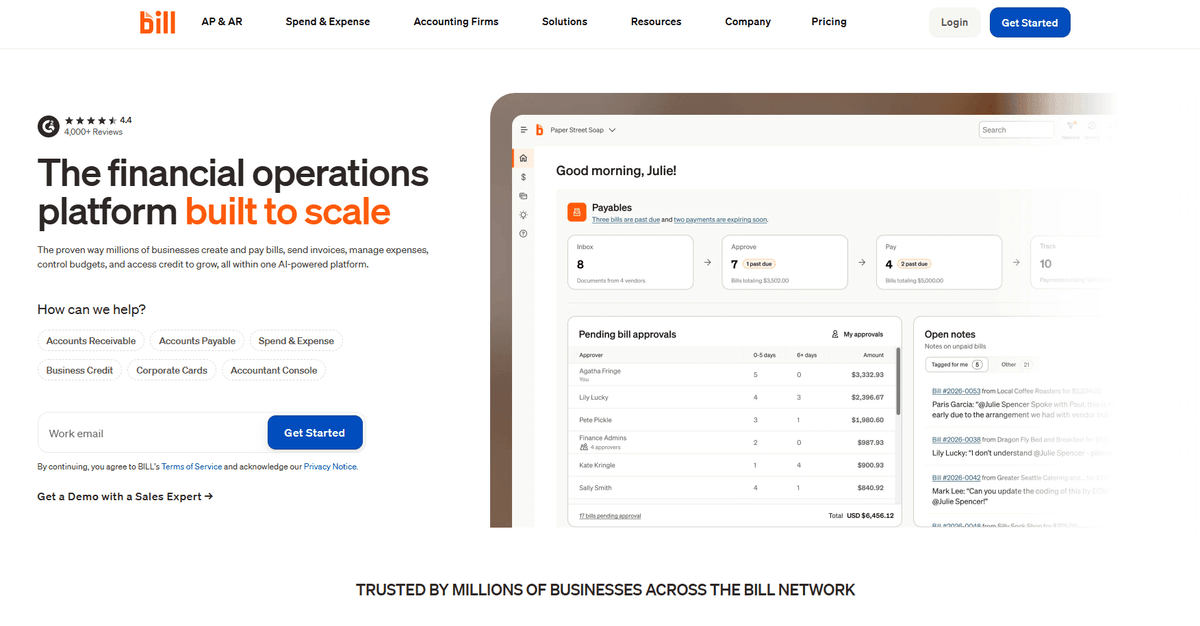
BILL is not a scheduling tool, and it earns its place here for what happens after the booking. Service teams that bill for booked time, consultations, onsite visits, or retainer hours, still have to turn those appointments into invoices, chase payment, and reconcile it against the books. BILL automates the accounts payable and receivable side of that loop for half a million businesses.
Key features:
- Agentic automation for accounts payable and invoicing, so approved work becomes an invoice without manual re-keying
- Real-time spend visibility across expenses, corporate cards, and travel in one view
- Invoice financing and treasury tools for teams that need to manage cash flow between booking and payment
- Fraud protection and approval controls built into every transaction
Pricing (2026): Essentials $45/user/month for basic AP or AR automation, Team $55/user/month adding accounting software integration, Corporate $79/user/month for custom workflows and permissions, Enterprise on request for multi-entity management.
No Albato connector. BILL does not integrate with Albato. It connects natively to accounting platforms such as QuickBooks, NetSuite, and Xero, and exposes an API for everything else.
Verdict: BILL is the pick for a service business whose scheduling problem ends where the billing problem begins. It does no scheduling of its own, so it sits alongside a booking tool from this list rather than replacing one.
How to Choose the Right Scheduling Tool for Your Pipeline
The right scheduling software depends on what happens after the meeting is booked, not just during the booking itself.
If your priority is sales pipeline integration, Calendly or HubSpot Meetings should be your starting point. Both connect directly to CRMs and support round-robin routing. Calendly gives you more scheduling flexibility and broader CRM coverage through Albato. HubSpot Meetings gives you zero-config CRM sync if you're already in HubSpot.
If your priority is paid appointments and client intake, Acuity Scheduling or Square Appointments handle payment collection, intake forms, and client management better than sales-focused tools. Both have Albato connectors for pushing appointment data to your CRM.
If your priority is cost, Cal.com (self-hosted), Setmore, and HubSpot Meetings all offer functional free plans. Cal.com's self-hosted version gives you the most features at zero cost, but requires technical resources to maintain.
If your priority is team control and open source, Cal.com is the only real option on this list. Self-host it, customize the code, and own your scheduling infrastructure completely.
🔧 How it works
When a prospect books a meeting through Calendly, Albato can automatically create a deal in your CRM and assign it to the rep who owns that account. It also sends a Slack notification to the sales channel and adds the prospect to a pre-meeting nurture sequence. All of this triggers the moment the booking is confirmed, with zero manual data entry. You can automate lead generation workflows beyond scheduling to cover form submissions, chat conversations, and ad leads in the same pipeline.
Whether you start with Calendly, Acuity, Cal.com, or any other tool from this list, the key is making sure your scheduling data reaches your CRM without manual steps. Albato connects scheduling tools to 1,000+ apps so bookings, cancellations, and rescheduled events flow into your pipeline automatically.
What to Look for in Appointment Scheduling Software
Not every scheduling tool feeds your pipeline. Here are the features that separate a booking page from a pipeline-connected scheduling system.
CRM sync (automatic, not manual). The booking should create or update a CRM record without anyone copying data. Check whether the tool offers native CRM integration, Albato connector, API access, or at minimum webhook support. If the answer is "export CSV and upload," keep looking.
Automated reminders and follow-ups. Meeting no-shows waste rep time and stall pipeline velocity. Look for tools that send email and SMS reminders before the meeting and follow-up messages after. Teams that also use helpdesk software should check whether their scheduling tool can trigger support workflows from post-meeting actions.
Lead qualification before booking. Routing forms, intake questionnaires, or conditional booking logic let you filter prospects before they take a time slot. This prevents unqualified leads from filling your team's calendar and keeps pipeline quality high. Once qualified leads do book, many teams hand them off to proposal software that auto-populates deal data from the CRM.
Round-robin and team routing. If more than one person on your team takes meetings, you need a distribution mechanism. Round-robin (equal distribution), weighted routing (prioritize closers), and territory-based assignment are the main options.
Payment collection (if applicable). Service businesses and consultants benefit from collecting payment or deposits at booking time. This reduces no-shows more effectively than reminders alone and simplifies the billing workflow.
FAQ
What is the best free appointment scheduling software?
For sales teams, HubSpot Meetings offers the best free scheduling experience because bookings flow directly into HubSpot CRM without any integration setup. For service businesses, Setmore's free plan supports up to 4 users with payment processing. Cal.com's free hosted plan provides unlimited calendars and event types, making it the most feature-rich free option for individuals and small teams.
How does scheduling software integrate with CRM systems?
Scheduling tools connect to CRMs through three main methods: native integration (built-in connectors like Calendly-to-Salesforce), no-code integration platforms like Albato that act as a bridge between the scheduling tool and your CRM, and direct API/webhook connections that require developer resources. Native integrations are simplest but limited to specific CRM pairs. Albato connectors cover a wider range of CRM combinations without code.
Can appointment scheduling software reduce meeting no-shows?
Yes. Automated email and SMS reminders are the most effective tactic, and most tools on this list include them on paid plans. Collecting payment or deposits at booking time (available in Acuity, Square, and YouCanBookMe) further reduces no-shows because prospects have financial commitment. Calendar invites that sync to the prospect's calendar also help by keeping the meeting visible in their daily view.
What is the difference between Calendly and HubSpot Meetings?
Calendly is a standalone scheduling platform that integrates with multiple CRMs (via native connectors or Albato) and focuses on scheduling features like routing forms, round-robin, and booking workflows. HubSpot Meetings is a scheduling feature embedded inside HubSpot CRM that offers zero-config CRM sync but limited scheduling sophistication. If HubSpot is your CRM, HubSpot Meetings is simpler to set up. If you use a different CRM or need advanced scheduling features, Calendly with an Albato connector is more flexible.
Is open-source scheduling software reliable enough for business use?
Cal.com is the primary open-source scheduling option, and it's used by thousands of businesses. The hosted version is managed by Cal.com's team and is reliable for most use cases. Self-hosting gives you full control but requires your team to handle uptime, security patches, and scaling. For non-technical teams, the hosted version or a proprietary tool like Calendly is the safer choice.
Read more: