


Organize AI-generated content for easy access and collaboration
Trello + Claude AI + Trello


In this article
In this article
Anthropic built Claude as a safety-focused alternative to ChatGPT, and in 2026 it is a full AI platform with web, desktop, and mobile apps, a coding agent (Claude Code), and API access through Anthropic and the major cloud providers. The newest model generation arrived in about two weeks: according to Anthropic's newsroom, Opus 5.5 shipped on September 22, Sonnet 5.5 on September 28, and Haiku 5.5 on October 7, 2026.

Let us build your automation or AI Agent
Tell us which process eats your time. Certified Albato engineers take it from there, A to Z.
Claude AI, also known as Claude.ai, is an AI assistant for writing, analysis, coding, and document work. Developed by Anthropic AI, a startup founded in 2021 by former OpenAI team members, the creators behind ChatGPT, Claude now competes directly with ChatGPT and Gemini for both consumer and business users.
Built on Anthropic's Constitutional AI language model, Claude AI is built on the transformer architecture, which has become the benchmark for natural language processing tasks. This architecture efficiently manages sequences of any length, effectively considering the context and relationships between words in various positions.
Claude AI, sometimes referred to as Claud AI, is capable of answering questions, composing texts, generating ideas, solving mathematical problems, and assisting with software engineering tasks. The same chat window handles creative writing, data cleanup, and technical problem-solving, so one tool covers most day-to-day text and code tasks. The safety features of Claude AI make it suitable for various computer use scenarios in both personal and professional settings.
If you're already familiar with popular AI chatbots like ChatGPT or Gemini, you'll easily understand how Claude AI works. If you're just beginning your journey with AI assistants and chatbots, don't be intimidated, the platform's operation is incredibly simple and resembles a classic chat window (imagine you're chatting with a colleague on WhatsApp or Slack).
You send the chatbot any message, whether it's composing a poem, solving a math problem, or writing code for your website. The bot responds in real-time within the chat, allowing you to review the answer and continue the conversation by requesting the next task or asking to improve the previous response. This back-and-forth interaction makes Claude AI a practical tool for various computer use scenarios, from casual conversations to complex problem-solving.

Anthropic sorts its models into four tiers: Haiku is the fastest and cheapest, Sonnet balances speed and intelligence, Opus is the recommended starting point for most workloads, and Fable is reserved for demanding reasoning and long-horizon agentic work. Prices below come from Anthropic's API pricing docs as of October 2026.
| Model | Best for | API price (input / output, per 1M tokens) | Context window |
|---|---|---|---|
| Haiku 5.5 | High-volume, latency-sensitive tasks such as classification, extraction, and routing | From $0.10 / $0.50 (prompts over 100K tokens cost more) | 1M tokens |
| Sonnet 5.5 | Everyday work: well-scoped tasks, bug fixes, documents, slides, and spreadsheets | $2 / $10 | 1M tokens |
| Opus 5.5 | Long-running agentic coding and knowledge work; Anthropic's default recommendation | $4 / $20 | 1M tokens |
| Fable 5.1 | Demanding reasoning and long-horizon agents when Opus 5.5 at higher effort falls short | $10 / $50 | 1M tokens |
In the Claude apps, model access depends on the plan. Free users get Sonnet and Haiku, Opus requires Pro or Max, and Fable is available on Pro through usage credits and on Max within its weekly limits. Every current model accepts text and images, supports tool use, and returns text.
The main difference between Opus, Sonnet, and Haiku is how much judgment a task needs versus how much each run costs. In its Sonnet 5.5 announcement, Anthropic describes Opus 5.5 as clearly stronger at complex, open-ended work, and Sonnet 5.5 as strongest at well-scoped everyday tasks, fixing bugs, and building documents, slides, and spreadsheets. Sonnet 5.5 kept the $2/$10 list price of Sonnet 5 and is Anthropic's fastest Sonnet model so far.
Haiku 5.5, released October 7, 2026, is the model Anthropic recommends for quick, repetitive workloads: summaries, database queries, classification, live customer support, and subagent work alongside Opus 5.5 or Sonnet 5.5. It is the first Haiku model with an adjustable effort setting, so teams can trade cost for intelligence per request. For marketing automation, that makes Haiku the cheaper choice for tagging leads or routing messages, while Sonnet or Opus handles writing and analysis.
Opus 5.5 is the first model of the Claude 5.5 family. In the Opus 5.5 launch post, Anthropic cut its list price to $4 per million input tokens and $20 per million output tokens, down from $5 and $25 on Opus 5, and raised five-hour usage limits on Pro, Max, Team, and seat-based Enterprise plans. Opus 5.5 is a strong fit for building AI agents that work through long, multi-step tasks.
For software teams, the current Sonnet and Opus models can write, edit, and run code, translate code between languages, and help update legacy systems or migrate codebases. Claude Code, Anthropic's agentic coding tool, works in the terminal, in VS Code and JetBrains IDEs, in the desktop app, and in the browser.
What's more is that both Claude Opus 4 and Sonnet 4 can use the web to extend their thinking and provide better results. They have also introduced Claude Code that supports background tasks via GitHub Actions and native integrations with VS Code and JetBrains and can be a perfect coding assistant.
Every current Claude model accepts images as input, so it can read charts, diagrams, and screenshots and transcribe text from photos of tables or documents. Claude does not generate images the way an image model does. Instead it builds charts, slides, and interactive visuals as code or files that you can open, edit, and download.
For example, you can upload a screenshot of a monthly traffic table and ask Claude for a presentation slide with a chart of the changes.
Please design a visually appealing slide for my presentation that includes a graph illustrating the monthly traffic changes. Use the traffic data from the screenshot of my table.
Anthropic's Artifacts feature lets Claude generate code in a dedicated window next to the chat and show the rendered result right away, such as SVG graphics or a working web page. Artifacts are included on the free plan.
Create a visually appealing and creative paragraph design in the form of an "info-box" for my article. Add soft blue shadows, rounded corners, and a subtle animation for the section (e.g., the section with text slightly lifts when hovered over). Additionally, I want key bolded words to have a blue outline appear around them when hovered over..
Artifacts in Claude AI are a separate workspace where Claude places the code, documents, designs, and small apps it creates, so you can see and test the result without leaving the conversation.
The essence of this feature is that when a user asks Claude AI to generate content, such as code snippets, text documents, website designs, to draw a picture, or even create a game, the artifacts appear in a special window next to your conversation with Claude AI. For example, if you ask to create a design and HTML code for your landing page, you'll not only see the code but also how your page will look after publishing, displayed in the adjacent window.
Artifacts in Claude AI let users generate and view content, such as code, designs, or games, in a dynamic workspace. The generated artifacts appear in a separate window alongside your conversation with Claude AI, enabling real-time editing and visualization of your creations.
This feature enhances productivity by allowing users to immediately copy, download, or publish their work, making it easy to share with colleagues or implement directly.
After reading some incredible examples, I followed a user's recommendation and asked Claude to create a Checkers game. My colleague and I were then able to play it directly in the Claude AI chat window. This creates a dynamic workspace where you can create, view what you've created, and, most astonishingly, edit your creations in real-time within Anthropic's Claude AI. It's simply amazing!
A quick way to test Artifacts is to ask Claude for a small playable game, such as checkers, and play it in the chat window.
Create a web-based checkers game and make it playable within Artifacts.
Additionally, after receiving the result, Claude AI will offer you the options to copy the code, download it in the required format, or publish it directly. This is extremely convenient because you can create a landing page or registration form and immediately share the results with colleagues.
Artifacts are part of the free Claude plan, so you can try them right after you log in. Usage limits still apply, and they are lower on Free than on Pro or Max.

For developers, Sonnet 5.5 and the other current Claude models are available through the Claude API, Amazon Bedrock, Google Cloud, and Microsoft Foundry. Typical uses of the Claude API include:
Because the API is billed per token, companies can add Claude to support, marketing, and finance workflows and pay only for the requests those workflows send. Prompt caching and batch processing lower the cost further for repeated or non-urgent requests.
Claude by Anthropic can also be easily integrated into your workflows or applications through platforms like Albato. By connecting Claude AI with your favorite apps on a no-code platform, you can use the Anthropic AI API to create custom integrations or automated processes without the need for developers or writing any code. This simplifies AI-powered solutions across your business, making it practical for teams to automate tasks and improve efficiency without extra engineering time.
Claude and ChatGPT cover the same core jobs, so the choice comes down to workflow. Claude AI from Anthropic is part of the AI chatbot family. This means that the interface, interaction style, and general range of tasks will be similar to what you've experienced before. So, if you've already used ChatGPT, getting started with Claude AI won't be difficult, and you'll quickly figure out how to navigate the platform.
Both Claude AI and ChatGPT offer free tiers. Claude's free plan includes the Sonnet and Haiku models, while ChatGPT's free plan runs on an OpenAI GPT model. Every current Claude model supports up to 1M tokens of context, which matters most when you work with long documents or large codebases.
And yet, which one should you choose, ChatGPT or Claude AI? Choosing between ChatGPT and Claude depends on your specific workflow. Both models are capable, with distinct strengths that cater to different use cases:
Anthropic released the Claude 5.5 family between September 22 and October 7, 2026, and made Fable 5.1 its top generally available model for demanding reasoning. In the Claude app, Cowork and chat merged into one Claude: you can hand over a report or a slide deck from a normal conversation, and Claude keeps working after you close your laptop. The merge is rolling out to Pro and Max first, with Team and Free to follow.
If you need native image generation or voice interaction, ChatGPT has the edge. For long-context analysis, coding assistance, and document-heavy workflows, Claude is the stronger choice. Claude AI's strengths in reasoning skills and frontier intelligence make it particularly useful for complex problem-solving and advanced knowledge Q&A tasks.
If you want to learn more about how to generate not only text but also images with genAI, check out our article about how to create images with Midjourney.
Claude AI offers a free tier and several paid plans. The free version includes Sonnet and Haiku, web search, file creation, Artifacts, and app connectors, with usage limits that reset every five hours.
Paid subscription options, per Anthropic's plan documentation as of October 2026:
API access is billed separately per token, from Haiku 5.5 at $0.10/$0.50 to Fable 5.1 at $10/$50 per million input/output tokens.
The Albato team has experimented with various AI chatbot platforms and, based on their experience, offers a few recommendations on how to effectively use Claude AI for your business:
1. Reduce the need for marketers to rely on developers. Claude AI is the best AI chatbot platform for working with code. Marketing teams often face simple coding tasks that end up being passed to the development team, distracting programmers from more critical tasks and creating a lack of focus. Claude AI can handle: Creating simple designs for forms on your website, generating basic scripts like JavaScript to process data, such as tables with marketing analytics.
2. Handle large datasets with ease. Claude AI can free you from the burden of processing huge amounts of data. For example, if you have user or customer behavior data spanning five years, and you need to create analytical summaries and interpretations, Anthropic's Claude can clean up the tables, remove empty rows, unnecessary symbols, and other clutter. It will find the necessary data, combine it, and calculate the financial and marketing metrics you need.
3. Create charts and presentations. Claude AI builds charts and presentation slides from your data and can export decks as PowerPoint or PDF. Its design capabilities allow you and your team to spend more time working on KPIs rather than crafting visuals for meetings.
4. Text and content generation. Claude AI shines when it comes to text-based tasks. It can save you significant time on content editing and proofreading, help generate article structures for your blog, suggest SEO keywords, and even write or polish your company's social media posts to make them more readable. It can also help brainstorm topics or create a content plan for your marketing strategy.
Beyond one-off prompts, you can put Claude to work as the decision-maker inside an automation. Albato's AI Agent is a step you drop into a scenario: it reads the incoming data, decides which action to run, and calls it, instead of you wiring fixed conditions by hand. Claude can be the model behind that step when you connect your own Anthropic account.
You set it up with four pieces. A model makes the decisions: pick Claude AI (Anthropic) as a connected provider and enter the model ID, or choose another supported option such as OpenAI, Gemini, DeepSeek, or Albato's built-in Albato AI. Instructions in plain language describe the task and the guardrails it must respect. Tools are the actions the agent may call, drawn from around 5,000 across connected apps, so it can look something up, write a record, or send a message. Optional memory keeps context across turns for chatbot-style flows.
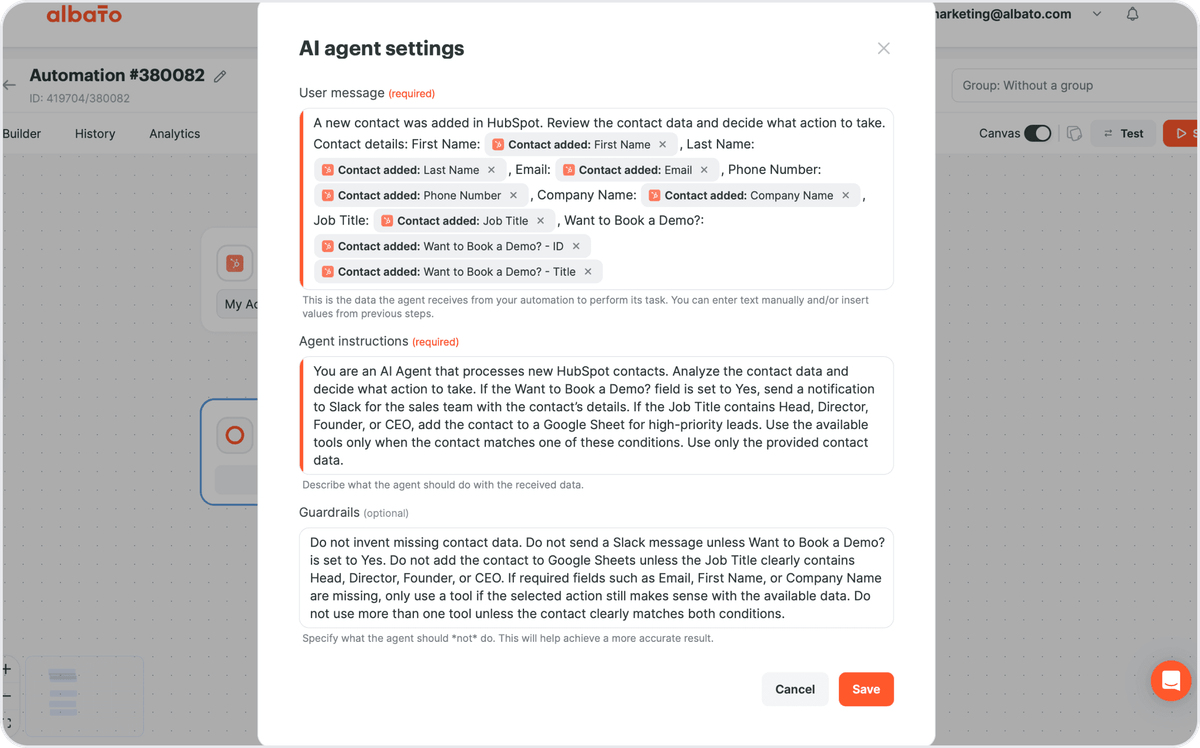
The field-level control is what makes this safe for real work. For any action you decide which values are fixed and which the agent chooses, using "Let the AI agent decide" per field. Each AI Agent run costs 3 transactions in Albato, and with Claude as the model there is no extra token charge from Albato because Anthropic bills the tokens on your own account. You can build the flow on the free plan and connect the tools you already use.
Outside the AI Agent step, Albato's Claude AI (Anthropic) connector offers a "Run text prompt" action and a long-running variant, so a regular scenario can send data to Claude and pass the answer to a CRM, inbox, or spreadsheet.
Yes. Claude offers a free tier with Sonnet and Haiku and usage limits that reset every five hours. Paid plans (Pro at $20/month, Max at $100 or $200/month) raise usage limits and add Claude Code and Opus.
Opus 5.5 is Anthropic's recommended default for long-running agentic coding and knowledge work ($4/$20 per million tokens). Sonnet 5.5 is faster and cheaper for everyday tasks ($2/$10). Haiku 5.5 handles high-volume work like classification and routing (from $0.10/$0.50), and Fable 5.1 sits above Opus for the most demanding reasoning ($10/$50).
Claude excels at long-context tasks (up to 1M tokens), coding assistance, and document analysis. ChatGPT has native image generation, voice features, and broader multimodal capabilities. Both offer free tiers and competitive API pricing.
Claude Code is Anthropic's agentic coding tool. It reads your codebase, edits files, and runs commands in the terminal, in VS Code and JetBrains IDEs, in the desktop app, and in the browser. It is included in every paid Claude plan.
Yes. Through the API, Claude connects to thousands of apps. Albato offers no-code integrations linking Claude AI to 1,000+ business tools like CRMs, email platforms, and project management apps. Teams building more autonomous workflows can also run Claude inside AI agents that take actions across those tools without manual steps.
Claude AI has matured from a text-focused chatbot into a full productivity platform. With desktop and mobile apps, Claude Code for developers, background tasks that keep running after you close the chat, and MCP connectors that link the model to external tools, Claude now produces finished documents, slides, and code as well as answers.
The October 2026 lineup gives a clear choice by workload: Opus 5.5 as the default for complex work, Sonnet 5.5 for everyday tasks, Haiku 5.5 for high-volume automation, and Fable 5.1 for the hardest long-running problems. All four share a 1M token context window, which suits document-heavy and coding workflows.
If you're looking for a tool that can help you connect Claude AI to your favorite tools try Albato. It has integrations with 1,000+ apps including popular ones like HubSpot and Slack to more niche and regional ones.
Read more:


Hand-picked content and zero spam!

Side-by-side comparison of GPT-5.5, Grok 4.3, Claude Opus 4.8, and Gemini 2.5 Pro: pricing, benchmarks, and the best use case for each.

Claude Artifacts turn chats into a live workspace for apps, docs, and dashboards. Learn what they are and how to use them in 7 ways.

AI prompt engineering for SaaS users in 2026: why prompt-aware users retain longer, the guardrails-plus-power pattern, and how Embedded iPaaS plus AI fits.

Learn how AI agents and Albato automate customer service workflows—from ticket triage to WhatsApp replies and CRM updates.

In this article, you will learn five practical ways to connect and automate Claude AI with Albato. Learn how to boost workflows, integrate apps, and streamline business tasks.

In this article, you will find some examples of powerful AI automations with ChatGPT, Claude, and other LLMs you can set up with Albato to boost productivity and streamline your business processes effortlessly.

In this post, you will learn about the top 5 ways how artificial intelligence (AI), agents, and MCP are transforming the SaaS industry.

Compare the top generative AI models (Nov 2026): GPT-6, Claude Opus 5.5, Gemini 4 Argon, Grok 4.7 and DeepSeek V4, with pricing and the best pick per task.

Ranked list of the best AI tools in 2026 for business, SEO, writing, image generation, video, sales, and coding, with pricing and free options.

In this article, you’ll learn how to document your workflow automations using AI easily, and how a platform like Albato helps simplify the process from end to end.
In this article, you’ll learn how to craft effective AI prompts that generate useful Albato integration ideas—and how to turn those ideas into real workflows without writing a line of code.
Set up AI auto-replies to customer emails in minutes. Connect Gmail or Outlook, let an AI model draft the answer, and log it to your CRM. No code.


