In this article
Key Takeaways
- Top picks by scenario: Google Analytics 4 for free overall traffic and conversion tracking, Triple Whale for Shopify DTC attribution, Klaviyo for email and SMS revenue attribution, Mixpanel for product and funnel analytics, and Hotjar for behavioral heatmaps and session recordings.
- The right tool depends on whether you need behavioral heatmaps, marketing attribution, or unified profitability dashboards. Most stores need at least two tools working together.
The average online retailer now runs dozens of software applications to manage orders, marketing, shipping, and customer support. When sales data lives in that many places, spreadsheets stop being a solution and start being the problem. The tools below are built to pull those data streams into one view so you can stop guessing which channels actually drive profit.

Let us build your automation or AI Agent
Tell us which process eats your time. Certified Albato engineers take it from there, A to Z.
How We Selected These Tools
We started with 25+ ecommerce analytics platforms and narrowed the list to 12 based on five weighted criteria:
| Criteria | Weight | What We Looked For |
|---|---|---|
| Multi-channel tracking | 25% | Can it pull data from Shopify, Amazon, paid ads, email, and social in one dashboard? |
| Integration depth | 25% | Number of native connectors, API quality, and compatibility with tools like Albato for custom data flows |
| Pricing transparency | 20% | Published pricing, predictable scaling costs, free tier availability |
| Ease of setup | 15% | Time to first insight: minutes vs. weeks |
| AI and automation | 15% | Predictive analytics, automated alerts, anomaly detection |
We also checked each tool's Albato connector availability, because analytics data only becomes useful when it flows into your CRM, marketing stack, or notification systems without manual exports.
Comparison Table
The table below summarizes pricing, free tiers, and Albato connector availability for all 12 tools.
| Tool | Best For | Starting Price | Free Tier | Albato Connector | Key Strength |
|---|---|---|---|---|---|
| Google Analytics 4 | Overall web + ecommerce tracking | Free | Yes (full) | Yes (1 trigger, 10 actions) | Deepest free analytics with ML insights |
| Triple Whale | Shopify DTC attribution | $179/mo | Yes (limited) | No | First-party pixel + profit tracking |
| Fullstory | Behavioral analytics & CRO | Custom (from ~$199/mo) | No | No | Session replays, Rage Click detection, and UX friction analysis |
| Klaviyo | Email/SMS revenue attribution | $20/mo (500 contacts) | Yes (250 profiles) | Klaviyo connector (4 triggers, 11 actions) | Predictive CLV + churn scoring |
| Mixpanel | Product and funnel analytics | Free (1M events) | Yes | No | Cart-level behavioral analysis |
| Hotjar | Behavioral heatmaps + recordings | Free | Yes (200K sessions) | No | See exactly where shoppers drop off |
| Amplitude | Product analytics at scale | Free | Yes | No | Journey mapping + experimentation |
| Kissmetrics | Person-level ecommerce tracking | $99/mo | Yes (7-day trial) | Kissmetrics connector (1 trigger, 1 action) | Individual customer journey tracking |
| Glew | Multi-channel ecommerce BI | Custom pricing | No | No | 170+ native ecommerce connectors |
| Looker Studio | Custom reporting dashboards | Free | Yes (full) | No | 800+ data connectors, fully customizable |
| Whatagraph | Marketing agencies and multi-brand ecommerce operators | Custom pricing (based on data sources and scale) | No | Yes (via webhooks or data warehouse connectors like Google BigQuery) | Scalable, unified data hub that eliminates silos across multi-channel campaigns |
| Paz.ai | Visibility on AI shopping surfaces | $119/mo (500 products) | No (14-day trial) | No native connector; API and webhooks | Catalog enrichment for AI search |
1. Google Analytics 4
Google Analytics 4 is the default starting point for ecommerce analytics.

Google Analytics 4 remains the default starting point for ecommerce tracking, and for good reason: it covers web traffic, conversion funnels, audience segmentation, and marketing attribution without charging a dollar for most businesses.
GA4's event-based tracking model replaced the old session-based approach, which means you can now track granular ecommerce events like add_to_cart, begin_checkout, purchase, and refund as discrete data points with up to 27 custom parameters per item. That level of detail matters when you need to figure out which product pages convert best or where shoppers abandon their carts.
The machine learning layer surfaces automated insights (anomaly detection, predictive audiences, churn probability) that used to require a dedicated data team. Cross-device tracking stitches together a shopper's journey from mobile browse to desktop purchase, which is increasingly common in ecommerce.
Where GA4 falls short: The learning curve is real. The interface was redesigned from scratch compared to Universal Analytics, and building custom ecommerce reports still takes time. GA4 also samples data on high-traffic properties (above ~500K events per day in explorations), which can skew results for larger stores. For unsampled data, Google Analytics 360 starts at roughly $50,000 per year.
Albato integration: GA4 connects to Albato with GA4 connector (1 trigger, 10 actions), including custom events, lead generation events, and cart actions. You can route GA4 conversion data into your CRM, send purchase events to Slack channels, or trigger follow-up sequences in your email tool based on specific ecommerce events.
Pricing: Free for standard use. Google Analytics 360 starts at ~$50,000/year for enterprise-grade features and unsampled data.
Best for: Every ecommerce store as a baseline. Pair it with a behavioral tool (Hotjar) or attribution tool (Triple Whale) for the full picture.
💡 Tip
GA4's Explorations reports are where the real ecommerce insights live. The standard reports give you surface-level metrics, but Explorations let you build funnel analysis, path analysis, and cohort reports that reveal exactly where revenue leaks happen.
Next on our list:
2. Triple Whale

Triple Whale built its reputation as the analytics platform for Shopify-based DTC brands, and in 2026, more than 50,000 ecommerce brands use it for attribution and profitability tracking. The platform's core strength is its first-party pixel (Triple Pixel), which captures purchase data directly from your store and ties it back to specific ad clicks across Meta, Google, TikTok, Snapchat, Pinterest, and X.
Where most analytics tools stop at "this campaign generated $X in revenue," Triple Whale factors in ad spend, shipping costs, COGS, and returns to show actual profit per channel, per campaign, and per creative. That distinction matters enormously when a campaign looks profitable on ROAS but is actually losing money after fulfillment costs.
The AI layer (Moby) is genuinely useful here: it generates channel budget reallocation suggestions, creative briefs based on winning ad patterns, and audience recommendations grounded in your actual conversion data rather than generic benchmarks.
Where Triple Whale falls short: It is deeply tied to Shopify. If you run WooCommerce, BigCommerce, or a custom storefront, Triple Whale is not the right fit. Pricing scales with your store's GMV, which can get expensive quickly for high-revenue brands. The free Founders Dash is limited to basic dashboards.
Albato integration: Triple Whale does not currently have a native Albato connector. However, you can still route data through webhook-based workflows or use shared tools like Google Sheets as an intermediary to push Triple Whale exports into your broader automation stack.
Pricing: Free (Founders Dash, limited). Starter: $179/month. Advanced: $259/month. Custom: $539/month (for $20M+ GMV). Annual billing available. Pricing scales with GMV.
Best for: Shopify DTC brands spending $5K+/month on paid ads who need real profitability numbers, not just ROAS.
3. Fullstory

Fullstory provides a behavioral layer to ecommerce analytics that goes beyond standard conversion tracking. While most tools record what happens, Fullstory reveals why it happens by capturing every click, scroll, and mouse movement. Its "FullCapture" technology automatically records user sessions, allowing you to replay exactly how customers navigate your checkout flow or interact with new product features without needing manual event tagging.
This granular data is key for identifying "Rage Clicks" and "Dead Clicks", clear signals of user frustration and revenue leaks that numerical reports might overlook. By quantifying the impact of UX friction, Fullstory helps ecommerce teams prioritize technical fixes that directly lift conversion rates and customer loyalty.
Where Fullstory falls short: The pricing model is based on session volume and can scale quickly for high-traffic stores. Additionally, the depth of behavioral data can be overwhelming for teams without a dedicated analyst to translate insights into action.
Albato integration: Fullstory does not currently have a native Albato connector. However, you can use Fullstory’s webhooks or API to send behavioral events to Albato, enabling you to automate workflows in your CRM, support tools, or Slack based on user behavior.
Pricing: Custom volume-based pricing; entry-level plans generally start around $199/month.
Best for: Growing ecommerce brands focused on conversion rate optimization (CRO) and identifying hidden friction points in the digital customer journey.
4. Klaviyo

Klaviyo started as an email marketing platform but has evolved into a full ecommerce analytics engine with four core products: Marketing, Analytics, Service, and Data. For stores that rely heavily on email and SMS for revenue (which is most ecommerce businesses), Klaviyo's analytics layer provides something the standalone analytics tools cannot: direct attribution from campaign to purchase with segment-level granularity.
The predictive analytics capabilities stand out. Klaviyo builds CLV predictions, expected next order dates, and churn risk scores for individual customers using your store's actual purchase history. That data feeds directly into automated flows (abandoned cart, win-back, VIP tier upgrade), which means the analytics and the action happen in the same platform.
Real-time syncing from Shopify and WooCommerce keeps customer profiles current, and the segmentation engine supports behavioral, predictive, and demographic filters with 350+ platform integrations.
Where Klaviyo falls short: Pricing scales steeply with contact list size. The Email plan starts at $20/month for up to 500 active profiles and 15,000 emails. The Marketing Analytics add-on costs an additional $100/month. And while Klaviyo's analytics are strong for email/SMS attribution, it does not track on-site behavior (heatmaps, scroll depth, session recordings) the way dedicated behavioral tools do.
Albato integration: Klaviyo connects to Albato with Klaviyo connector, covering profile creation, event tracking, list management, and campaign triggers. This lets you route purchase data from non-Klaviyo sources into Klaviyo segments, sync customer profiles across your CRM and analytics stack, or trigger automations based on events happening in other tools.
Pricing: Free (250 profiles, 500 emails/month, 150 SMS credits). Email plan from $20/month (500 contacts). Email + SMS from $60/month. Marketing Analytics add-on: $100/month.
Best for: Ecommerce stores where email and SMS drive a significant share of revenue and you want attribution, segmentation, and automation in one tool.
5. Mixpanel

Mixpanel has repositioned itself for ecommerce with dedicated features launched in 2025-2026: automatic page view tracking, cart-level analysis, and revenue analytics powered by warehouse connectors. The result is a product analytics platform that understands ecommerce-specific events (browse, add to cart, checkout, purchase) at a depth that general analytics tools do not reach.
The Cart Analysis feature is particularly useful. It lets you inspect what was in a shopper's cart at any point in their journey, down to item category, brand, and price. If you notice a spike in cart abandonment at a specific step, you can drill into the exact products and price points that correlate with drop-off.
Mixpanel's event-based architecture tracks every user interaction (up to 1 million events/month for free), and the Growth plan extends that with behavioral cohorts, session replays (up to 20K/month), and formula-based custom metrics. The AI assistant (Spark) handles natural language queries like "show me conversion rate by acquisition channel for the past 30 days."
Where Mixpanel falls short: Enterprise pricing is opaque (typically $25,000-$30,000+/year). The Growth plan charges roughly $0.28 per 1,000 events after the free tier, which can add up unpredictably for high-traffic stores. Mixpanel also requires more setup work than plug-and-play tools like Triple Whale. You need to instrument your tracking properly to get useful data.
Albato integration: Mixpanel does not currently have a native Albato connector. For stores that need to push Mixpanel event data into CRM or marketing tools, you can use webhooks or route data through a shared data layer like Google Sheets or Google BigQuery.
Pricing: Free (1M events/month). Growth plan: first 1M free, then ~$0.28/1K events. Enterprise: custom pricing (typically $25K+/year).
Best for: Product-led ecommerce teams that need to understand on-site behavior at the event level, not just marketing attribution.
⚠️ Important
Mixpanel's free tier is generous at 1M events/month, but ecommerce stores with moderate traffic can blow through that quickly. A store with 50,000 monthly visitors averaging 20 events per session would hit 1M events in the first month. Check your estimated event volume before committing.
Next on our list:
6. Hotjar

Hotjar answers a question that numbers-based analytics tools cannot: what are shoppers actually doing on your pages? Session recordings show real user behavior (mouse movements, scrolling patterns, click targets), heatmaps aggregate that data into visual overlays, and conversion funnels highlight exactly where users drop off between product page and checkout.
For ecommerce specifically, this is invaluable for diagnosing conversion problems. A 3% cart abandonment rate in GA4 tells you something is wrong. A Hotjar recording showing users clicking a broken "apply discount code" button tells you exactly what to fix.
The platform (now part of Contentsquare) offers three products: Observe (heatmaps, recordings), Ask (surveys, feedback widgets), and Engage (user interviews). The free tier is generous at up to 200,000 sessions per month for basic heatmaps and recordings, which covers most stores comfortably.
Where Hotjar falls short: Hotjar is a diagnostic tool, not a reporting tool. It does not track revenue, attribute sales to channels, or build the kind of cross-channel marketing reports that pull every source into one view. You need it alongside GA4 or another analytics platform, not instead of one. The paid Growth plan starts at $49/month for advanced features like journey analysis and AI-powered insights, scaling with session volume.
Albato integration: Hotjar does not have a native Albato connector. Since Hotjar is primarily a front-end observation tool (JavaScript-based), its data stays within the Hotjar dashboard. You can export insights manually or use Hotjar's integrations with Slack, HubSpot, and Segment for basic workflow triggers.
Pricing: Free (200K sessions/month, basic heatmaps and recordings). Growth: from $49/month (advanced features, AI insights). Pro and Enterprise: custom pricing. Now part of Contentsquare's product suite.
Best for: Any ecommerce store that needs to diagnose conversion problems visually. Pair it with GA4 for the full picture of "what happened" plus "why it happened."
7. Amplitude

Amplitude positions itself as a product analytics platform, but its ecommerce-specific features (Cart Analysis, pre-built ecommerce integrations, journey mapping) make it a strong contender for online stores that want deeper behavioral insights than GA4 provides.
The journey mapping feature is particularly strong for ecommerce. It automatically identifies the most common paths shoppers take from landing page to purchase (and the paths that lead to bounce), which helps you optimize page flow without guessing. The experimentation suite lets you run A/B tests on product pages, checkout flows, and pricing displays with built-in statistical rigor.
Amplitude's Free plan includes 2M events per month forever, plus analytics, feature flags, session replay, and activation features. The Plus plan uses event-based pricing and starts at $0 with the first 2M events free, scaling up from there, with Growth and Enterprise tiers for larger operations.
Where Amplitude falls short: The platform is built for product teams, and the terminology reflects that (events, properties, behavioral cohorts). Ecommerce marketers may find the setup and mental model less intuitive than tools designed specifically for online retail. Growth plan pricing is not published, which makes budgeting difficult for scaling stores.
Albato integration: Amplitude does not currently have a native Albato connector. For teams that need to route Amplitude insights into marketing or CRM tools, API-based integrations or data warehouse connections (BigQuery, Snowflake) through Albato's BigQuery connector provide a path.
Pricing: Free: 2M events/month forever. Plus: event-based, starts at $0 with the first 2M events free. Growth and Enterprise: custom pricing.
Best for: Ecommerce teams with a product-led mindset that want experimentation and behavioral analytics beyond what GA4 offers.
💡 Tip
Amplitude's journey mapping pairs well with experimentation: spot the highest-traffic path from landing page to purchase, then run an A/B test on the one step in that path with the worst conversion rate. That sequence usually finds revenue lift faster than redesigning the whole funnel at once.
Next on our list:
8. Kissmetrics

Kissmetrics was built specifically for ecommerce and SaaS businesses that need person-level tracking, meaning it ties every page view, click, and purchase to an identified individual rather than an anonymous session. This matters for ecommerce because it lets you see the complete customer journey: from first ad click through multiple browsing sessions to eventual purchase, across devices and over weeks or months.
The funnel reports show exactly where customers drop off in checkout, with the ability to segment abandoners by traffic source, device, or behavioral pattern. That segmentation connects directly to automated recovery emails, turning analytics insight into immediate revenue recovery.
Cohort analysis tracks how customer groups behave over time (LTV trends, repeat purchase rates by acquisition channel), which is essential data for deciding where to invest your marketing budget.
Where Kissmetrics falls short: While the $99/month starting price is more accessible than enterprise tools, the 500,000 events/month cap means high-traffic stores will need to negotiate custom pricing. The platform's strength (person-level tracking) requires proper identity resolution setup, which adds implementation complexity. The UI, while functional, feels dated compared to newer tools like Amplitude or Mixpanel.
Albato integration: Kissmetrics connects to Albato with Kissmetrics connector, allowing you to route ecommerce events between Kissmetrics and your broader tool stack. You can trigger CRM updates, notification workflows, or email sequences based on Kissmetrics events.
Pricing: 7-day free trial. Core plan: $99/month (500K events included). Price guaranteed for first 2 months. Usage-based pricing scales with event volume after that. Enterprise: custom pricing.
Best for: Mid-size ecommerce stores ($1M+ revenue) that need to understand individual customer journeys and tie analytics directly to retention workflows.
9. Glew

Glew is purpose-built for multi-channel ecommerce. While GA4 and Mixpanel track on-site behavior, Glew connects to your Shopify, WooCommerce, or Magento store alongside your ad platforms, email tools, shipping providers, and accounting software to create a unified view of business performance. With 170+ native integrations, it pulls data that other tools miss: COGS, shipping costs, return rates, and true profit margins.
The platform ships with hundreds of pre-built dashboards covering performance KPIs, customer analytics (LTV, cohort analysis, RFM segmentation), marketing analytics (attribution, channel ROI), and product/inventory analytics. The 30+ pre-built customer segments let you identify high-value buyers, at-risk churners, and seasonal shoppers without manual configuration.
Where Glew falls short: Pricing is custom and not publicly available, which makes it difficult to evaluate without a sales conversation. The platform is optimized for Shopify, WooCommerce, and Magento, so stores on less common platforms may find limited support. Some users report that the depth of data can be overwhelming without dedicated analytics resources.
Albato integration: Glew does not have a native Albato connector. However, Glew's report scheduling feature can export data via email or to Google Sheets, which can then flow into your broader automation stack through Albato's Google Sheets connector.
Pricing: Custom pricing (contact sales). Plans range from basic features to enterprise-grade with full API access. Annual prepayment required for advanced tiers.
Best for: Multi-channel ecommerce operators (Shopify, WooCommerce, Magento) who need profitability and inventory analytics across every sales channel in one platform, with a centralized dashboard view of profit margins, inventory performance, and multi-channel sales data.
🔧 How it works
Glew's RFM (Recency, Frequency, Monetary) segmentation automatically groups your customers into actionable segments. "Champions" (recent, frequent, high-spend) get VIP treatment. "At risk" (formerly active, declining) get win-back campaigns. This runs continuously without manual tagging.
Next on our list:
10. Looker Studio

Looker Studio (formerly Google Data Studio) is not an analytics tool in the traditional sense. It does not collect data. Instead, it connects to your existing data sources (GA4, Shopify, ad platforms, CRMs, spreadsheets) and lets you build custom dashboards and reports that combine everything into a single visual layer.
For ecommerce teams juggling data across five or ten platforms, this solves a real problem: instead of logging into GA4 for traffic, Shopify for orders, and Meta Ads Manager for campaign performance, you pull all three into one interactive report. With 800+ data connectors (through native integrations and third-party connectors like Supermetrics), virtually any data source can feed into your dashboards.
The collaborative editing feature lets multiple team members work on the same report simultaneously, and shared reports are interactive for viewers without needing their own Looker Studio accounts.
Where Looker Studio falls short: It requires you to understand your data structure. Building useful ecommerce dashboards means knowing which metrics matter, how to join data sources correctly, and how to set up calculated fields. Pre-built templates help, but customization requires effort. It also depends entirely on the quality and freshness of its data connections.
Albato integration: Looker Studio does not have a native Albato connector. However, since Looker Studio reads from data sources rather than collecting its own data, the integration path runs through your connected tools. Push ecommerce data into Google Sheets or BigQuery using Albato, and Looker Studio visualizes it automatically.
Pricing: Free (standard). Looker Studio Pro: $9/user/month (adds team management, SLAs, Google Cloud support).
Best for: Ecommerce teams that already have data in multiple tools and need a single reporting layer to tie everything together. Ideal complement to any analytics tool on this list.
11. Whatagraph
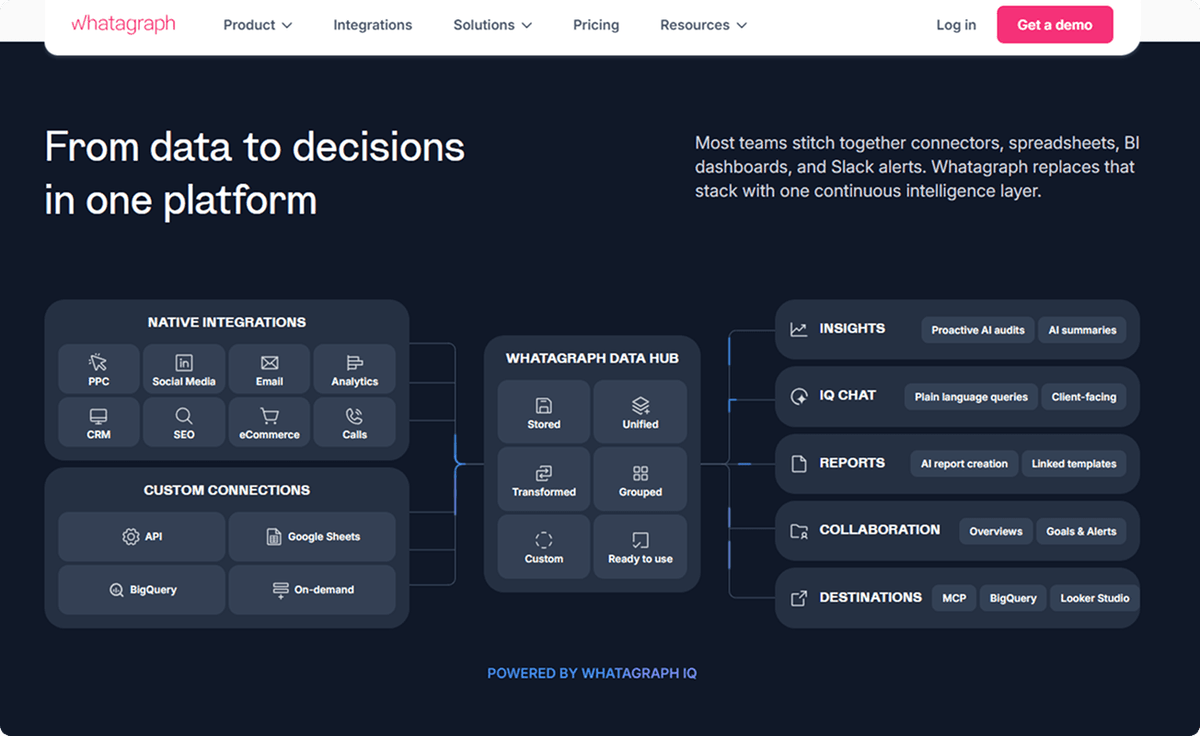
Whatagraph is an AI-ready marketing intelligence platform built for ecommerce brands and agencies that have outgrown manual spreadsheets. It functions as a unified data hub, consolidating marketing performance from Shopify, Amazon, and social media channels into a single, governed foundation. This ensures that metrics like ROAS, CAC, and LTV remain consistent whether you're viewing them in a client report, a team dashboard, or an AI-driven chat.
The platform’s core strength lies in its scalability. With features like linked reports and scalable themes, teams can manage reporting for dozens of brands or hundreds of locations from one place. Whatagraph also supports custom metrics and dimensions, allowing you to define your business logic once and apply it across all your data sources automatically.
Where Whatagraph falls short: The platform is built for scale, which might make it a heavy lift for very small businesses that only use one or two marketing channels. Some of its most advanced AI agents are still being rolled out, and getting the most out of the governed data foundation requires an initial setup phase to align metrics across sources.
Albato integration: You can connect Whatagraph to your automation stack via Albato by using webhooks or data warehouse connectors like Google BigQuery. This enables you to push governed marketing data into your CRM, Slack, or other business tools to trigger actions based on real-time performance trends.
Pricing: Custom pricing based on the number of data sources and scale of reporting; offers significant cost savings compared to enterprise tools like Funnel.
Best for: Marketing agencies and multi-brand ecommerce operators who need a scalable, unified reporting layer that eliminates data silos.
12. Paz.ai
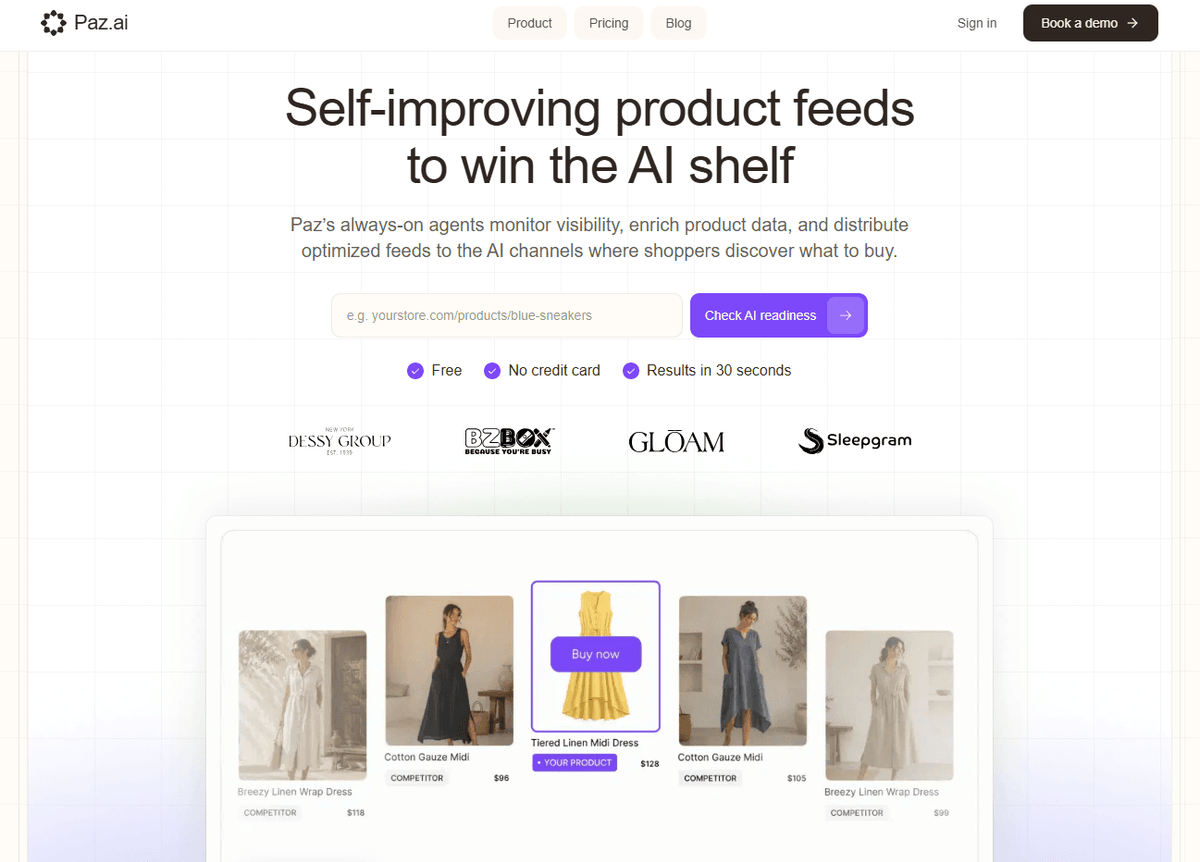
Paz.ai is an AI-first catalog optimization platform built to help brands capture traffic from the "AI shelf": channels like ChatGPT, Perplexity, and Google AI Overviews.
As AI search becomes a real discovery channel, Paz.ai uses always-on agents to monitor product visibility and benchmark your catalog against competitors. It identifies the specific queries where you are missing and surfaces the data gaps that keep you from being recommended.
Paz enriches product data and distributes optimized feeds to AI platforms so your catalog stays contextually relevant. Industry data shows AI-referred sessions can convert at meaningfully higher rates than traditional search, which is the case the tool is built on.
Where Paz.ai falls short: It focuses on Shopify, Adobe Commerce, and Salesforce, which makes it a poor fit for custom storefronts. The price point reflects enterprise-grade AI monitoring and will be more than smaller stores need.
Albato integration: Paz.ai does not have a native Albato connector. It exposes an API and webhooks, so visibility alerts and catalog updates can be routed into the rest of your stack through Albato's HTTP request.
Pricing: Starter $119/month for 500 products, Growth $279/month for 5,000 products, billed annually with a 14-day free trial.
Best for: Brands that want to win the "AI shelf" and optimize for AI-driven product recommendations.
How to Build a Complete Ecommerce Analytics Stack
No single tool covers every angle. Based on common ecommerce needs, here are three practical combinations:
Stack 1: Budget-friendly ($0) Google Analytics 4 (traffic + conversions) + Hotjar free tier (behavioral diagnostics) + Looker Studio (custom dashboards). Total cost: $0.
Stack 2: Growth-stage DTC ($200-$500/month) Triple Whale (attribution + profitability) + Klaviyo (email/SMS analytics + automation) + GA4 (baseline). Connect Klaviyo to your CRM through Albato to keep customer data synchronized.
Stack 3: Multi-channel enterprise ($500+/month) Glew (unified multi-channel BI) + Mixpanel or Amplitude (product behavior) + GA4 (SEO traffic). Route data between platforms using Albato's 1,000+ connectors to eliminate manual exports.
The key principle: use a quantitative tool (what happened) alongside a qualitative tool (why it happened), connected through an integration layer that keeps data flowing automatically. Manual CSV exports between analytics platforms is exactly the kind of repetitive work that no-code automation was built to replace.
What to Look For When Choosing an Ecommerce Analytics Tool
If the comparison table and tool breakdowns have not narrowed your options enough, focus on these five factors:
1. What channels do you actually sell on? If you are Shopify-only, Triple Whale or Klaviyo will give you the most relevant insights. If you sell across Shopify, Amazon, Etsy, and wholesale, Glew's multi-channel aggregation becomes essential.
2. What question are you trying to answer? "Where does my traffic come from?" is a GA4 question. "Why do people abandon their cart?" is a Hotjar question. "Which customers will churn next month?" is a Klaviyo or Kissmetrics question. Start with the question, not the tool.
3. What is your data infrastructure? If you have a data warehouse (BigQuery, Snowflake), tools like Mixpanel and Amplitude integrate natively. If you run everything through Shopify with no custom infrastructure, look for tools with direct Shopify connectors.
4. Who will use the data? Marketers need dashboards and pre-built reports. Product teams need event-level exploration. Founders need P&L-style profitability views, ideally connected to their accounting software for a full financial picture. The tool should match the user, not just the use case.
5. How does data get from analytics to action? An insight without a follow-up workflow is just trivia. Check whether the tool integrates with your email platform, CRM, and ad platforms natively, or through a no-code integration platform like Albato that can bridge the gap.
💡 Tip
Before committing to any paid analytics tool, check whether the free tier covers your needs for the first 6-12 months. GA4, Mixpanel (1M events), Amplitude (free tier), and Hotjar (200K sessions) all offer genuinely usable free plans. Start free, identify gaps, then invest in the specific tool that fills them.
Below are answers to common questions about ecommerce analytics tools, covering tool selection, data integration, and cost considerations.
FAQ
What is the best free ecommerce analytics tool?
Google Analytics 4 is the most comprehensive free option. It covers traffic analysis, conversion tracking, audience segmentation, and ecommerce event tracking (cart additions, checkout, purchases) with machine learning insights included. For behavioral analytics, Hotjar's free tier (200K sessions/month) adds heatmaps and session recordings. Used together, they cover quantitative and qualitative analysis at zero cost.
Can I track sales from multiple channels in one dashboard?
Yes, but the approach depends on your budget. Glew natively aggregates data from Shopify, WooCommerce, Magento, ad platforms, and fulfillment tools into unified dashboards. For a free option, Looker Studio connects to 800+ data sources and lets you build custom multi-channel reports. You can also use Albato to route sales data from various platforms into Google Sheets, which Looker Studio then visualizes.
How do ecommerce analytics tools integrate with CRM and marketing platforms?
Most tools offer native integrations with major CRM and marketing platforms (HubSpot, Salesforce, Klaviyo). For tools that lack a specific native integration, no-code platforms like Albato bridge the gap by connecting 1,000+ apps through triggers and actions. For example, you can route GA4 conversion events to your CRM, sync Klaviyo segments with ad platforms, or push Kissmetrics events into Slack notifications, all without code.
Do I need more than one analytics tool for my ecommerce store?
For most stores, yes. Analytics tools specialize: GA4 handles traffic and conversion tracking, Hotjar diagnoses on-site behavior, Triple Whale tracks ad profitability, and Klaviyo attributes email/SMS revenue. The best approach is to combine a quantitative tool (what is happening) with a qualitative tool (why it is happening), connected through an integration layer that keeps data synchronized automatically.
Read more: