

How to Connect Odoo to Albato
IN THIS ARTICLE
Odoo is an all-in-one business management software suite that helps teams manage CRM, sales, billing inventory and warehouse operations. Connect Odoo with Albato to integrate it with over 800+ apps, including AI tools like Claude and ChatGPT. Follow the steps below to set it up.
- Log in to your Albato account.

- Go to the Apps section and click Add a connection.

- Search for Odoo, select it, and click Add a connection again.

- To get your API key, log in to your Odoo account in a new tab.

- Click on your User icon, then go to Preferences.

- Then, select the Account Security tab.

- Click New API Key to generate a new key, and copy it.

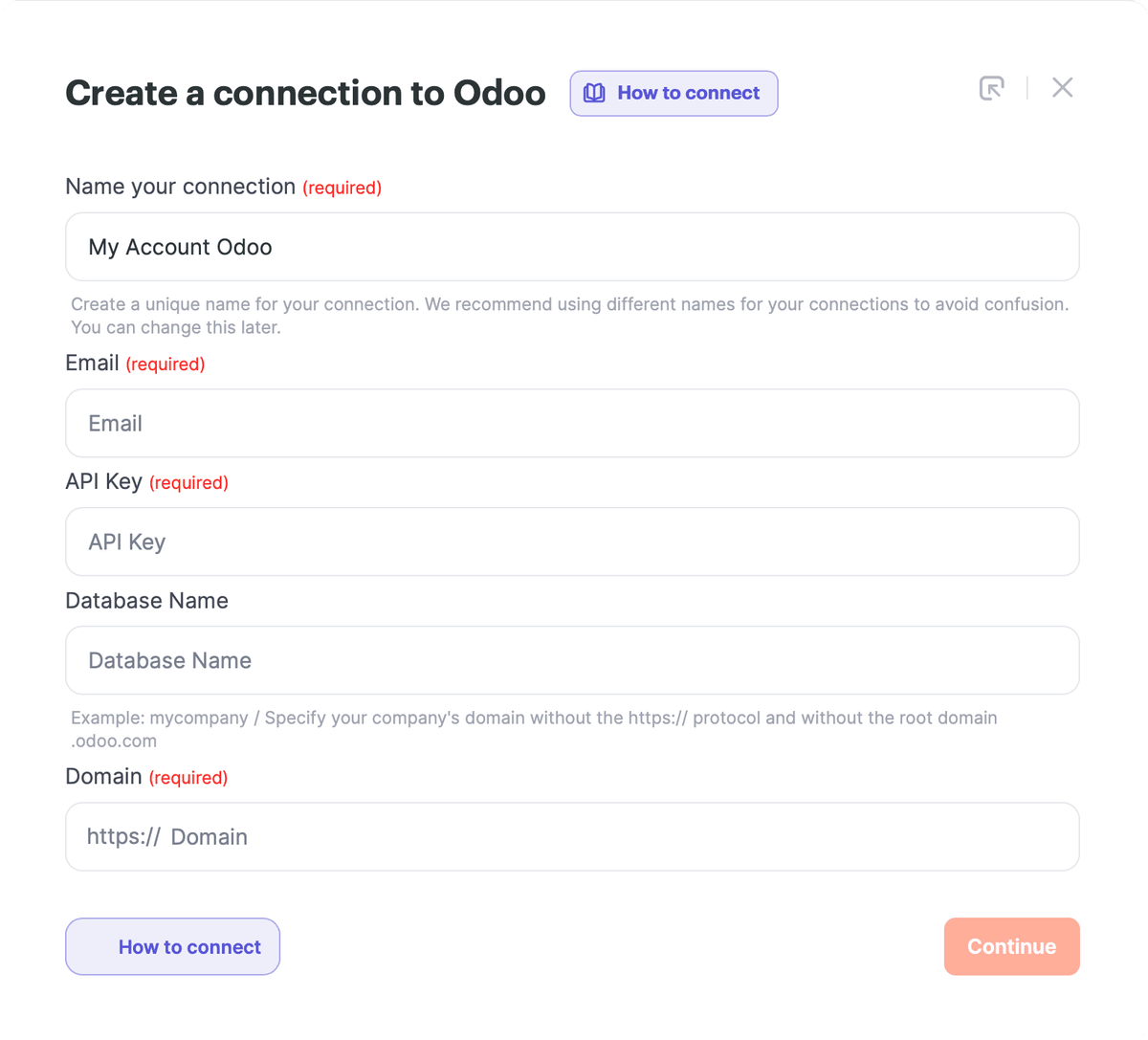
- Finally, fill in the Odoo connection fields on the Albato page, then click Continue.
- Email: enter the email address you use to log in to Odoo.
- API Key: paste the API key you generated in Odoo.
- Database Name: enter the exact name of your Odoo database. This is not always the same as the domain in your browser address bar. For example, the database name can look like mesquita-prod-18.0 or mesquita-test.
- Domain: enter the domain of your Odoo instance. The field already contains the https:// prefix, so enter only the domain part, for example odootest.mesquita.com.ar.
 Your connection is ready, and you can now create automations with Albato and Odoo. If you have any issues, contact support via the live chat on our website.
Connection error: “Object xxx.xxx doesn’t exist”
If this error appears when you test or create the Odoo connection, add the required applications on the Odoo side first.

Open your Odoo domain and go to Apps.

Install the applications you need for the data you want to work with. For example, install CRM if you want to work with leads.

After installing the required Odoo applications, return to Albato and test the connection again.
About Odoo
Odoo helps businesses improve overall efficiency, enhance customer satisfaction, and drive growth.
With it, you can:
- Manage stock levels, track inventory in real time, and organize products within warehouses.
- Use the CRM module to manage leads, track sales opportunities, and analyze customer interactions.
- Leverage built-in tools to facilitate teamwork and communication across departments.
Did this answer your question?