

How to Connect Eduzz to Albato
IN THIS ARTICLE
Eduzz is a digital business platform that helps creators, affiliates, and companies manage products, payments, and sales. Connect Eduzz to Albato to use it in automations with other apps, including AI tools such as ChatGPT and Claude. Follow the steps below to set up the connection.
Connect Eduzz to Albato
- Log in to your Albato account.

- Go to the Apps section and click Add a connection.

-
Search for Eduzz, select it, and click Add a connection again.
-
To get your System ID, API key, and Public key, log in to your Eduzz account in a new tab.
-
In Eduzz, go to your Profile / Account settings — your registered account email is displayed there.
-
Navigate to the API / Integrations / Security section.
- Copy your System ID.
- Copy your API key.
- Copy your Public key.
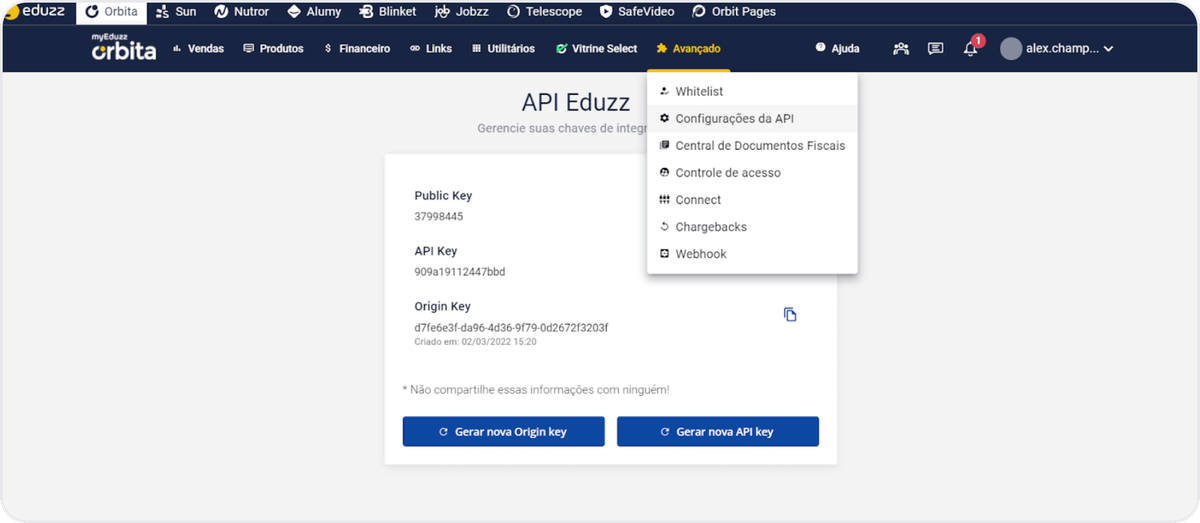
- Return to Albato and paste the copied values into the fields. Click Continue.
Your connection is ready, and you can now create automations with Albato and Eduzz. If you have any issues, contact support via the live chat on our website.
About Eduzz
Eduzz helps businesses and creators manage digital sales, products, and affiliates.
With it, you can:
- Track sales and commissions in real time.
- Automate product delivery and payment confirmations.
- Manage affiliates and promotional campaigns from one dashboard.
- Access detailed reports and analytics.
Did this answer your question?